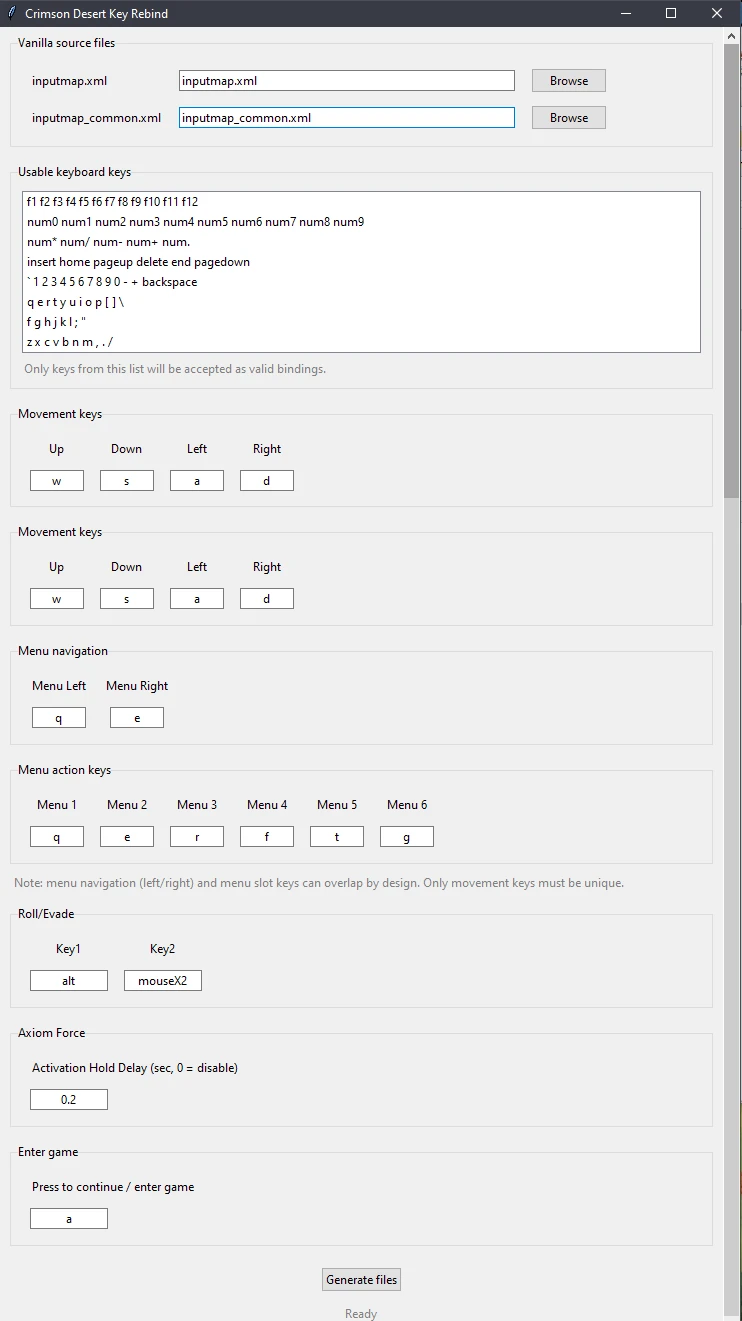
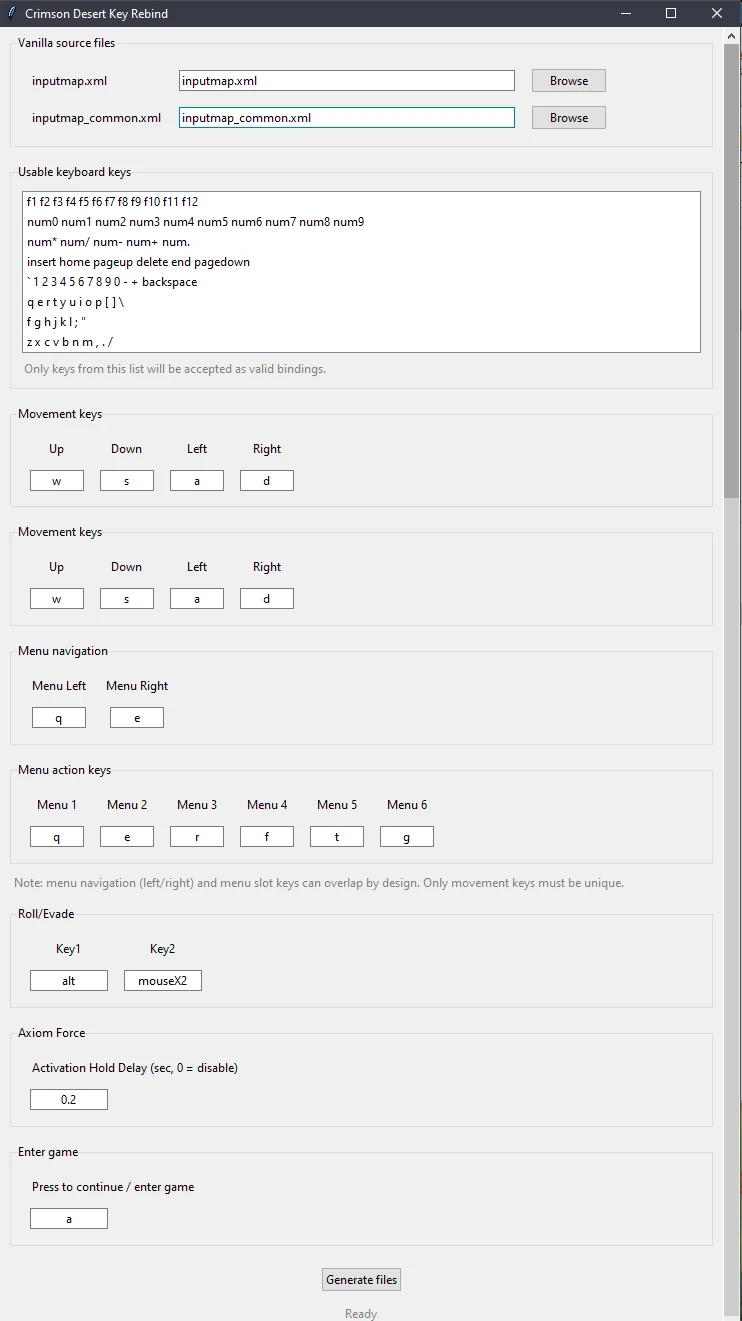
Crimson Movement keys rebind
Tools to reconfigure movement keys still not rebindable in game. (You will also be able to reconfigure menu actions keys
 查看大图
查看大图[size=4][b][color=#ff7700]Update : [/color][/b][/size]
[b][color=#ff7700][size=3]___ Version 1.3.0[/size][/color][/b]
[b][size=2]Adding Support for :[/size][/b]
[b][size=2][color=#cccccc]- [/color][color=#ff7700]Evade/Roll[/color] keys [/size][/b][size=2][b]Allowing to "fix" : [/b][i][b] [/b]If the "Evasion Control" option is set to “Hold,” the default Evasion key still functions even after the Evasion key has been changed [/i][/size][i]
https://crimsondesert.pearlabyss.com/en-US/News/Notice/Detail?_boardNo=68
[/i]
[i]- [/i][color=#ff7700][b]Axion force action delay[/b][/color][i] : [/i]select the duration you want, 0 mean its instant. Added this because i previously used a mod tweaking this[i].[/i]
[i]- [/i][b][color=#ff7700]Press Q to enter / start game[/color][/b][i] key : [/i]Select the key you might prefer to access the menu and start the game[i] (the press q / press e wasnt the most appropriate on PC)[/i]
[b]
[size=4][color=#ff7700]Description[/color][/size]
[/b]
This mod allows you to remap [b][u]movement keys[/u][/b] that are not configurable through the in-game settings.
It unlocks the ability to assign new functions to [b]W, A, S D[/b], once in game in the keys configuration menu, which the game normally prevents.
The tool automatically updates every related movement functions when you changing movement keys.
This means all game features that rely on those keys—such as menu navigation, mount controls, housing camera movement, and more—will continue to work correctly with your new bindings.
Because the various menu action keys cannot be rebound in the game, this mod also lets you change them to prevent any conflicts with your custom movement layout.
[list]
[]Left / Right menu tab navigation[/]
[]The six most used menu action keys ([b]Q, E, R, F, T, G[/b])[/]
[/list]
Everything is updated consistently across the differents possibles menu actions, including the inventory, world map, mini-games, housing..etc.
[b]Note:[/b][color=#cccccc] [i]If I missed any functions, please don't hesitate to report them. Be sure to include as much detail as possible, such as which function is affected and its default key binding. [/i][/color]
[size=4][b][color=#ff7700]Installation instructions[/color]
[/b][/size]
[b][u]Update mod files with the lateset[/u][u] input.xml files first [/u](if you do not extract them already yourself), found in optional download[/b]
[list=1]
[] [color=#ff7700]Extract the contents of the ZIP file anywhere you like.[/color]
[i]The mod includes the original (vanilla) input files as a starting point, but you're free to use your own input files if you've already made custom modifications.[/i][/]
[][color=#ff7700]Run [b]CrimsonKeyRebind.exe[/b][/color].[/]
[][color=#ff7700]Select your desired key bindings.[/color][/]
[][color=#ff7700]Click [b]Generate[/b].[/color] (re generating will overrite the preview generated files)[/]
[][color=#ff7700]The modified files will be created inside the [b]Movement_keys_rebind[/b] folder[/color]. This folder already has the correct mod structure, so it can be imported directly into your favorite mod manager.[/]
[/list]
[size=4][b]Shout outs[/b][/size]
[color=#D4D4D8]Thanks to [url=https://www.nexusmods.com/crimsondesert/mods/62]Crimson Desert Unpacker[/url] that allowed me to retrive the necessary files
Thanks for PA for making a complete and extensive XML with all the keys and functions[/color]
正在加载版本记录…
正在加载评论…
评论在新手盒子客户端中发表,这里同步展示。