
NPC 对话气泡(Hycompanion 扩展插件)
为其他插件提供API,以在NPC上方显示对话气泡。由Hycompanion NPC AI插件使用。
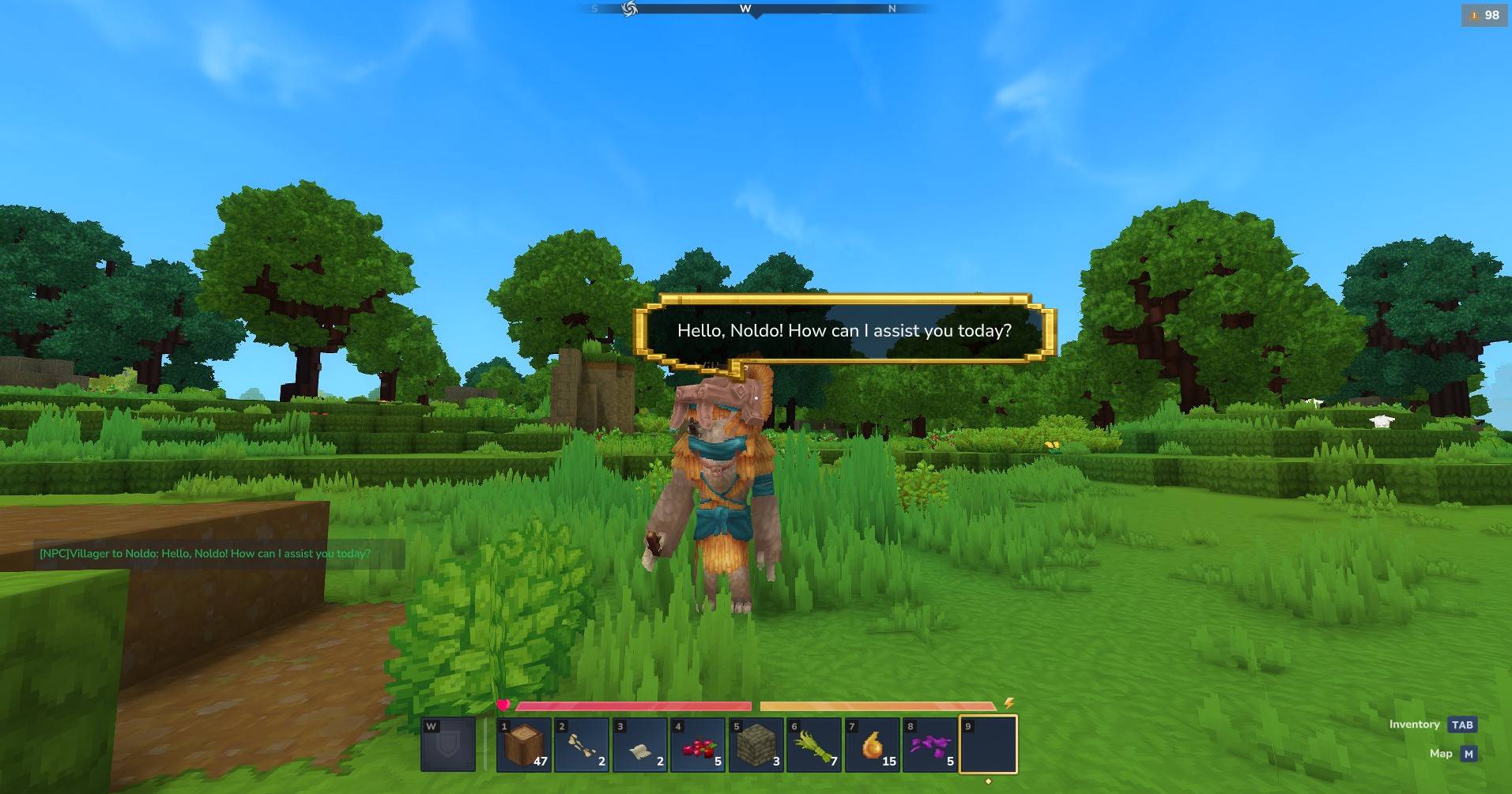 查看大图
查看大图Hycompanion NPC 语音气泡插件
一个 Hytale 服务器插件,提供悬浮的语音气泡界面,位于 NPC 和其他实体上方。这个插件是 Hycompanion AI NPC 插件的扩展,但也可以用来做其他 NPC 插件:)
如果你想找玩家语音气泡,可以改用 Hycompanion 玩家语音气泡插件。
特色
- 🎈 浮动语音气泡——显示锚定于任意实体的文本气泡
- 📍 边缘夹持——当 NPC 不在屏幕或镜头后面时,气泡依然可见于屏幕边缘
- 📐 3D 定位——全 3D 投影,支持俯仰和偏航相机旋转
- ⏱️ 可配置持续时间——设置气泡可见的时间
- 🎨 样式选项——自定义文本颜色和气泡偏移
- 👥 玩家专属——气泡会显示给特定玩家或所有玩家
- 🔄 其他插件的 API——用于与其他插件集成的简单 API
- 🔌 可选依赖——插件如果有,可以使用,不用依赖也可以
安装
- 从 CURSEFORGE 安装插件,或者从仓库中构建插件:
compile-plugin.bat
把生成的 JAR 复制 target/hycompanion-speech-bubbles.jar 到你 Hytale 服务器的 mod/ 文件夹
插件第一次运行时会创建默认的 config.yml
配置
编辑 mods/dev.hycompanion_SpeechBubbles/config.yml:
# Speech Bubbles Configuration

defaults:
  # Display duration in milliseconds
  duration: 5000
  # Maximum width in pixels (based on bubble image)
  maxWidth: 626
  # Maximum height in pixels (based on bubble image)
  maxHeight: 349
  # Text color (hex)
  textColor: "#FFFFFF"
  # Background opacity (0.0 - 1.0)
  backgroundOpacity: 0.9
  # Field of view for 3D projection (degrees)
  fov: 75.0
  # Offset above entity head in blocks (can be negative)
  headOffset: -0.75

# Maximum visibility distance in blocks (bubble won't show if entity is farther)
maxDistance: 25

# Cleanup interval in seconds
cleanupInterval: 30
配置选项
| 选项 | 默认 | 描述 |
|---|---|---|
duration |
5000 | 显示时长(毫秒) |
maxWidth |
626 | 最大气泡宽度(像素单位) |
maxHeight |
349 | 最大气泡高度(像素单位) |
textColor |
"#FFFFFF" | 十六进制格式的文本颜色 |
backgroundOpacity |
0.9 | 背景不透明度(0.0-1.0) |
fov |
75.0 | 三维投影的视场(度数) |
headOffset |
0 | 实体头(方块)上方的垂直偏移量 |
maxDistance |
25 | 最大可见距离(以区块计) |
cleanupInterval |
30 | 清理任务间隔(秒数) |
用法
基本 API 用法
将插件添加为 provided 依赖项并直接使用 API:
import dev.hycompanion.speechbubbles.api.SpeechBubbleAPI;
import dev.hycompanion.speechbubbles.api.SpeechBubbleOptions;

// Show a simple speech bubble (5 second duration)
UUID npcUuid = ...;  // The NPC's entity UUID
UUID playerUuid = ...;  // The player's UUID
SpeechBubbleAPI.showBubble(npcUuid, playerUuid, "Hello, adventurer!");

// With custom duration (milliseconds)
SpeechBubbleAPI.showBubble(npcUuid, playerUuid, "Welcome!", 6000);

// With full options
SpeechBubbleOptions options = new SpeechBubbleOptions()
    .duration(10000)
    .maxWidth(300)
    .textColor("#FFD700")
    .fov(90.0f);
SpeechBubbleAPI.showBubble(npcUuid, playerUuid, "Check this out!", options);

// Show to all players
SpeechBubbleAPI.showBubbleToAll(npcUuid, "Hello everyone!");
可选依赖模式(推荐)
对于真正可选的依赖项(编译时不要求 Speech Bubbles JAR),请使用反射和 Hytale 的 PluginManager:
import com.hypixel.hytale.common.plugin.PluginIdentifier;
import com.hypixel.hytale.server.core.HytaleServer;
import com.hypixel.hytale.server.core.plugin.PluginBase;
import com.hypixel.hytale.server.core.plugin.PluginManager;
import com.hypixel.hytale.server.core.plugin.PluginState;
import java.lang.reflect.Method;
import java.util.UUID;

public class SpeechBubbleIntegration {

    private static final PluginIdentifier PLUGIN_ID =
        new PluginIdentifier("dev.hycompanion.speech", "SpeechBubbles");
    private static final String API_CLASS =
        "dev.hycompanion.speechbubbles.api.SpeechBubbleAPI";

    private Method showBubbleMethod;
    private boolean available = false;

    public SpeechBubbleIntegration() {
        detectPlugin();
    }

    private void detectPlugin() {
        try {
            PluginManager pm = HytaleServer.get().getPluginManager();
            PluginBase plugin = pm.getPlugin(PLUGIN_ID);

            if (plugin == null || plugin.getState() != PluginState.ENABLED) {
                return;
            }

            ClassLoader cl = plugin.getClass().getClassLoader();
            Class<?> apiClass = Class.forName(API_CLASS, true, cl);
            showBubbleMethod = apiClass.getMethod("showBubble",
                UUID.class, UUID.class, String.class, long.class);

            available = true;
        } catch (Exception e) {
            // Plugin not available
        }
    }

    public boolean isAvailable() {
        return available;
    }

    public void showBubble(UUID entityUuid, UUID playerUuid, String text, long durationMs) {
        if (!available || showBubbleMethod == null) {
            return;
        }
        try {
            showBubbleMethod.invoke(null, entityUuid, playerUuid, text, durationMs);
        } catch (Exception e) {
            // Ignore errors
        }
    }
}
完整的集成示例
以下是如何在 NPC 与玩家对话时集成语音气泡:
public class MyPlugin {
    private final SpeechBubbleIntegration speechBubbles = new SpeechBubbleIntegration();

    public void onNpcSpeak(UUID npcId, UUID playerId, String message) {
        // Send chat message
        sendChatMessage(playerId, message);

        // Show speech bubble if available
        if (speechBubbles.isAvailable()) {
            // Truncate long messages for the bubble
            String bubbleText = truncateText(message, 150);

            // Show for 6 seconds
            speechBubbles.showBubble(npcId, playerId, bubbleText, 6000);
        }
    }

    private String truncateText(String text, int maxLength) {
        if (text.length() <= maxLength) {
            return text;
        }
        // Try to break at sentence
        int lastSentence = text.lastIndexOf(".", maxLength);
        if (lastSentence > maxLength * 0.7) {
            return text.substring(0, lastSentence + 1);
        }
        // Break at word boundary
        int lastSpace = text.lastIndexOf(" ", maxLength - 3);
        if (lastSpace > maxLength * 0.5) {
            return text.substring(0, lastSpace) + "...";
        }
        // Hard truncate
        return text.substring(0, maxLength - 3) + "...";
    }
}
API 参考
SpeechBubbleAPI
| 方法 | 描述 |
|---|---|
isAvailable() |
检查插件是否已加载 |
showBubble(entity, player, text) |
显示简单气泡(持续 5 秒) |
showBubble(entity, player, text, duration) |
显示自定义持续时间(毫秒) |
showBubble(entity, player, text, options) |
使用完整选项显示 |
showBubbleToAll(entity, text) |
向所有玩家显示 |
showBubbleToAll(entity, text, options) |
向所有玩家显示并带选项 |
hideAllBubblesForPlayer(player) |
隐藏玩家的所有气泡 |
hideAllBubblesForEntity(entity) |
隐藏实体的所有气泡 |
SpeechBubbleOptions
| 方法 | 默认 | 描述 |
|---|---|---|
duration(ms) |
5000 | 显示持续时间 |
maxWidth(px) |
626 | 最大宽度 |
maxHeight(px) |
349 | 最大高度 |
textColor(hex) |
#FFFFFF | 文本颜色 |
backgroundOpacity() |
0.9 | 背景不透明度(0.0-1.0) |
fov(degrees) |
75.0 | 三维投影的视场 |
技术细节和限制
FPS/TPS 模式
语音气泡插件在第一人称相机模式下效果更佳。否则在第三人称视角下会出现漂移。将在下一次更新中修复。
屏幕分辨率
该插件使用 1920x1080 作为参考分辨率。Hytale UI 系统会根据客户端的实际分辨率在内部缩放坐标。
- 16:9 分辨率(1080p、1440p、4K):比例缩放效果好
- 超宽屏(21:9):可能略微偏离中心,但气泡仍然可见
- 其他长宽比:半屏外夹持确保气泡保持可见
边缘夹持
当实体在屏幕外或镜头后方时:
- 气泡被夹持到屏幕边缘
- 允许半屏外:最多 50% 的气泡可以延伸到屏外
- 当在镜头后方时,气泡会吸附到最近的边缘
从源码构建
要求:
- Java 25 (OpenJDK)
- Maven 3.8+
cd hycompanion-speech-bubbles
mvn clean package
# JAR will be in target/hycompanion-speech-bubbles.jar
故障排除
气泡未显示
检查插件是否已加载:
PluginManager pm = HytaleServer.get().getPluginManager();
PluginBase plugin = pm.getPlugin(new PluginIdentifier("dev.hycompanion.speech", "SpeechBubbles"));
System.out.println("Plugin state: " + (plugin != null ? plugin.getState() : "NOT FOUND"));
气泡位置过高/过低
在配置中调整 headOffset:
- 正值:更高(例如
0.5) - 负值:更低/更接近头部(例如
-0.5)
许可
MIT License - 详见 LICENSE 文件
仓库(源码)
正在加载版本记录…
正在加载评论…
评论在新手盒子客户端中发表,这里同步展示。