EcoTale Reforging
Hytale服务器渐进式武器与护甲升级系统
 查看大图
查看大图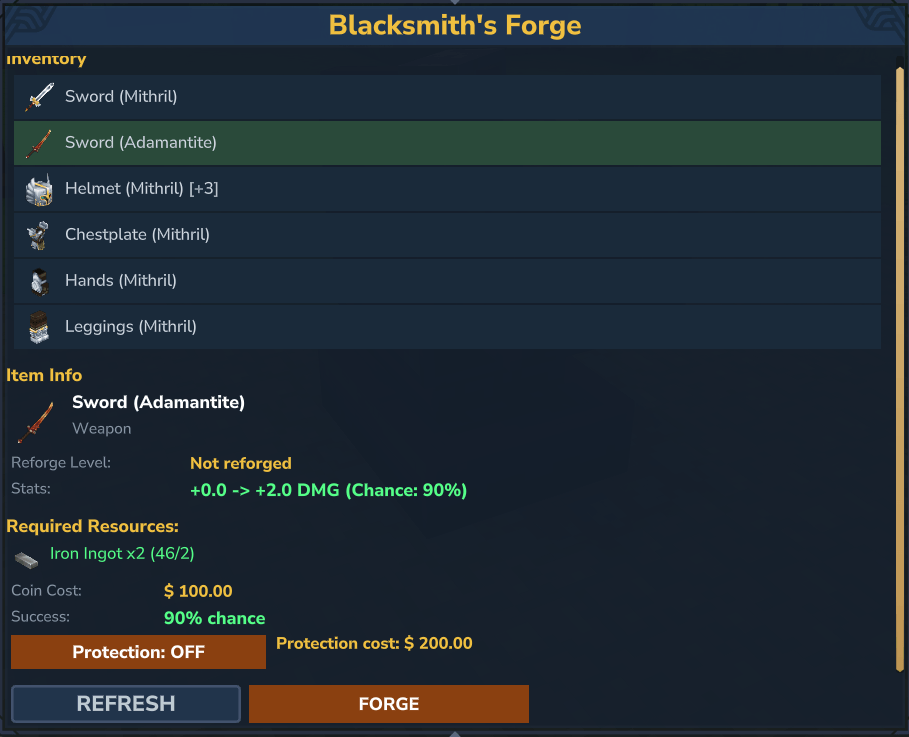
⚔️ EcoTaleReforging
Hytale 服务器的渐进式武器与护甲强化系统
放置一个强化站方块,按下 F 键——即可通过 10 个强化等级升级你的装备,伴随风险、材料成本和强力属性加成的逐步提升。




[ ]
]
🌐 EcoTale 生态系统
EcoTaleReforging 是 EcoTale 插件套件的一部分——这些相互关联的模组共同构建了一个丰富的玩家驱动经济体系:
| 插件 | 描述 | 与强化系统的协同 |
|---|---|---|
| Ecotale | 核心经济——钱包、货币、转账 | 💰 每次升级都需要消耗游戏币 |
| EcoTaleIncome | 从怪物、挖矿、伐木、农耕中赚钱 | 💵 玩家赚钱 → 用于强化 |
| EcoTaleBanking | 存款、贷款、信用评级 | 🏦 为昂贵的顶级强化存钱 |
| EcoTaleQuests | 日常与周常任务 | 🎯 任务奖励用于购买强化材料 |
| EcoTaleRewards | 登录日历与连续签到奖励 | 🎁 每日奖励包含强化材料 |
提示: 安装了所有 EcoTale 插件后,玩家会遵循一个自然的循环:赚钱 (Income) → 存钱 (Banking) → 升级装备 (Reforging) → 完成更难的任务 (Quests)。
✨ 特性
| 特性 | 描述 |
|---|---|
| ⚒️ 渐进式强化 | 10 个强化等级,成功率可配置 (90% → 5%) |
| ⚔️ 伤害与防御加成 | 武器获得额外伤害加成,护甲获得额外减伤——通过 ECS 伤害系统在战斗中生效 |
| 🪙 材料与硬币成本 | 每个等级需要特定的锭类型和硬币数量 |
| 💥 失败惩罚 | 强化失败时物品被摧毁——可配置百分比的材料回收返还 |
| 🛡️ 保护模式 | 支付额外硬币以在失败时保留物品(等级重置为 0 而非销毁) |
| 🔄 逆向配方 | 32 个内置的物品到材料映射,用于失败时的材料返还 |
| 🪨 强化站方块 | 可放置的砧板风格方块,带有自定义 3D 模型——按下 F 键打开强化 GUI |
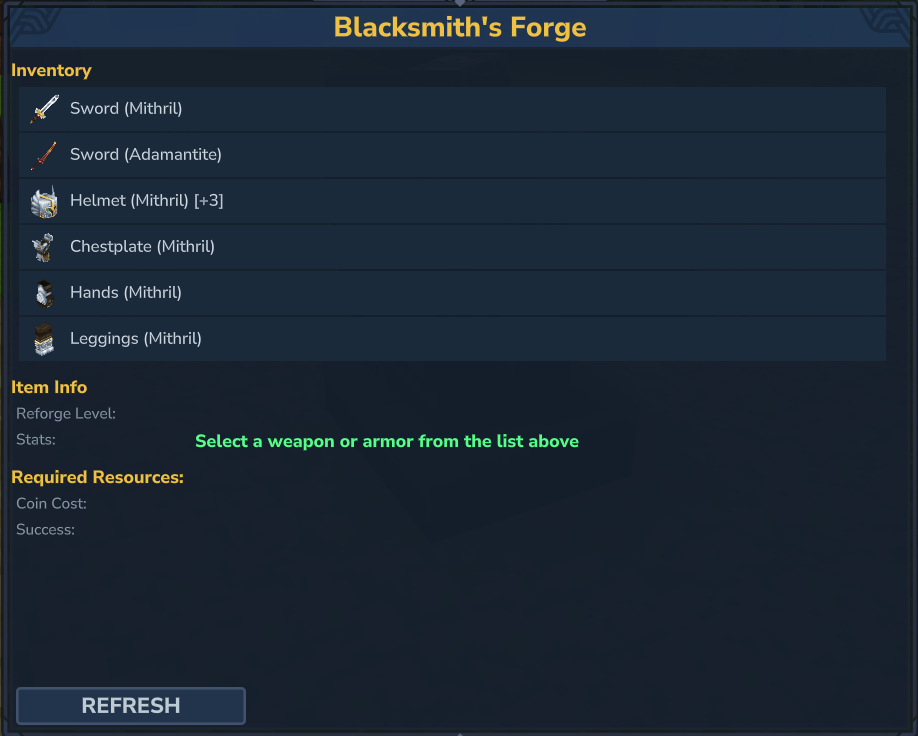
| 🖥️ 玩家 GUI | 放入物品 → 查看成功率/成本 → 强化——简洁的原生 Hytale UI |
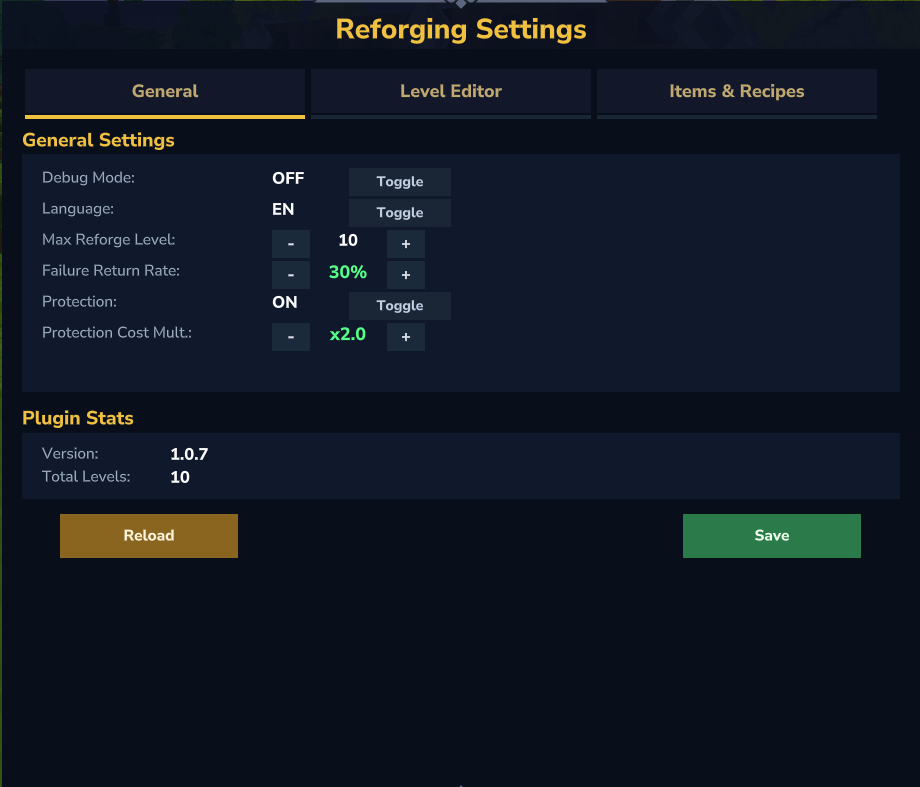
| 🛠️ 管理面板 | 完整设置编辑器——等级、允许物品、配方、通用配置 |
| ✏️ 逐字符编辑器 | 在管理面板中直接使用方向键编辑物品模式 |
| 🎯 通配符模式 | Weapon_*,Armor_*——支持自定义模组物品 |
| 🚫 排除列表 | 通过通配符模式阻止特定物品类型被强化(如箭、法杖、盾牌等) |
| 🧩 自定义物品 | 用显示名称注册任何模组物品——在 GUI 和管理员材料循环中均可工作 |
| 📦 每级多种材料 | 每个强化等级可以需要多种材料类型 |
| 🔧 热重载 | 从管理面板保存/重载——无需重启服务器 |
| 🌍 6 种语言 | 完整本地化:英语、俄语、德语、法语、西班牙语、葡萄牙语 (巴西) |
| 🔐 LuckPerms | 基于权限的访问:ecotalereforging.use,ecotalereforging.admin |
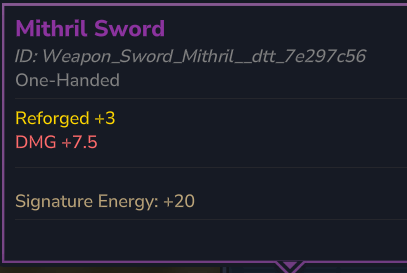
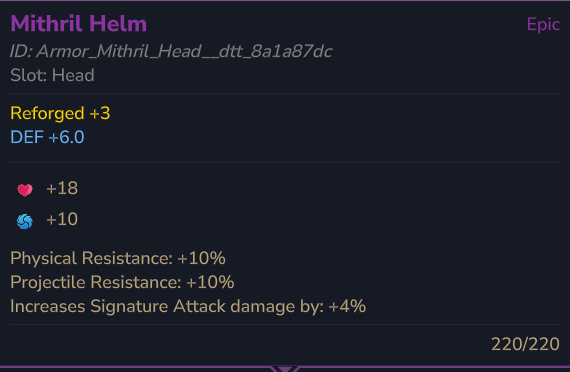
| 📋 DynamicTooltipsLib | 在物品提示中显示强化等级和属性加成 |
| 🖼️ 材料图标 | 在强化 GUI 和管理面板中显示锭图标 |
管理面板部分
| 部分 | 描述 |
|---|---|
| 通用设置 | 调试模式、语言、最大等级、失败返还率、保护开关 |
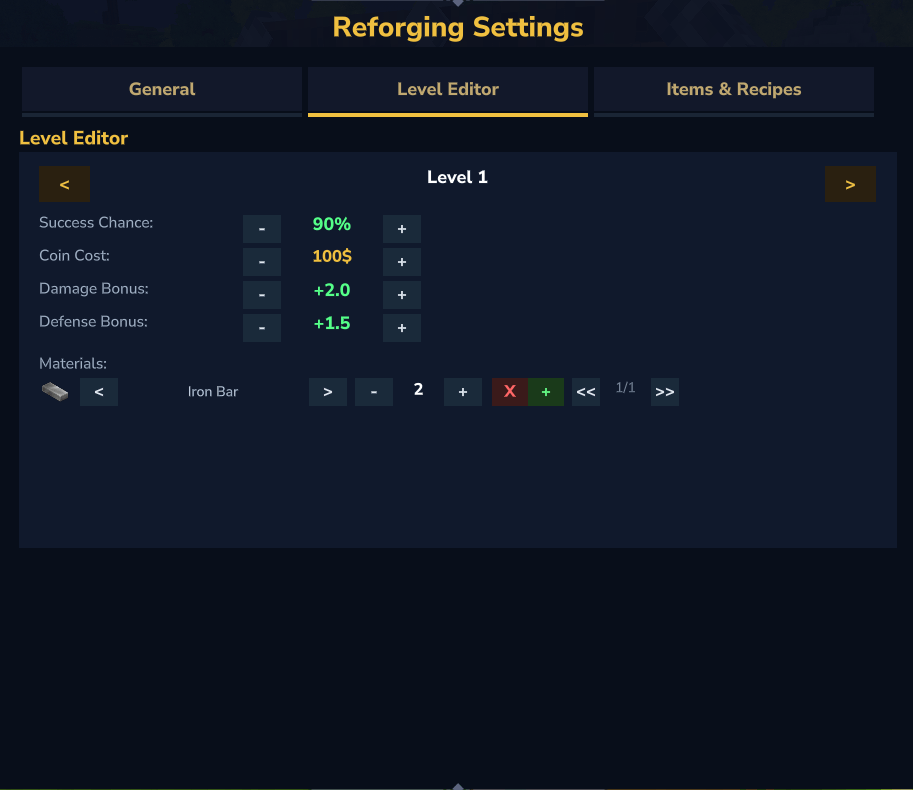
| 等级编辑器 | 成功率、硬币成本、伤害/防御加成、材料类型与数量——支持多材料导航 |
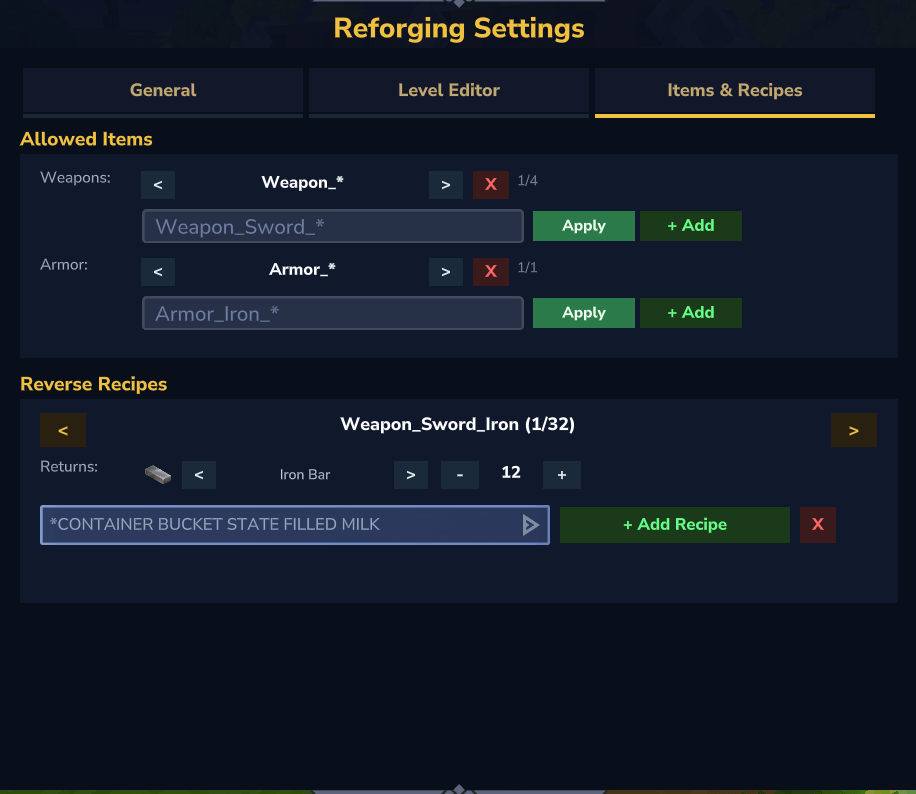
| 允许物品 | 武器和护甲模式,支持添加/删除/字符级编辑 |
| 逆向配方 | 浏览、编辑、添加、删除制作材料返还配方 |
| 插件统计 | 插件版本、已配置等级数量 |
⚔️ 属性加成如何工作
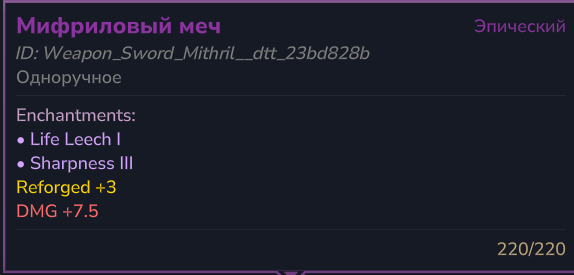
伤害加成 (DMG)——每次武器攻击附加的固定伤害值。
- 每个强化等级将其配置的
weaponDamageBonus加入总加成 - 加成是所有等级的累计:一件 +3 武器累加 1、2、3 级的加成
- 公式:
最终伤害 = 基础伤害 + 总伤害加成 - 示例:铁剑基础伤害 10,强化至 +3 (加成 +7.5) → 每次攻击造成 17.5 伤害
防御加成 (DEF)——每次受到攻击时减少的固定伤害值。
- 每件强化后的护甲部件贡献其累计的
armorDefenseBonus - 所有装备的强化护甲部件的加成叠加在一起
- 减伤后的最低伤害始终为 1 (不会减至零)
- 公式:
最终伤害 = max(1, 受到的伤害 - 总防御加成) - 示例:玩家佩戴 +2 头盔 (DEF +3.5) 和 +1 胸甲 (DEF +1.5) → 总防御减伤为 5.0。一次 20 点伤害的攻击 → 实际受到 15.0 点伤害
[!注意] 强化加成是固定值,而非百分比。原生 Hytale HUD 中显示的"防御 10%"来自基础护甲物品自身的属性,而非强化。强化 DEF 是在基础护甲防御之上额外附加的固定减伤。
📦 需求
| 依赖项 | 版本 | 必需 | 描述 |
|---|---|---|---|
| Ecotale | ≥ 1.0.0 | ✅ | 经济系统——强化所需的硬币成本 |
| LuckPerms | 任意 | ✅ | 基于权限的访问控制 |
| DynamicTooltipsLib | 任意 | ✅ | 在物品提示中显示强化属性 |
所有依赖项均为必需!!!
新增支持 | EconomyAPI |≥ 1.4.5 |✅ |经济系统——强化所需的硬币成本 |
🚀 快速开始
# 1. 下载最新发布版本
# 2. 放入服务器的 mods/ 文件夹
cp EcoTaleReforging-1.0.2.jar /server/mods/

# 3. 启动服务器——配置和资源文件会自动解压
# 4. 放置一个强化站方块并按下 F 键打开 GUI
就是这样。 所有 10 个强化等级都已预配置了平衡的成本和成功率。
🎮 命令
| 命令 | 描述 | 权限 |
|---|---|---|
/reforge info |
显示手中物品的强化信息 | ecotalereforging.use |
/reforge help |
显示可用命令 | ecotalereforging.use |
/reforgeadmin |
打开管理员设置面板 | ecotalereforging.admin |
/reforgeadmin reload |
从文件重新加载配置 | ecotalereforging.admin |
注意: 强化 GUI 只能通过在强化站方块上按下 F 键打开——没有打开它的命令。
🔐 权限
| 权限 | 描述 | 默认 |
|---|---|---|
ecotalereforging.use |
使用强化站方块并查看物品信息 | 所有玩家 |
ecotalereforging.admin |
管理面板和重载命令 | OP |
🌍 支持的语言
| 语言 | 代码 | 文件 |
|---|---|---|
| 🇬🇧 英语 | en |
lang/en.json |
| 🇷🇺 俄语 | ru |
lang/ru.json |
| 🇩🇪 德语 | de |
lang/de.json |
| 🇫🇷 法语 | fr |
lang/fr.json |
| 🇪🇸 西班牙语 | es |
lang/es.json |
| 🇧🇷 葡萄牙语 (巴西) | pt_br |
lang/pt_br.json |
在配置中设置语言:"language": "ru"。每个文件包含约 140 个翻译键,涵盖所有 GUI 文本、消息和管理面板标签。
⚙️ 配置
配置文件:mods/com.crystalrealm_EcoTaleReforging/EcoTaleReforging.json
每个强化等级在 levels 对象下定义为一个键 ("1" 到 "10")。你可以自由添加、删除或修改等级。
| 字段 | 类型 | 描述 |
|---|---|---|
successChance |
double | 成功概率 (0.0–1.0)。0.90 = 90% |
weaponDamageBonus |
double | 在此等级添加的固定伤害加成。与所有之前等级累计 |
armorDefenseBonus |
double | 在此等级添加的固定防御加成。与所有之前等级累计 |
coinCost |
double | EcoTale 货币成本。设为 0.0 表示免费(或未安装 EcoTale 时) |
materials |
array | 所需的一种或多种材料。每个条目包含 itemId (字符串) 和 count (整数) |
默认等级表
| 等级 | 成功率 | 伤害(+本级) | 伤害(累计) | 防御(+本级) | 防御(累计) | 金币 | 材料 |
|---|---|---|---|---|---|---|---|
| +1 | 90% | +2.0 | 2.0 | +1.5 | 1.5 | 100 | 铁锭 ×2 |
| +2 | 85% | +2.5 | 4.5 | +2.0 | 3.5 | 200 | 铁锭 ×4 |
| +3 | 75% | +3.0 | 7.5 | +2.5 | 6.0 | 350 | 铁锭 ×6 |
| +4 | 65% | +3.5 | 11.0 | +3.0 | 9.0 | 500 | 钴锭 ×4 |
| +5 | 55% | +4.0 | 15.0 | +3.5 | 12.5 | 750 | 钴锭 ×6 |
| +6 | 45% | +5.0 | 20.0 | +4.0 | 16.5 | 1,000 | 钴锭 ×8 |
| +7 | 35% | +6.0 | 26.0 | +5.0 | 21.5 | 1,500 | 秘银锭 ×4 |
| +8 | 25% | +7.0 | 33.0 | +6.0 | 27.5 | 2,000 | 秘银锭 ×6 |
| +9 | 15% | +9.0 | 42.0 | +7.5 | 35.0 | 3,000 | 精金锭 ×4 |
| +10 | 5% | +12.0 | 54.0 | +10.0 | 45.0 | 5,000 | 奥尼克斯锭 ×4 |
每级多种材料
每个等级支持多种材料需求。玩家必须同时拥有所有列出的材料。这使得高等级强化可以有更复杂的制作要求。
"7": {
    "successChance": 0.35,
    "weaponDamageBonus": 6.0,
    "armorDefenseBonus": 5.0,
    "coinCost": 1500.0,
    "materials": [
        { "itemId": "Ingredient_Bar_Mithril", "count": 4 },
        { "itemId": "Skull_Skeleton_Epic_Bar", "count": 2 }
    ]
}
管理面板为多材料等级提供完整导航——使用 < > 箭头循环浏览材料,使用 + 添加新材料,或使用 × 删除。
添加更多等级
只需在 "10" 之后添加新键并增加 maxReforgeLevel:
"general": { "maxReforgeLevel": 12 },
"levels": {
    "11": { "successChance": 0.03, "weaponDamageBonus": 15.0, "armorDefenseBonus": 12.0, "coinCost": 8000.0, "materials": [{ "itemId": "Ingredient_Bar_Onyxium", "count": 8 }] },
    "12": { "successChance": 0.01, "weaponDamageBonus": 20.0, "armorDefenseBonus": 15.0, "coinCost": 15000.0, "materials": [{ "itemId": "Ingredient_Bar_Onyxium", "count": 12 }] }
}
允许物品
控制哪些物品可以放入强化站。使用带有前缀通配符的通配符模式匹配。
| 字段 | 类型 | 描述 |
|---|---|---|
weapons |
string[] | 被视为武器的物品模式(获得伤害加成) |
armor |
string[] | 被视为护甲的物品模式(获得防御加成) |
excluded |
string[] | 永远不可强化的物品模式,即使它们匹配武器/护甲模式 |
模式语法:
"Weapon_*"—— 匹配任何以Weapon_开头的物品(前缀通配符)"*"—— 匹配所有物品"Weapon_Sword_Iron"—— 仅精确匹配
评估顺序: 一个物品可被强化,当且仅当其匹配任何 weapons 或 armor 模式 且 不匹配任何 excluded 模式。排除规则始终优先。
"allowedItems": {
    "weapons": [
        "Weapon_*"
    ],
    "armor": [
        "Armor_*"
    ],
    "excluded": [
        "Weapon_Arrow_*",
        "Weapon_Bolt_*",
        "Weapon_Shield_*",
        "Weapon_Staff_*",
        "Weapon_Crossbow_*",
        "Weapon_Shortbow_*"
    ]
}
添加自定义模组物品
要允许来自其他模组的物品:
"weapons": ["Weapon_*", "CoolMod_Blade_*", "ExoticWeapons_*"],
"armor": ["Armor_*", "CoolMod_Armor_*"]
微调排除项
excluded 列表在武器/护甲匹配之后进行评估。这允许你使用像 Weapon_* 这样的宽泛通配符,同时精确地阻止特定物品类型:
"excluded": [
    "Weapon_Arrow_*",
    "Weapon_Bolt_*",
    "Weapon_Shield_*",
    "Weapon_Staff_*",
    "Weapon_Crossbow_*",
    "Weapon_Shortbow_*",
    "Weapon_Bomb_*",
    "Weapon_Fishing_*",
    "Armor_Cosmetic_*"
]
[!注意] 排除项仅通过 JSON 配置文件进行配置。管理面板不提供排除项编辑器——这是有意为之,以防止在游戏进行中意外批量排除物品。
自定义物品
customItems 部分允许你用人类可读的显示名称注册任何物品 ID。这有两个目的:
- 显示名称覆盖——注册的名称会显示在玩家强化 GUI、管理面板以及任何显示物品名称的地方(取代原始 ID 或自动生成的标题大小写格式)
- 管理员材料循环——自定义物品 ID 会自动添加到管理层级编辑器的材料下拉菜单中,这样你可以使用
<>箭头选择它们而不会丢失
| 键 | 值 | 描述 |
|---|---|---|
| 物品 ID (字符串) | 显示名称 (字符串) | 将精确的物品 ID 映射到人类可读的名称 |
"customItems": {
    "Skull_Skeleton_Epic_Bar": "Skeleton Skull Bar",
    "MyMod_Crystal_Flame": "Flame Crystal",
    "Rare_Essence_Shadow": "Shadow Essence"
}
物品名称解析如何工作
当插件需要显示物品名称时(在 GUI、聊天、提示中),它按以下顺序检查:
- 语言键
item.name.<ItemId>—— 首先检查当前语言文件(例如item.name.Skull_Skeleton_Epic_Bar) customItems映射 —— 其次检查配置文件- 结构化解析 ——
Weapon_<Type>_<Material>和Armor_<Material>_<Slot>会被解析并通过item.type.*和item.material.*语言键进行本地化 - 材料解析 ——
Ingredient_Bar_<Material>→ 本地化的材料名称 + "锭" - 标题大小写回退 —— 下划线替换为空格,每个单词首字母大写:
Skull_Skeleton_Epic→ "Skull Skeleton Epic"
要为自定义物品添加特定语言的翻译,将语言键添加到相应的语言文件中:
// lang/es.json
"item.name.Skull_Skeleton_Epic_Bar": "Barra de Calavera Esqueleto"
如果语言键存在,则其优先级高于 customItems。这允许你在使用 customItems 作为通用回退方案的同时,提供每种语言的名称。
逆向配方
当强化失败时,玩家的物品被销毁,但会回收一部分制作材料。reverseRecipes 映射定义了每种物品类型会产生什么材料。
| 键 | 值 | 描述 |
|---|---|---|
| 物品 ID (字符串) | MaterialEntry[] | { "itemId": string, "count": int } 的数组——要返回的物品 |
实际返还数量为 count × failureReturnRate(向下取整,如果定义了任何材料则至少为 1)。
"reverseRecipes": {
    "Weapon_Sword_Iron":       [{ "itemId": "Ingredient_Bar_Iron", "count": 12 }],
    "Weapon_Sword_Cobalt":     [{ "itemId": "Ingredient_Bar_Cobalt", "count": 12 }],
    "Armor_Iron_Chest":        [{ "itemId": "Ingredient_Bar_Iron", "count": 28 }],
    "Armor_Adamantite_Head":   [{ "itemId": "Ingredient_Bar_Adamantite", "count": 14 }]
}
示例: 玩家强化 Weapon_Sword_Iron 失败,failureReturnRate: 0.30:
- 配方定义了 12 个铁锭
- 12 × 0.30 = 3.6 → 3 个铁锭返还到物品栏
自动生成的配方
如果某个物品没有显式的逆向配方,插件会尝试根据其命名模式自动生成一个:
Weapon_<Type>_<Material>→ 查找Ingredient_Bar_<Material>,数量根据武器类型变化:- 战斧: 24,长剑: 20,双刃刀: 20,钉头锤: 18,斧头: 16,长矛: 14,剑: 12
Armor_<Material>_<Slot>→ 查找Ingredient_Bar_<Material>,数量根据部位变化:- 胸甲: 28,护腿: 20,头盔: 14,护手: 10,靴子: 10
自动生成仅在 reverseRecipes 中没有匹配的键时应用。要禁用特定物品的材料返还,将其添加为空数组:"Weapon_Sword_Gold": []。
添加自定义逆向配方
对于模组物品或命名不标准的物品,添加显式条目:
"reverseRecipes": {
    "MyMod_Blade_Phoenix": [
        { "itemId": "Rare_Essence_Shadow", "count": 5 },
        { "itemId": "Ingredient_Bar_Adamantite", "count": 8 }
    ]
}
完整配置示例
点击展开完整的默认配置
{
  "general": {
    "language": "en",
    "messagePrefix": "<dark_gray>[<gold>Reforge<dark_gray>]",
    "maxReforgeLevel": 10,
    "debugMode": false,
    "failureReturnRate": 0.30,
    "protectionEnabled": true,
    "protectionCostMultiplier": 2.0
  },
  "levels": {
    "1":  { "successChance": 0.90, "weaponDamageBonus": 2.0,  "armorDefenseBonus": 1.5,  "coinCost": 100.0,  "materials": [{ "itemId": "Ingredient_Bar_Iron", "count": 2 }] },
    "2":  { "successChance": 0.85, "weaponDamageBonus": 2.5,  "armorDefenseBonus": 2.0,  "coinCost": 200.0,  "materials": [{ "itemId": "Ingredient_Bar_Iron", "count": 4 }] },
    "3":  { "successChance": 0.75, "weaponDamageBonus": 3.0,  "armorDefenseBonus": 2.5,  "coinCost": 350.0,  "materials": [{ "itemId": "Ingredient_Bar_Iron", "count": 6 }] },
    "4":  { "successChance": 0.65, "weaponDamageBonus": 3.5,  "armorDefenseBonus": 3.0,  "coinCost": 500.0,  "materials": [{ "itemId": "Ingredient_Bar_Cobalt", "count": 4 }] },
    "5":  { "successChance": 0.55, "weaponDamageBonus": 4.0,  "armorDefenseBonus": 3.5,  "coinCost": 750.0,  "materials": [{ "itemId": "Ingredient_Bar_Cobalt", "count": 6 }] },
    "6":  { "successChance": 0.45, "weaponDamageBonus": 5.0,  "armorDefenseBonus": 4.0,  "coinCost": 1000.0, "materials": [{ "itemId": "Ingredient_Bar_Cobalt", "count": 8 }] },
    "7":  { "successChance": 0.35, "weaponDamageBonus": 6.0,  "armorDefenseBonus": 5.0,  "coinCost": 1500.0, "materials": [{ "itemId": "Ingredient_Bar_Mithril", "count": 4 }] },
    "8":  { "successChance": 0.25, "weaponDamageBonus": 7.0,  "armorDefenseBonus": 6.0,  "coinCost": 2000.0, "materials": [{ "itemId": "Ingredient_Bar_Mithril", "count": 6 }] },
    "9":  { "successChance": 0.15, "weaponDamageBonus": 9.0,  "armorDefenseBonus": 7.5,  "coinCost": 3000.0, "materials": [{ "itemId": "Ingredient_Bar_Adamantite", "count": 4 }] },
    "10": { "successChance": 0.05, "weaponDamageBonus": 12.0, "armorDefenseBonus": 10.0, "coinCost": 5000.0, "materials": [{ "itemId": "Ingredient_Bar_Onyxium", "count": 4 }] }
  },
  "allowedItems": {
    "weapons": ["Weapon_*"],
    "armor": ["Armor_*"],
    "excluded": [
      "Weapon_Arrow_*",
      "Weapon_Bolt_*",
      "Weapon_Shield_*",
      "Weapon_Staff_*",
      "Weapon_Crossbow_*",
      "Weapon_Shortbow_*"
    ]
  },
  "reverseRecipes": {
    "Weapon_Sword_Iron":        [{ "itemId": "Ingredient_Bar_Iron", "count": 12 }],
    "Weapon_Sword_Cobalt":      [{ "itemId": "Ingredient_Bar_Cobalt", "count": 12 }],
    "Weapon_Sword_Mithril":     [{ "itemId": "Ingredient_Bar_Mithril", "count": 12 }],
    "Weapon_Sword_Adamantite":  [{ "itemId": "Ingredient_Bar_Adamantite", "count": 12 }],
    "Weapon_Axe_Iron":          [{ "itemId": "Ingredient_Bar_Iron", "count": 16 }],
    "Weapon_Axe_Cobalt":        [{ "itemId": "Ingredient_Bar_Cobalt", "count": 16 }],
    "Weapon_Axe_Mithril":       [{ "itemId": "Ingredient_Bar_Mithril", "count": 16 }],
    "Weapon_Axe_Adamantite":    [{ "itemId": "Ingredient_Bar_Adamantite", "count": 16 }],
    "Weapon_Daggers_Iron":      [{ "itemId": "Ingredient_Bar_Iron", "count": 20 }],
    "Weapon_Daggers_Cobalt":    [{ "itemId": "Ingredient_Bar_Cobalt", "count": 20 }],
    "Weapon_Daggers_Mithril":   [{ "itemId": "Ingredient_Bar_Mithril", "count": 20 }],
    "Weapon_Daggers_Adamantite":[{ "itemId": "Ingredient_Bar_Adamantite", "count": 20 }],
    "Armor_Iron_Head":          [{ "itemId": "Ingredient_Bar_Iron", "count": 14 }],
    "Armor_Iron_Chest":         [{ "itemId": "Ingredient_Bar_Iron", "count": 28 }],
    "Armor_Iron_Legs":          [{ "itemId": "Ingredient_Bar_Iron", "count": 20 }],
    "Armor_Iron_Hands":         [{ "itemId": "Ingredient_Bar_Iron", "count": 10 }],
    "Armor_Iron_Feet":          [{ "itemId": "Ingredient_Bar_Iron", "count": 10 }],
    "Armor_Cobalt_Head":        [{ "itemId": "Ingredient_Bar_Cobalt", "count": 14 }],
    "Armor_Cobalt_Chest":       [{ "itemId": "Ingredient_Bar_Cobalt", "count": 28 }],
    "Armor_Cobalt_Legs":        [{ "itemId": "Ingredient_Bar_Cobalt", "count": 20 }],
    "Armor_Cobalt_Hands":       [{ "itemId": "Ingredient_Bar_Cobalt", "count": 10 }],
    "Armor_Cobalt_Feet":        [{ "itemId": "Ingredient_Bar_Cobalt", "count": 10 }],
    "Armor_Mithril_Head":       [{ "itemId": "Ingredient_Bar_Mithril", "count": 14 }],
    "Armor_Mithril_Chest":      [{ "itemId": "Ingredient_Bar_Mithril", "count": 28 }],
    "Armor_Mithril_Legs":       [{ "itemId": "Ingredient_Bar_Mithril", "count": 20 }],
    "Armor_Mithril_Hands":      [{ "itemId": "Ingredient_Bar_Mithril", "count": 10 }],
    "Armor_Mithril_Feet":       [{ "itemId": "Ingredient_Bar_Mithril", "count": 10 }],
    "Armor_Adamantite_Head":    [{ "itemId": "Ingredient_Bar_Adamantite", "count": 14 }],
    "Armor_Adamantite_Chest":   [{ "itemId": "Ingredient_Bar_Adamantite", "count": 28 }],
    "Armor_Adamantite_Legs":    [{ "itemId": "Ingredient_Bar_Adamantite", "count": 20 }],
    "Armor_Adamantite_Hands":   [{ "itemId": "Ingredient_Bar_Adamantite", "count": 10 }],
    "Armor_Adamantite_Feet":    [{ "itemId": "Ingredient_Bar_Adamantite", "count": 10 }]
  },
  "customItems": {}
}
🧩 高级自定义配方
场景:使用自定义模组材料进行强化
你希望强化消耗来自 Boss 怪物的特殊掉落物——Skull_Skeleton_Epic_Bar——以及标准锭。
1. 注册自定义物品以获取显示名称和管理员支持:
"customItems": {
    "Skull_Skeleton_Epic_Bar": "Skeleton Skull Bar"
}
2. 将其添加为高级强化的材料需求:
"levels": {
    "9": {
        "successChance": 0.15,
        "weaponDamageBonus": 9.0,
        "armorDefenseBonus": 7.5,
        "coinCost": 3000.0,
        "materials": [
            { "itemId": "Ingredient_Bar_Adamantite", "count": 4 },
            { "itemId": "Skull_Skeleton_Epic_Bar", "count": 2 }
        ]
    }
}
3. (可选) 添加逆向配方,以便失败时返还材料:
"reverseRecipes": {
    "Weapon_Sword_Adamantite": [
        { "itemId": "Ingredient_Bar_Adamantite", "count": 12 },
        { "itemId": "Skull_Skeleton_Epic_Bar", "count": 1 }
    ]
}
结果: 玩家 GUI 会显示"Skeleton Skull Bar ×2"及其物品图标,管理面板会在材料循环下拉菜单中包含"Skeleton Skull Bar"。
场景:将强化限制在特定等级
只允许铁和钴的武器/护甲被强化——阻止更高级别:
"allowedItems": {
    "weapons": ["Weapon_Sword_Iron", "Weapon_Sword_Cobalt", "Weapon_Axe_Iron", "Weapon_Axe_Cobalt"],
    "armor": ["Armor_Iron_*", "Armor_Cobalt_*"],
    "excluded": []
}
场景:简单模式服务器 (无失败)
"general": {
    "failureReturnRate": 1.0,
    "protectionEnabled": true,
    "protectionCostMultiplier": 1.0
},
"levels": {
    "1": { "successChance": 1.0, ... },
    "2": { "successChance": 0.95, ... }
}
场景:硬核服务器 (严厉惩罚)
"general": {
    "failureReturnRate": 0.0,
    "protectionEnabled": false
},
"levels": {
    "1": { "successChance": 0.50, ... }
}
正在加载版本记录…
正在加载评论…
评论在新手盒子客户端中发表,这里同步展示。