
MCP(模型上下文协议)- 连接AI助手(Claude、Gemini、ChatGPT等)
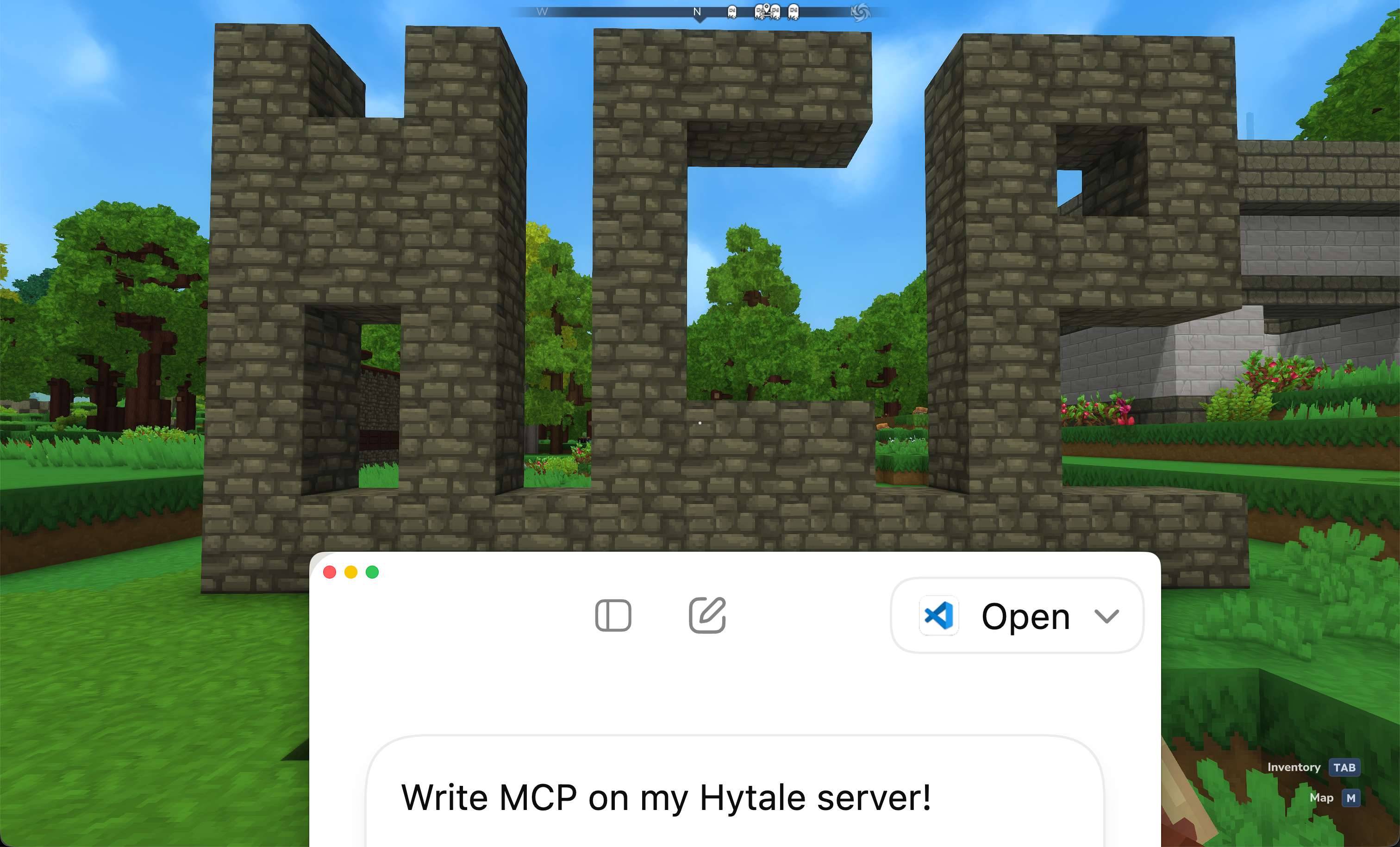
Hytale MCP 通过模型上下文协议(MCP)将人工智能助手的力量带到您的 Hytale 服务器。此插件使 Claude、ChatGPT 和 Gemini 等 AI 模型能够与您的服务器交互,从而实现自动化、创意建造
 查看大图
查看大图Hytale MCP
用于 Hytale 服务器的模型上下文协议插件
将 OpenCode、Claude、ChatGPT 和 Gemini 等 AI 助手直接连接到您的 Hytale 服务器


指南: https://top-games.net/guides/connect-ai-hytale-server-mcp
目录
关于
Hytale MCP 通过模型上下文协议(MCP)将 AI 助手的强大功能引入您的 Hytale 服务器。此插件使 Claude、ChatGPT 和 Gemini 等 AI 模型能够与您的服务器交互,支持自动化、创意建造和增强的服务器管理。
使用场景
- 创意建造 - 告诉 AI“在我的位置建造一座埃菲尔铁塔”,观看它构建复杂的结构
- 服务器自动化 - 自动化管理玩家等常规任务
- 管理工具 - 使用自然语言命令管理您的服务器
- 开发与测试 - 快速原型化和测试游戏机制
无论您是服务器管理员、建造者还是开发者,Hytale MCP 都为 AI 集成提供了安全且可扩展的基础。
特性
核心能力
- 完整 MCP 协议支持 - 符合标准的模型上下文协议实现
- 安全认证 - 基于令牌的认证,区分管理员和玩家权限
- 可扩展架构 - 易于使用的插件系统,用于添加自定义功能
- 细粒度权限 - 为不同用户级别提供精细的访问控制
- AI 客户端兼容 - 适用于 OpenCode、Claude、ChatGPT、Gemini 及任何兼容 MCP 的客户端
内置工具
- 世界建造 - 使用自然语言提示,通过批量放置方块构建任何东西
- 地形编辑 - 平整矩形区域以建造地基
- 物品管理 - 通过智能物品搜索将物品给予玩家
- 方块发现 - 搜索并分类所有可用方块
- 玩家管理 - 列出玩家、获取位置、管理背包、发送消息
- 服务器管理 - 执行命令、广播消息、踢出玩家
- 信息检索 - 访问服务器统计、世界信息、方块类型和玩家数据
- 日志管理 - 按级别、日期和行数筛选和检索服务器日志
要求
安装
快速开始
- 下载 来自发布页面的最新
MCP-1.*.*.jar - 安装 Nitrado WebServer 插件(必要依赖)
- 放置 两个 JAR 文件到服务器的
mods/目录 - 启动 您的服务器以生成默认配置
- 配置 您的令牌和权限(参见配置)
- 重启 您的服务器
插件将在 http://your-server:port/Top-Games/MCP/mcp 可用
快速示例
安装后,您可以测试连接:
# 测试基本连接
curl http://localhost:port/Top-Games/MCP/mcp

# 列出可用工具(带认证)
curl -X POST http://localhost:port/Top-Games/MCP/mcp \
  -H "Authorization: Bearer your-admin-token" \
  -H "Content-Type: application/json" \
  -d '{
    "jsonrpc": "2.0",
    "method": "tools/list",
    "id": 1
  }'
配置
首次运行后,将在 mods/MCP/config.json 创建配置文件:
注意: 服务器端口在 WebServer 插件设置中配置,而非此处。
{
  "auth": {
    "enabled": true,
    "adminTokens": [
      "your-admin-token-here"
    ],
    "playerTokens": [
      "your-player-token-here"
    ]
  },
  "features": {
    "players": {
      "listPlayers": false,
      "executeCommand": false,
      "broadcastMessage": false,
      "setBlock": false,
      "getPlayerPosition": false,
      "getLogs": false,
      "sendChatMessage": false,
      "getBlockTypes": false,
      "listBlocks": false,
      "getWorldInfo": false,
      "getServerInfo": false
    },
    "admins": {
      "listPlayers": true,
      "executeCommand": true,
      "broadcastMessage": true,
      "setBlock": true,
      "getPlayerPosition": true,
      "getLogs": true,
      "sendChatMessage": true,
      "getBlockTypes": true,
      "listBlocks": true,
      "getWorldInfo": true,
      "getServerInfo": true
    },
    "maxBlocksBatch": 1000
  }
}
配置参考
服务器设置
认证设置
| 选项 | 类型 | 描述 |
|---|---|---|
auth.enabled |
boolean | 启用/禁用令牌认证 |
auth.adminTokens |
string[] | 具有完全管理权限的令牌 |
auth.playerTokens |
string[] | 具有有限玩家级访问权限的令牌 |
功能权限
为每个权限级别配置功能可用性:
| 权限 | 描述 | 使用此权限的工具 |
|---|---|---|
listPlayers |
列出所有已连接玩家 | list_players |
getServerInfo |
获取服务器信息和状态 | get_server_info |
executeCommand |
执行服务器命令 | execute_command, give_item |
broadcastMessage |
向所有玩家发送消息 | broadcast_message |
getLogs |
检索和筛选服务器日志 | get_logs |
setBlock |
在坐标处放置方块 | set_block, set_blocks_batch, flatten_terrain |
getBlockTypes |
获取可用方块类型列表 | get_block_types, get_building_guide |
listBlocks |
搜索和筛选方块并分类 | list_blocks |
getPlayerPosition |
获取玩家位置、旋转和世界 | get_player_position |
getWorldInfo |
获取世界信息和属性 | get_world_info |
sendChatMessage |
向特定玩家发送聊天消息 | send_chat_message |
附加设置:
maxBlocksBatch(int, 默认: 1000) - 每次set_blocks_batch调用的最大方块数
权限结构:
features.admins- 管理员令牌持有者可用的功能features.players- 玩家令牌持有者可用的功能
禁用 HTTPS (HTTP 连接)
默认情况下,Nitrado WebServer 插件使用 HTTPS。如果您需要通过 HTTP 连接,可以在 WebServer 插件配置中禁用 TLS。
位置: mods/Nitrado_WebServer/config.json
添加或修改 Tls 部分:
{
  "Tls": {
    "Insecure": true
  }
}
使用
连接 AI 客户端
将 AI 助手连接到您的 Hytale 服务器:
- 配置您的 AI 客户端 连接到您的 MCP 端点
- 提供端点 URL:
http://your-server:port/Top-Games/MCP/mcp - 在请求头中使用 Bearer 令牌进行认证:
Authorization: Bearer your-token-here
示例客户端设置
对于 OpenCode 或其他 MCP 客户端,添加此配置:
{
  "mcpServers": {
    "hytale-mcp": {
      "url": "http://your-server:port/Top-Games/MCP/mcp",
      "headers": {
        "Authorization": "Bearer your-admin-token"
      }
    }
  }
}
API 参考
可用工具
set_block
在指定坐标放置单个方块。
示例提示:
"在坐标 x:10, y:64, z:10 放置一个砂岩砖块"
参数:
x(int): X 坐标y(int): Y 坐标z(int): Z 坐标blockType(string): 方块标识符(例如Rock_Sandstone_Brick)world(string): 世界名称
示例响应:
{
  "success": true,
  "message": "Block placed successfully",
  "x": 10,
  "y": 64,
  "z": 10,
  "world": "world",
  "blockType": "Rock_Sandstone_Brick"
}
list_players
列出服务器上当前所有已连接的玩家。
示例提示:
"服务器上当前谁在线?" "列出所有已连接玩家"
响应:
{
  "count": 5,
  "players": [
    {
      "uuid": "player-uuid",
      "name": "PlayerName"
    }
  ]
}
get_server_info
获取服务器信息,包括名称、版本和运行时间。
示例提示:
"服务器状态如何?" "显示服务器信息和运行时间"
响应:
{
  "name": "My Hytale Server",
  "version": "1.0.0",
  "uptime": "2 days, 5 hours, 30 minutes",
  "tps": 20.0
}
list_blocks
列出所有可用方块,带有智能分类和缓存。非常适合发现物品 ID 以用于建造或给予物品。
示例提示:
"显示所有石头方块" "查找名称包含 'brick' 的建筑方块" "列出 20 个装饰方块"
参数:
limit(int, 可选): 返回的最大方块数search(string, 可选): 按名称筛选方块的搜索词(不区分大小写)category(string, 可选): 按类别筛选(building, decoration, nature, ore, stone, wood, metal, glass, food, tool, weapon, misc)
示例请求 - 搜索石头:
{
  "search": "stone",
  "limit": 10
}
示例请求 - 获取所有建筑方块:
{
  "category": "building",
  "limit": 50
}
响应:
{
  "total": 1234,
  "returned": 10,
  "blocks": [
    {
      "name": "hytale:stone_brick",
      "id": 42,
      "category": "building"
    },
    {
      "name": "hytale:sandstone",
      "id": 87,
      "category": "stone"
    }
  ],
  "categoryStats": {
    "building": 250,
    "stone": 180,
    "wood": 120,
    "nature": 300,
    "decoration": 95,
    "misc": 289
  },
  "searchTerm": "stone"
}
give_item
使用 /give 命令将物品给予玩家。
示例提示:
"给 Michel 10 根木棍" "给 PlayerName 64 个石砖"
参数:
player(string): 接收物品的玩家名称itemId(string): 物品 ID(使用list_blocks查找 ID)quantity(int, 可选): 给予数量(默认: 1)
示例请求:
{
  "player": "Michel",
  "itemId": "Ingredient_Stick",
  "quantity": 10
}
响应:
{
  "player": "Michel",
  "itemId": "Ingredient_Stick",
  "quantity": 10,
  "command": "give Michel Ingredient_Stick --quantity=10",
  "status": "executed"
}
flatten_terrain
在特定高度平整一个矩形地形区域,非常适合建造地基。下方用方块填充,上方用空气清除。
示例提示:
"在我的位置平整一个 50x50 的区域用于建造城堡" "在高度 64 创建一个 100 方块宽的石平台" "为大型建筑准备地形,使其平坦"
参数:
world(string): 世界 UUIDx1,z1(int): 第一个角坐标x2,z2(int): 第二个角坐标y(int): 平整的高度层级fillBlock(string, 可选): 填充地面下方的方块类型(默认: "hytale:dirt")maxHeight(int, 可选): 上方清除的最大高度(默认: y+10)
示例请求 - 创建一个 50x50 的石平台:
{
  "world": "world-uuid-here",
  "x1": 100,
  "z1": 100,
  "x2": 150,
  "z2": 150,
  "y": 64,
  "fillBlock": "hytale:stone"
}
响应:
{
  "area": 2601,
  "minX": 100,
  "maxX": 150,
  "minZ": 100,
  "maxZ": 150,
  "flattenY": 64,
  "maxHeight": 74,
  "fillBlock": "hytale:stone",
  "blocksPlaced": 166464,
  "blocksCleared": 26010,
  "totalBlocks": 192474,
  "durationMs": 1250,
  "status": "success"
}
execute_command
执行服务器命令。
示例提示:
"让 Michel 成为管理员" "执行命令 'weather clear'" "将时间设置为白天"
参数:
{
  "command": "op Michel"
}
响应:
{
  "command": "op Michel",
  "status": "executed"
}
broadcast_message
向所有已连接玩家广播消息。
示例提示:
"向大家宣布服务器将在 5 分钟后重启" "向所有玩家广播一条欢迎消息"
参数:
{
  "message": "Welcome to our server!"
}
响应:
{
  "message": "Welcome to our server!",
  "status": "broadcasted"
}
get_logs
检索服务器日志,带有可选筛选。
示例提示:
"显示最近 50 条错误日志" "获取昨天的服务器日志" "日志中最近的警告是什么?"
参数:
lines(int, 可选): 检索的行数(默认: 100,最大: 1000)level(string, 可选): 按日志级别筛选(例如 "INFO", "WARNING", "ERROR", "SEVERE")date(string, 可选): 日志文件日期,格式为 "YYYY-MM-DD"
示例请求:
{
  "lines": 50,
  "level": "ERROR"
}
响应:
{
  "lineCount": 50,
  "level": "ERROR",
  "content": "[2026-02-01 10:30:45] [ERROR] Failed to connect to database\n[2026-02-01 10:30:45 [ERROR] Connection timeout\n...",
  "timestamp": "2026-02-01T10:32:00"
}
指定日期的示例请求:
{
  "date": "2024-01-14",
  "lines": 200
}
set_blocks_batch
在单个请求中在指定的世界坐标处放置多个方块(可配置限制,默认: 1000 个方块)。
示例提示:
"在我的位置建造一堵 10x10 的石墙" "在坐标 x:100, y:64, z:200 处建造一栋房子" "在我的位置建造一个埃菲尔铁塔复制品" "在我附近建造一个小城堡"
参数:
blocks(array): 方块对象数组,每个包含 x, y, z, blockTypex(int): X 坐标y(int): Y 坐标z(int): Z 坐标blockType(string): 方块标识符(例如Rock_Sandstone_Brick)
world(string): 世界名称(可选,默认为当前世界)
请求示例:
{
  "blocks": [
    {"x": 10, "y": 64, "z": 10, "blockType": "Rock_Sandstone_Brick"},
    {"x": 11, "y": 64, "z": 10, "blockType": "Rock_Sandstone_Brick"},
    {"x": 10, "y": 64, "z": 11, "blockType": "Rock_Sandstone_Brick"}
  ]
}
响应:
{
  "total": 3,
  "success": 3,
  "failed": 0,
  "results": [
    {"x": 10, "y": 64, "z": 10, "blockType": "Rock_Sandstone_Brick", "status": "success"},
    {"x": 11, "y": 64, "z": 10, "blockType": "Rock_Sandstone_Brick", "status": "success"},
    {"x": 10, "y": 64, "z": 11, "blockType": "Rock_Sandstone_Brick", "status": "success"}
  ]
}
get_player_position
获取特定玩家的当前位置 (x, y, z) 和旋转 (yaw, pitch)。
示例提示:
"Michel 在哪里?" "获取我的当前位置" "PlayerName 的坐标是什么?"
参数:
player(string): 玩家名称
请求:
{
  "player": "Michel"
}
响应:
{
  "name": "Michel",
  "uuid": "xxxxx-xxxxx-xxxxx-xxxxx-xxxxx",
  "position": {
    "x": 1943.18,
    "y": 124.0,
    "z": 603.64,
    "yaw": -1.91,
    "pitch": 0.0,
    "worldUuid": "xxxxx-xxxxx-xxxxx-xxxxx-xxxxx"
  }
}
get_world_info
获取世界信息,包括名称、种子和维度。
示例提示:
"世界的种子是什么?" "显示当前世界的信息" "出生点在哪里?"
响应:
{
  "name": "My World",
  "seed": 123456789,
  "dimension": "overworld",
  "spawn": {
    "x": 0,
    "y": 100,
    "z": 0
  }
}
send_chat_message
向特定玩家发送聊天消息。
示例提示:
"给 Michel 发送一条欢迎消息" "告诉 PlayerName 他们的建筑看起来很棒" "向管理员发送关于问题的消息"
参数:
player(string): 目标玩家名称message(string): 要发送的消息
请求:
{
  "player": "Michel",
  "message": "Welcome to the server!"
}
响应:
{
  "message": "Welcome to the server!",
  "status": "sent"
}
MCP 协议端点
该插件实现了标准的 MCP JSON-RPC 2.0 端点:
POST /mcp
MCP 工具操作的主端点。
可用方法:
initialize- 初始化 MCP 连接并协商能力tools/list- 根据认证级别列出可用工具tools/call- 使用指定参数执行工具ping- 健康检查端点
示例请求:
{
  "jsonrpc": "2.0",
  "method": "tools/list",
  "params": {},
  "id": 1
}
GET /mcp
返回插件元数据和版本信息。
示例响应:
{
  "name": "MCP",
  "version": "1.0.0",
  "protocol": "mcp",
  "description": "Model Context Protocol for Hytale servers"
}
扩展自定义功能
创建一个自定义功能很简单(以另一个插件为例)。实现 McpFeature 接口:
public class MyCustomFeature implements McpFeature {
    private final HytaleLogger logger;

    public MyCustomFeature(HytaleLogger logger) {
        this.logger = logger;
    }

    @Override
    public String getName() {
        return "my_custom_feature";
    }

    @Override
    public McpTool getToolDefinition() {
        return new McpTool(
            "my_custom_feature",
            "Description of what this feature does",
            "function"
        );
    }

    @Override
    public McpToolResponse execute(McpToolCall call, McpAuthManager.AuthLevel authLevel) {
        try {
            // Your custom logic here

            JsonObject result = new JsonObject();
            result.addProperty("data", "your result");

            return McpToolResponse.success(GSON.toJson(result));
        } catch (Exception e) {
            logger.atSevere().withCause(e).log("Error in custom feature");
            return McpToolResponse.error("Failed: " + e.getMessage());
        }
    }

    @Override
    public boolean hasPermission(McpAuthManager.AuthLevel authLevel, McpConfig config) {
        // Define who can use this feature
        return authLevel == McpAuthManager.AuthLevel.ADMIN;
    }
}
然后在您插件的 registerFeatures() 方法中注册它:
featureRegistry.registerFeature(new MyCustomFeature(logger));
最佳实践
- 强令牌 - 生成加密安全的随机令牌(32 个以上字符)
  # 示例令牌生成
  openssl rand -base64 32
- 最小权限 - 仅启用用户实际需要的功能
- 将
executeCommand限制为仅管理令牌 - 如果不需要,禁用玩家功能
- 将
常见问题
一般问题
问: 什么是模型上下文协议(MCP)? 答: MCP 是一个开放标准,使 AI 助手能够安全地连接到外部工具和数据源。它允许 AI 模型以标准化方式与您的 Hytale 服务器交互。
问: 哪些 AI 助手兼容? 答: 任何支持模型上下文协议的 AI 助手,包括 Claude、ChatGPT(通过插件)、Gemini 和其他兼容 MCP 的客户端。
问: 这需要对 Hytale 服务器进行修改吗? 答: 不需要。这是一个与 Nitrado WebServer 插件一起使用的标准插件。不需要对服务器进行修改。
问: 我可以在生产服务器上使用这个吗? 答: 可以,但请确保遵循安全最佳实践:使用强令牌、仅启用必要功能、并适当限制权限。
技术问题
问: 性能影响如何? 答: 影响极小。该插件仅在 AI 助手发出请求时处理请求。批量操作已优化以减少服务器负载。
问: 我可以添加自定义工具/功能吗? 答: 可以!该插件具有可扩展的架构。详情请参阅扩展自定义功能部分。
问: 一次可以放置的方块数量有限制吗? 答: 是的,set_blocks_batch 操作每次请求有可配置的最大数量(默认: 1000 个方块),以防止服务器过载。flatten_terrain 工具对于大规模地形操作有更高的限制。
问: 玩家可以有不同的权限级别吗? 答: 可以。您可以为管理令牌和玩家令牌配置单独的权限集,从而实现细粒度控制。
贡献
我们欢迎来自社区的贡献!以下是您可以提供帮助的方式:
报告问题
- 使用 GitHub 问题追踪器
- 在创建新问题前检查该问题是否已存在
- 包含详细信息:服务器版本、插件版本、错误日志
提交更改
- Fork 本仓库
- 创建功能分支(
git checkout -b feature/amazing-feature) - 进行您的更改
- 彻底测试
- 使用清晰的消息提交(
git commit -m 'Add amazing feature') - 推送到您的 fork(
git push origin feature/amazing-feature) - 打开一个 Pull Request
许可证
本项目采用 MIT 许可证授权 - 详情请参见 LICENSE 文件。
版权所有 (c) 2026 Top-Games
支持
获取帮助
- 问题与错误: GitHub Issues
还没有人评论,去客户端里说两句吧。
评论在新手盒子客户端中发表,这里同步展示。