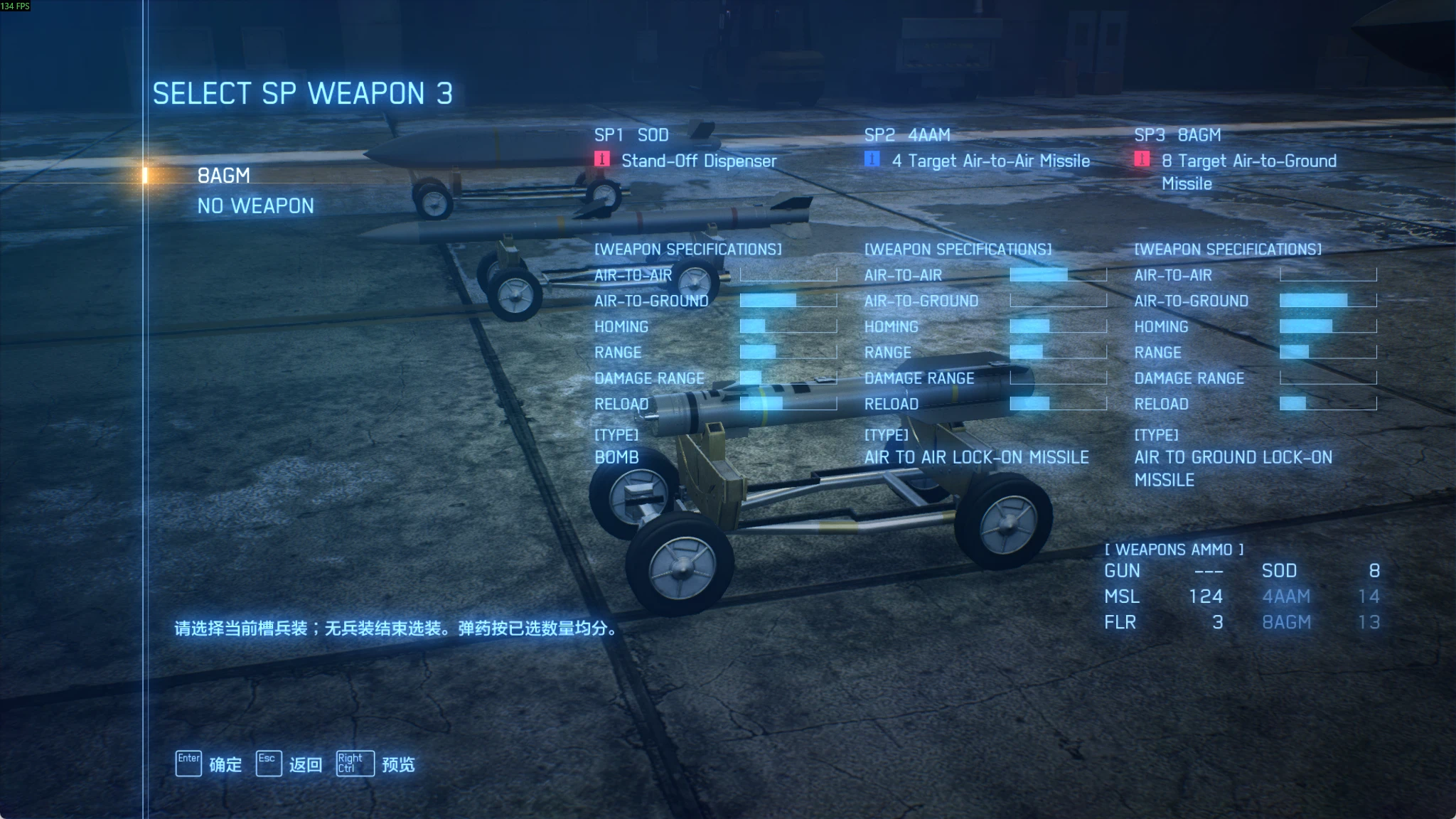
AC7 Multi SP Weapon
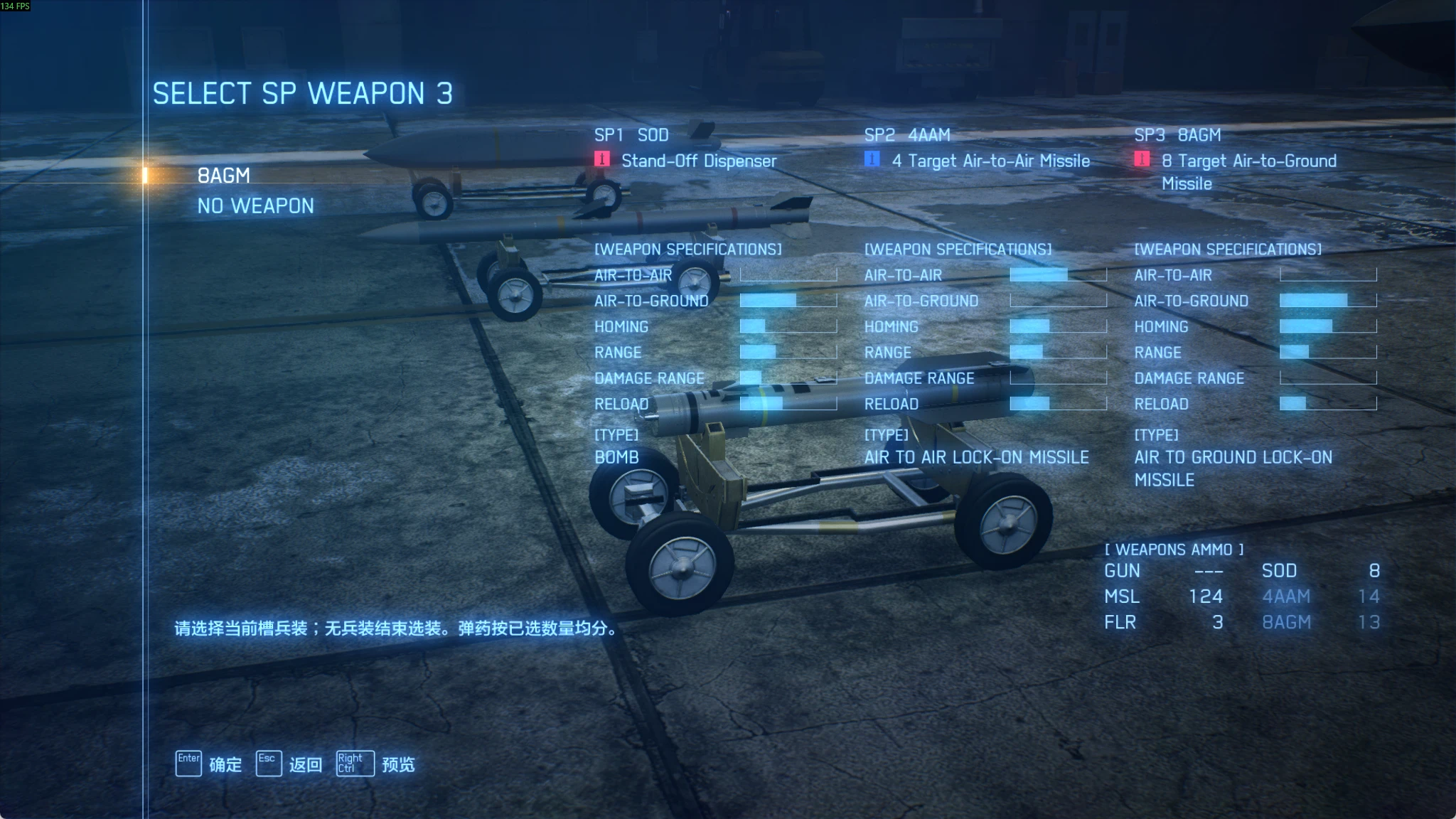
所有机体可最多选择三种SP武器出击。 All aircraft can sortie with up to three types of SP weapons.
 查看大图
如果你没有安装 Vortex,我推荐去我的主页下载 AC7MultiSP_Installer.exe,可以一键安装/升级/卸载本 mod。
我的主页:https://ac7multisp-updates.pages.dev/
英文版介绍位于本页后半部分。
bilibili:班德慕
反馈 FeedBack:
- 邮箱:karenorthterofchina@gmail.com
- 测试 QQ 群:1072924682(发布最新 beta 体验版)
本程序仅供学习交流,完全免费,请勿用于其他商业用途。 This program is for learning and discussion only. It is completely free. Do not use it for any other commercial purposes.
AC7MultiSP 功能说明
一、主要功能
- 所有机体可最多选择三种 SP 武器出击。 默认设置下,搭载两个 SP 武器各有 50% 弹药,三个 SP 武器各有 33% 弹药量,但均可调节到 100%。
- 为大部分游戏本体和 DLC 中的每个机体制作了 SP 武器挂载模型,在机身上同时显示多种 SP 武器模型,避免切换武器导致 SP 武器模型突变。 此功能可能会影响游戏 FPS 帧数或造成卡顿,可在任务中或机库中关闭此功能。
- 搭载 MGP/HGP/PLSL 吊舱时,支持机炮与机炮吊舱一键齐射。
- 优化视角操作:
- 可启用 按下注视键持续注视目标功能,无需持续按住注视键
- 可启用 视角保持,右摇杆/鼠标移动视角后不会自动回正。
- 可启用 VR 模式选择目标功能,切换目标时优先选择视角中心的敌人作为 NEXT(原本是优先切换到机头指向的敌人)
- 调试功能:
- 任务内即时更换 SP 武器组合。
- 特殊武器无限弹药、快速装填。
- 任务内换机并重开任务。
- 主菜单快速进入某任务,方便开发和测试 mod。
二、常用操作
以下为默认按键。可自定义键盘按键。
- F6 或手柄 Select+Y:打开管理界面。
- 键盘 1/2/3/4:选择普通导弹/第一/第二/第三种特殊武器。
- 手柄十字键左/上/右/下:对应上述四种武器;手柄 X 仍可切换武器。
- Ctrl+Alt+F5:开关机炮联动功能;
- Ctrl+Alt+F6:开关视角保持功能。
- 持续注视需在管理界面的“视角”页单独开启:手柄长按 Y 开始,再长按 Y 取消;键盘按一下游戏设置的注视键开始,再按一次结束。
- L3 按一下:镜头回正/结束注视。R3 长按:开关视角保持功能。
三、多 SP 武器模型适配列表
完全适配:
- F-4E、F-14A、F-14D、F-14A TGM、F-15C、F-15E、F-15J、F-15 S/MTD、F-16C、F-16XL、F/A-18E、F/A-18E TGM、F/A-18F、F/A-18F Block III、F-35C、F-2A
- Mirage 2000-5、Rafale M、Typhoon、Gripen E
- MiG-29A、MiG-31B(部分组合在机腹挂载 SAAM)、MiG-35D、Su-30M2、Su-30SM、Su-33、Su-34、Su-35S、Su-37
- XFA-27、ADFX-01、ADF-01 FALKEN(发射 TLS 时不能切换武器)、ADF-11F、CFA-44(左边 ADMM,右边 EML,隐藏 ECM 模型)
部分适配:
- F-22A:8AAM 吊舱始终显示。机腹内部弹舱的 SP 武器模型会在切换时变化。
- Su-57 普通型:PLSL 吊舱始终显示,机腹内部弹舱的 SP 武器模型会在切换时变化。
- DarkStar:PLSL 吊舱始终显示,机腹内部弹舱的 SP 武器模型会在切换时变化。
暂未适配: A-10、ASF-X、F-2A Super Kai、F-104C、MiG-21bis Su-47、Su-57 TGM、X-02S、FB-22、YF-23 热门 mod 机体也会优先更新适配。
四、适用范围与其他 Mod 兼容性
- 适用 Steam 版游戏,仅用于单人战役,多人模式停用。
- 兼容的 mod:大部分 Addon 机体、皮肤 SKIN、AC7MouseAim 鼠标飞控、Enhanced Gunplay、All Aircraft PSM、Modular Weapon Swap。
- 无法共存:F-14IA
- 可共存但本 mod 不生效:Pre-Campaign VR 关卡
五、已知问题:
- 部分 mod 机体的机炮齐射功能暂未兼容。
- 部分机体的腹部弹舱会保持打开。
- 选用配件 PART 时,SP 武器的性能条不会变化,此为 UI 问题,配件实际是生效的。
- 部分 mod 机体的长按武器切换键触发的特殊效果可能不完全适配。
- 部分含有特殊持续效果的机体(例如 ADF-11 的 APS),无法与 SP 同时选择。
- 性能较差的电脑上启用此 mod 时,过低的 fps 可能导致鼠标飞控异常,此时请关闭多 SP 模型功能提升 fps。
AC7MultiSP 安装说明
本 mod 仅适用于 Steam 版本的 ACE COMBAT 7 最新版。 本说明适用于通用 ZIP 及配套 EXE 安装程序。vortex 安装和 exe 安装请任选一种,更新和卸载也沿用同一种方式,不要混用。 不支持 CreeperUX 启动器安装(因为本 mod 同时含有 ue4ss 组件和 pak 文件,CreeperUX 不拷贝 pak 文件)
一、EXE 安装(点我下载)
- 运行 AC7MultiSP_Installer.exe,选择“直接安装”。
- 确认游戏文件夹;未自动找到时,选择含 Ace7Game.exe 的文件夹。
- 点击“安装”或“更新”,等待完成。
二、Vortex 安装
- 在 Vortex 中管理《皇牌空战 7》,启用对应的游戏支持扩展。并安装 AC7 专用 UE4SS:https://www.nexusmods.com/acecombat7skiesunknown/mods/2474
- 从 Nexus 通过“Mod Manager Download”下载通用 ZIP,或用“Install From File”导入已下载的 ZIP。
- 安装后确认 Mod 类型为“Engine Injector”;如显示为其他类型,先改为此类型。
- 启用 Mod 并部署,再通过 Steam 启动游戏。
三、手动安装
- 安装 AC7 专用 UE4SS。
- 将 ZIP 中的 ue4ss 和 Game 两个文件夹合并复制到游戏文件夹。不要复制 ZIP 外层文件夹,其他说明及管理文件无需复制。
第三方组件与素材
本 Mod 使用的第三方组件分别遵循各自的许可证,完整文本随包提供,位于 ue4ss/Mods/DualSP/licenses。
致谢
- UE4SS:Narknon 及 UE4SS-RE 贡献者,提供脚本运行支持。
- PM-UE4SS:Playmore-ModdingConcepts,提供《皇牌空战 7》专用适配。
- Dear ImGui:Omar Cornut 及贡献者,提供游戏内界面库。
- MinHook:Tsuda Kageyu;其中 HDE 组件由 Vyacheslav Patkov 开发。
- nlohmann/json:Niels Lohmann 及贡献者,提供数据处理库。
- PROJECT ACES / Bandai Namco:感谢《皇牌空战 7》原作。
- 感谢所有参与 mod 测试、提供反馈意见的玩家。
特此声明: AC7MultiSP 是一个非官方的玩家自制项目。它与万代南梦宫娱乐(Bandai Namco Entertainment)并无关联,也未得到其认可或支持。《皇牌空战 7:未知空域》(ACE COMBAT™ 7: SKIES UNKNOWN)是万代南梦宫娱乐股份有限公司(Bandai Namco Entertainment Inc.)的商标。本模组不包含任何游戏文件或游戏代码;您必须拥有正版游戏方可使用。若要体验 DLC 内容,您还需拥有相应的 DLC。使用本模组的风险由您自行承担。
本 mod 在开发过程中尽力适配和兼容各个机体和其他 mod,仍存在一些问题等待修复,请见谅并耐心等待。若您在下载使用过程中遇到任何问题,请先仔细阅读使用说明,说明中已尽量详细的列举可能出现的情况及解决办法,若没有相关解决办法,欢迎您通过上方邮箱或 QQ 群方式向我反馈,我会第一时间关注并帮您解决。 本模组的一切功能解释权归作者本人所有,如果您想将本模组用于除游玩体验外的其他用途,请与我取得联系,并在征得我同意后方可使用,若您想将本模组转载于其他渠道或平台,请写明作者及出处,请勿将本模组用于非正当用途,由此产生的一切后果将由您自己承担。 最后,感谢您信任并使用本模组,祝您游戏愉快。
AC7MultiSP Features
I. Main features
- All aircraft can sortie with up to three SP weapon types. By default, carrying two SP weapon types gives each type 50% ammunition, while carrying three gives each type 33%. Both can be adjusted to 100%.
- SP weapon mounting models have been made for most aircraft in the base game and DLC. They display multiple SP weapon models on the aircraft at the same time, avoiding abrupt model changes when switching weapons. This feature may reduce FPS or cause stuttering. It can be disabled during missions or in the hangar.
- When carrying MGP/HGP/PLSL pods, the aircraft gun and gun pods can fire together with one button.
- Improved camera controls:
- Optional persistent target tracking: press the target-tracking button to keep tracking without holding it down.
- Optional camera hold: the camera does not automatically recenter after you move it with the right stick or mouse.
- Optional VR-mode target selection: when switching targets, enemies near the center of the camera view are prioritized as NEXT, instead of enemies in the direction of the aircraft's nose.
- Debug features:
- Change the SP weapon combination immediately during a mission.
- Unlimited ammunition and fast reload for special weapons.
- Change aircraft during a mission and restart the mission.
- Quickly enter a mission from the main menu to make mod development and testing easier.
II. Common controls
The following are the default controls. Keyboard bindings can be customized.
- F6 or controller Select + Y: open the management interface.
- Keyboard 1 / 2 / 3 / 4: select standard missiles / the first / second / third special weapon.
- Controller D-pad left / up / right / down: select the same four weapons. Controller X still cycles weapons.
- Ctrl + Alt + F5: toggle linked gun fire.
- Ctrl + Alt + F6: toggle camera hold.
- Persistent target tracking must be enabled separately on the Camera page of the management interface. Hold Y on the controller to start tracking, then hold Y again to cancel. On the keyboard, press the target-tracking key assigned in the game settings once to start, and again to stop.
- Press L3 once: recenter the camera / stop tracking. Hold R3: toggle camera hold.
III. Multi-SP weapon model support
Fully supported:
- F-4E, F-14A, F-14D, F-14A TGM, F-15C, F-15E, F-15J, F-15 S/MTD, F-16C, F-16XL, F/A-18E, F/A-18E TGM, F/A-18F, F/A-18F Block III, F-35C, F-2A
- Mirage 2000-5, Rafale M, Typhoon, Gripen E
- MiG-29A, MiG-31B (some combinations mount SAAM under the fuselage), MiG-35D, Su-30M2, Su-30SM, Su-33, Su-34, Su-35S, Su-37
- XFA-27, ADFX-01, ADF-01 FALKEN (weapons cannot be switched while firing TLS), ADF-11F, CFA-44 (ADMM on the left, EML on the right, ECM model hidden)
Partially supported:
- F-22A: the 8AAM pods are always visible. SP weapon models inside the ventral weapon bays change when switching weapons.
- Standard Su-57: the PLSL pods are always visible. SP weapon models inside the ventral weapon bays change when switching weapons.
- DarkStar: the PLSL pods are always visible. SP weapon models inside the ventral weapon bays change when switching weapons.
Not yet supported: A-10, ASF-X, F-2A Super Kai, F-104C, MiG-21bis Su-47, Su-57 TGM, X-02S, FB-22, YF-23 Popular mod aircraft will also receive priority for future support.
IV. Scope and compatibility with other mods
- For the Steam version of the game, single-player campaign only. Disabled in multiplayer.
- Compatible mods: most add-on aircraft, skins, AC7MouseAim mouse-flight controls, Enhanced Gunplay, All Aircraft PSM, Modular Weapon Swap.
- Cannot coexist with: F-14IA.
- Can coexist with, but this mod does not take effect in: Pre-Campaign VR missions.
V. Known issues
- Linked gun fire is not yet compatible with some mod aircraft.
- The ventral weapon bays on some aircraft may remain open.
- The SP weapon performance bars do not change when selecting PARTs. This is a UI issue; the parts do take effect.
- Special effects triggered by holding the weapon-switch button on some mod aircraft may not be fully supported.
- Some aircraft with special sustained effects (such as APS on the ADF-11) cannot select them together with SP weapons.
- On lower-performance PCs, very low FPS while this mod is enabled may cause mouse-flight control problems. If this happens, disable multi-SP models to improve FPS.
AC7MultiSP Installation Guide
This mod is only for the latest Steam version of ACE COMBAT 7. This guide applies to the universal ZIP and its EXE installer. Choose either Vortex or EXE installation, and use the same method for updates and removal. Do not mix them. Installation through the CreeperUX launcher is not supported: this mod contains both UE4SS components and PAK files, and CreeperUX does not copy PAK files.
I. EXE installation ( Download )
- Run AC7MultiSP_Installer.exe and select "Direct Install".
- Confirm the game folder. If it is not found automatically, select the folder containing Ace7Game.exe.
- Click "Install" or "Update" and wait for completion.
II. Vortex installation
- Manage Ace Combat 7 in Vortex and enable its game support extension. Also install the AC7-specific UE4SS: https://www.nexusmods.com/acecombat7skiesunknown/mods/2474
- Download the universal ZIP from Nexus using "Mod Manager Download", or import a downloaded ZIP with "Install From File".
- After installation, confirm that the mod type is "Engine Injector". If another type is shown, change it to this type first.
- Enable and deploy the mod, then launch the game through Steam.
III. Manual installation
- Install the AC7-specific UE4SS.
- Merge and copy the ue4ss and Game folders from the ZIP into the game folder. Do not copy the ZIP's outer folder. Other documentation and management files do not need to be copied.
- Run AC7MultiSP_Installer.exe and select "Direct Install".
- Confirm the game folder. If it is not found automatically, select the folder containing Ace7Game.exe.
- Click "Install" or "Update" and wait for completion.
Third-party components and assets
The third-party components used by this mod are covered by their respective licenses. Full license texts are included in the package under ue4ss/Mods/DualSP/licenses.
Acknowledgments
- UE4SS: Narknon and UE4SS-RE contributors, for scripting runtime support.
- PM-UE4SS: Playmore-ModdingConcepts, for Ace Combat 7-specific adaptation.
- Dear ImGui: Omar Cornut and contributors, for the in-game interface library.
- MinHook: Tsuda Kageyu; its HDE component was developed by Vyacheslav Patkov.
- nlohmann/json: Niels Lohmann and contributors, for the data processing library.
- PROJECT ACES / Bandai Namco: thanks for creating Ace Combat 7.
- Thanks to all players who participated in mod testing and provided feedback.
Notice: AC7MultiSP is an unofficial fan project. It is not affiliated with, endorsed by or supported by Bandai Namco Entertainment. ACE COMBAT™ 7: SKIES UNKNOWN is a trademark of Bandai Namco Entertainment Inc. This mod contains no game files or game code; you must own a legitimate copy of the game to use it. To access DLC content, you must also own the corresponding DLC. Use this mod at your own risk.
Every effort has been made during development to support different aircraft and maintain compatibility with other mods, but some issues still need to be fixed. Thank you for your understanding and patience. If you encounter any problems while downloading or using this mod, please read the instructions carefully first. They describe possible situations and solutions in as much detail as possible. If your issue is not covered, please contact me through the email address or QQ group above. I will review your feedback and help you resolve it as soon as possible. The author reserves the right to interpret all features of this mod. If you wish to use this mod for any purpose other than playing the game, please contact me and obtain my consent beforehand. If you repost this mod on other channels or platforms, please credit the author and identify the source. Do not use this mod for improper purposes; you are responsible for any consequences arising from such use. Finally, thank you for trusting and using this mod. Enjoy the game.
正在加载版本记录…
正在加载评论…
评论在新手盒子客户端中发表,这里同步展示。