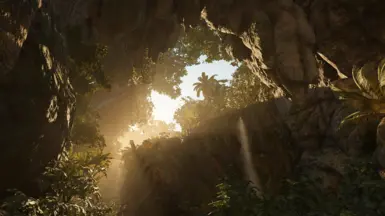
近乎完美 - 光影重置模组
使用Reshade进行着色器注入,以实现‘近乎完美’的自然渲染:✅ FilmicAnamorphSharpen,✅ AmbientLight,✅ Clarity,✅ LumaSharpen,✅ MXAO,✅ Colourfulness,✅ PPFXBloom
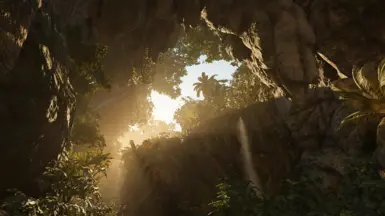 查看大图
查看大图⛩️**[b] 近乎完美 [/b]** - Reshade Mod [b] [/b] ⛩️[i] [/i]
################################################ ??? 此模组使用针对 Reshade 的自定义着色器 ??? ?????? - 您需要遵循所有步骤 - ?????? ################################################ [i] 此模组基于 Reshade 4.9.1* 版本制作,并适用于游戏的最新版本。[/i] 请全屏查看截图。
? 如果您喜欢这个模组,测试后别忘了点击 [b][color=#da8e35]认可[/color][/b] 支持一下 ? :
[url=javascript:void(0)" /onclick="jQuery('.custom-endorse').hide();jQuery('.custom-unendorse').show()" style="border: 1px solid transparent" class="btn inline-flex endorse-mod custom-endorse" data-mod-id="40" data-game-id="2588" data-positive="1" data-source-page="modPage" tabindex="0][b]✓ 认可[/b][/url][url=javascript:void(0)" /onclick="jQuery('.custom-endorse').show();jQuery('.custom-unendorse').hide()" class="btn btn-active inline-flex endorse-mod custom-unendorse" data-mod-id="40" data-game-id="2588" data-positive="0" data-source-page="modPage" tabindex="0" style="display:none;][b]✓ 已认可[/b][/url] [img]fake.jpg" /style="display:none" /onerror="jQuery('#action-unendorse-2588-40').click(function(){jQuery('.custom-endorse').show();jQuery('.custom-unendorse').hide()});jQuery('#action-endorse-2588-40').click(function(){jQuery('.custom-endorse').hide();jQuery('.custom-unendorse').show()});if((jQuery('#action-endorse-2588-40:visible').length === 0)&&(jQuery('.modhistory svg.icon-tick-blue').length === 1)){jQuery('.custom-endorse').hide();jQuery('.custom-unendorse').show()};if((jQuery('#action-endorse-2588-40:visible').length === 0)&&(jQuery('.modhistory svg.icon-tickunsafe').length === 1)){jQuery('.custom-endorse').attr({onclick:'',class:'btn inline-flex btn-inactive'}).css('cursor','not-allowed')}[/img]
⛩️ [b]使用方法[/b] ⛩️
1️⃣ 首次启动游戏并设置您的分辨率 / 以及其他所有选项。 为了获得更好的视觉效果,请禁用以下设置:[i] Motion Blur:关[/i] 2️⃣ 退出游戏并按照以下步骤操作:
额外提示(可选,用于跳过启动器和开场动画):您可以创建 SOTTR.exe 的快捷方式并编辑它(右键点击 > 属性),然后在快捷方式路径的末尾添加 -nolauncher,如下所示:
[i]......\Shadow of the Tomb Raider\SOTTR.exe" -nolauncher[/i]
[i]别忘了在 "-" 前留一个空格。[/i]
⛩️ [b]安装 Reshade[/b] ⛩️
*下载 Reshade: 4.9.1 : 文件标签页:[url=https://www.nexusmods.com/shadowofthetombraider/mods/40?tab=files]https://www.nexusmods.com/shadowofthetombraider/mods/40?tab=files[/url] 或者:[url=https://www.mediafire.com/file/wdfnrzhsk0bea07/ReShade_Setup_4.9.1.exe/file]https://www.mediafire.com/file/wdfnrzhsk0bea07/ReShade_Setup_4.9.1.exe/file[/url]
▶️ 执行 [b]reshade.exe[/b],在游戏文件夹中搜索 [b]SOTTR.exe[/b] 文件,[b]勾选 [b]Direct3D 10/11/12[/b][/b] 并 [b]安装任意着色器[/b]。(不要关闭应用程序)。 ▶️ 从 [url=https://www.nexusmods.com/shadowofthetombraider/mods/40?tab=files][b]文件标签页[/b][/url] 下载 [b]预设文件[/b],然后将其放入游戏文件夹。 ▶️ 仍在游戏文件夹中:[u][b]删除[/b][/u] 名为 "[b]reshade-shaders[/b]" 的文件夹,并 [b]将模组 [url=https://www.nexusmods.com/shadowofthetombraider/mods/40?tab=files][b]文件标签页[/b][/url] 中提供的那个文件夹复制/粘贴[/b] 过来。 ▶️ 在 Reshade 应用程序中,点击 [b]编辑 Reshade 设置按钮[/b],在新窗口中 [b]选择您已放置在游戏文件夹中的 ini 文件[/b],然后 [b]勾选性能模式[/b] 和 [b]跳过教程[/b],最后点击 [b]确定按钮[/b]。
▶️ 启动游戏!
❤️ 尽情享受 ❤️
⚠️:如果您想调整设置或只是想检查 ini 文件是否已正确加载,请按 Home 键: [url=https://www.computerhope.com/jargon/h/homekey.htm]https://www.computerhope.com/jargon/h/homekey.htm[/url] [i]如果您使用笔记本电脑,请在谷歌上搜索您的 Home 键在哪里![/i]
❗ [b]检查 ini 文件是否已正确加载[/b]([i]按下 Home 键,然后检查主页标签页顶部的选择下拉菜单[/i]): [url=https://reshade.me/forum/troubleshooting/5227-easy-troubleshooting-never-deal-troubles-again#33089]https://reshade.me/forum/troubleshooting/5227-easy-troubleshooting-never-deal-troubles-again#33089[/url] [i][url=https://i.imgur.com/xnhKkYH.png]https://i.imgur.com/xnhKkYH.png[/url][/i]
![https://i.imgur.com/xnhKkYH.png]](https://i.imgur.com/xnhKkYH.png%5D)
![https://i.imgur.com/xnhKkYH.png[/url][/i]](https://i.imgur.com/xnhKkYH.png%5B/url%5D%5B/i%5D)
❓ 如果您有问题,更多操作信息: [i][url=https://reshade.me/forum/troubleshooting/5227-easy-troubleshooting-never-deal-troubles-again]https://reshade.me/forum/troubleshooting/5227-easy-troubleshooting-never-deal-troubles-again[/url][/i]
+++++++++++++++++++++++++++++++++++++++++++++++++++++++++++++++++++++++++++++++++++++++++++++++++++++++++++++++++++++
ℹ️ [b]设置信息[/b] ℹ️
✅ FilmicAnamorphSharpen, ✅ AmbientLight, ✅ Clarity, ✅ LumaSharpen, ✅ MXAO, ✅ Colourfulness, ✅ PPFXBloom
ℹ️ [b]单独设置对比[/b] ℹ️
仅使用 FilmicAnamorphSharpen 着色器的截图: [url=https://drive.google.com/open?id=10sCgHutweEeMkIbjb-VpVIq8WAPzSVVK]https://drive.google.com/open?id=10sCgHutweEeMkIbjb-VpVIq8WAPzSVVK[/url]
仅使用 AmbientLight 着色器的截图: [url=https://drive.google.com/open?id=1USbtGCY32J__VzYuE-dkLmZgohqyMQ82]https://drive.google.com/open?id=1USbtGCY32J__VzYuE-dkLmZgohqyMQ82[/url]
仅使用 Clarity 着色器的截图: [url=https://drive.google.com/open?id=1NDJjRBQ2HcpgmtfywvVKjMm1NKVyE5S0]https://drive.google.com/open?id=1NDJjRBQ2HcpgmtfywvVKjMm1NKVyE5S0[/url]
仅使用 LumaSharpen 着色器的截图: [url=https://drive.google.com/open?id=1OLPvTjlcczRAX-rTarHxYlvteoVptKTQ]https://drive.google.com/open?id=1OLPvTjlcczRAX-rTarHxYlvteoVptKTQ[/url]
仅使用 MXAO 着色器的截图: [url=https://drive.google.com/open?id=1ovMLOGscYR2W_C3BkY30fUiezaTeJqAZ]https://drive.google.com/open?id=1ovMLOGscYR2W_C3BkY30fUiezaTeJqAZ[/url]
仅使用 Colourfulness 着色器的截图: [url=https://drive.google.com/open?id=19LjR0mmOsLOF1yF9W31vsX_cIzGR1dFq]https://drive.google.com/open?id=19LjR0mmOsLOF1yF9W31vsX_cIzGR1dFq[/url]
仅使用 PPFXBloom 着色器的截图: [url=https://drive.google.com/open?id=1RSCWHlyDPsgh_pgT5xRR_5CLV5fnQh7K]https://drive.google.com/open?id=1RSCWHlyDPsgh_pgT5xRR_5CLV5fnQh7K[/url]
-
--- [url=https://www.nexusmods.com/shadowofthetombraider/mods/40?tab=posts][b]欢迎留言评论[/b] [/url] ----
-
--- [b]请全屏查看截图[/b] ---- --- [i]下载截图:[url=https://drive.google.com/file/d/16g0gvyXNzzbCNy3hIrytM-WYB5vYH2fz/view?usp=sharing]https://drive.google.com/file/d/16g0gvyXNzzbCNy3hIrytM-WYB5vYH2fz/view?usp=sharing[/url] [/i] ---
⛩️ [b]查看我的其他 Reshade[/b] ⛩️
《古墓丽影:暗影》: [url=https://www.nexusmods.com/shadowofthetombraider/mods/40]https://www.nexusmods.com/shadowofthetombraider/mods/40[/url] [url=https://sfx.thelazy.net/games/preset/10034/]https://sfx.thelazy.net/games/preset/10034/[/url]
《星球大战:前线 II》(2017): [url=https://www.nexusmods.com/starwarsbattlefront22017/mods/1944]https://www.nexusmods.com/starwarsbattlefront22017/mods/1944[/url] [url=https://sfx.thelazy.net/games/preset/10102/]https://sfx.thelazy.net/games/preset/10102/[/url]
《质量效应 3》: [url=https://www.nexusmods.com/masseffect3/mods/787/]https://www.nexusmods.com/masseffect3/mods/787/[/url] [url=https://sfx.thelazy.net/games/preset/10139/]https://sfx.thelazy.net/games/preset/10139/[/url]
《羞辱 2》: [url=https://www.nexusmods.com/dishonored2/mods/4]https://www.nexusmods.com/dishonored2/mods/4[/url] [url=https://sfx.thelazy.net/games/preset/10256/]https://sfx.thelazy.net/games/preset/10256/[/url]
《质量效应:仙女座》: [url=https://www.nexusmods.com/masseffectandromeda/mods/814]https://www.nexusmods.com/masseffectandromeda/mods/814[/url]
《星球大战绝地:陨落的武士团》 [url=https://www.nexusmods.com/starwarsjedifallenorder/mods/105]https://www.nexusmods.com/starwarsjedifallenorder/mods/105[/url]
《杀出重围:人类分裂》 [url=https://www.nexusmods.com/deusexmankinddivided/mods/11]https://www.nexusmods.com/deusexmankinddivided/mods/11[/url]
《看门狗 2》 [url=https://www.nexusmods.com/watchdogs2/mods/21]https://www.nexusmods.com/watchdogs2/mods/21[/url]
《孤岛惊魂 5》 [url=https://www.nexusmods.com/farcry5/mods/93]https://www.nexusmods.com/farcry5/mods/93[/url]
《孤岛惊魂:新曙光》 [url=https://www.nexusmods.com/farcrynewdawn/mods/40]https://www.nexusmods.com/farcrynewdawn/mods/40[/url]
《地平线:零之曙光》 [url=https://www.nexusmods.com/horizonzerodawn/mods/59]https://www.nexusmods.com/horizonzerodawn/mods/59[/url]
《底特律:化身为人》 [url=https://www.nexusmods.com/detroitbecomehuman/mods/16]https://www.nexusmods.com/detroitbecomehuman/mods/16[/url]
《生化危机 2》(重制版) (即将推出)
接下来是什么?? ...
还没有人评论,去客户端里说两句吧。
评论在新手盒子客户端中发表,这里同步展示。