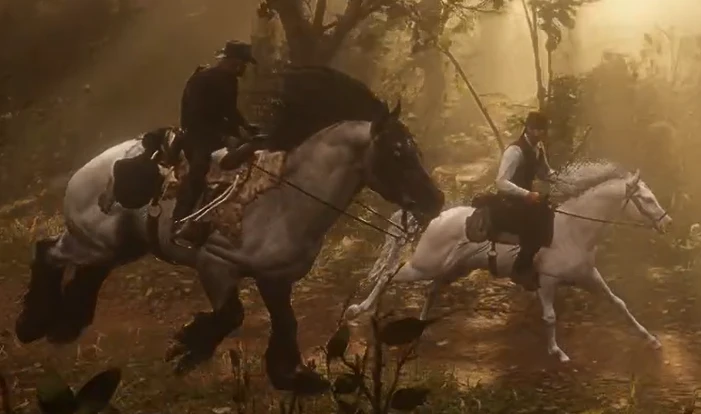
The Brabant Horse
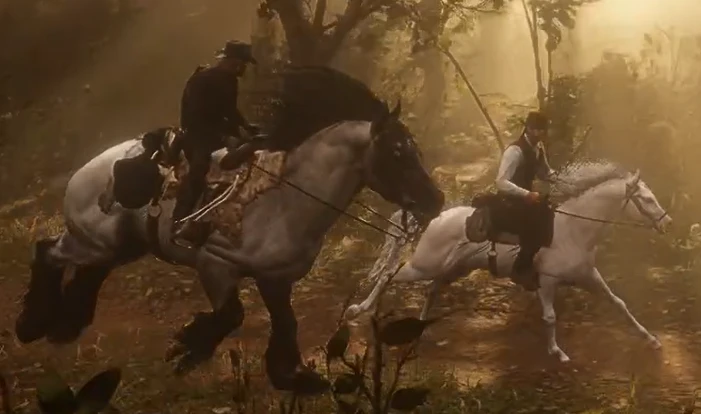
Add a related breed to the Belgian Draft and Ardennes, the Brabant! How to install my mod and add back the tail is explained in the mod's folder!! :>
 查看大图
查看大图[size=5][font=Courier New][b]The Brabant[/b][/font][/size]
[size=4][font=Courier New]This breed is also known as the Belgian Draught, and the first Brabant to have been imported to America was around the late 19th century -1800s-, just about around the time RDR2 takes place which is 1899. It is heavy built, similarly to the Ardennes, but is nearly as tall as the Belgian Draft. This steed comes in many different coats though most often in Bay Roans. In my mod, however, I chose to make it a Blue and Red RN -my reasoning as to why is explained in my text file-. I adore true Blue Roans a whole lot, especially on Belgian Drafts/Draughts! I added a Red Roan along as it is a very rare in real life for a Belgian horse to have that coat design.[/font][/size]
[center][font=Courier New][img width=528]https://staticdelivery.nexusmods.com/mods/3024/images/9876/9876-1785573510-2125849583.png[/img][/font][/center]
[center][font=Courier New][size=1]-This is a Bay Roan-[/size][/font][/center]
[size=5][font=Courier New][b]How to install the necessities[/b][/font][/size]
[size=4][font=Courier New]I will now go into detail on how to install the following: Lenny's Mod Loader, RDR2 Asi Loader, Rampage Trainer, and AB's Script Hook. Firstly, allow me to help set you up:
1. Look for your RDR2.exe file, which should be found in -> This PC\Windows (C:)\Program Files (x86)\Steam\steamapps\common - and now finally, you should be able to find it. Be sure to quick access the RDR2 folder -titled "Red Dead Redemption 2"- for, of course, quick access.
2. Before you begin downloading any mod, it is best you either take a screenshot of the material inside of your RDR2 folder, or copy the folder itself and paste it into a place you will remember -best place to put it is in the picture folder-. This is to ensure you don't delete the wrong items in case you want to play RDO.
Lenny's Mod Loader:
1. Go to the website I have provided in the requirements section of my mod and download the Mod Loader; the download button should be located on the right side of your screen as a black button with the title "Download this file".
2. Once the file is downloaded, open the file -or extract it first if you can't access its material- and access the folder "ModLoader". In it, you grab everything BUT the read me and license, and put it into the "Red Dead Redemption 2" folder, in which is also known as the game root folder, root folder, or even RDR2 directory.
3. The "lml" folder is now where you will be putting your mods in, but before you do, add another folder in it and title it in [i]ALL LOWERCASE[/i] "stream". The "stream" folder is the actual location you'll be putting your mods in unless stated otherwise by the author of the mod you choose to install from.
4. It is now installed.
RDR2 Asi Loader:
1. Likewise, go to the website provided in the requirements and download the ASI loader.[/font][/size]
[size=4][font=Courier New]2. Open the file -or extract it if you can't access its contents- and grab "version.dll" and put it into the game root folder.
3. It is now installed.
Rampage Trainer
1. Once again, download the mod via the required region of my mod.
2. Open file, grab both the ASI and folder and drop it into the root folder.
3. It is now installed.
AB's Script Hook
1. Go to website from the requirements section.
2. This website is a bit scary, but it's okay! Do NOT click on any pop-up download ads. The only area you need to care about is a small table that is near the bottom right of your screen.[/font][/size]
[size=4][font=Courier New]3. Click on the Download that is just below " 1.0.1207.58/1491.17 and above"
4. Open the file, or extract if contents are inaccessible, open the bin folder within, JUST grab "ScriptHookRDR2.dll" and place it into the RDR2 Directory. You do not need the other stuff within the folder as you already have downloaded them with "Lenny's Mod Loader" and "RDR2 Asi Loader".
5. It is now installed...again! XD
How to install my mod is explained in its own personal folder, as all else have been! I will not be explaining how to install the other mods within the requirements section because they have their own personal explanations on how to install their mod.[/font][/size]
![https://staticdelivery.nexusmods.com/mods/3024/images/9876/9876-1785573510-2125849583.png[/img][/font][/center]](https://staticdelivery.nexusmods.com/mods/3024/images/9876/9876-1785573510-2125849583.png%5B/img%5D%5B/font%5D%5B/center%5D)
正在加载版本记录…
正在加载评论…
评论在新手盒子客户端中发表,这里同步展示。