A Wolf's Life - Wolf Survival Mode
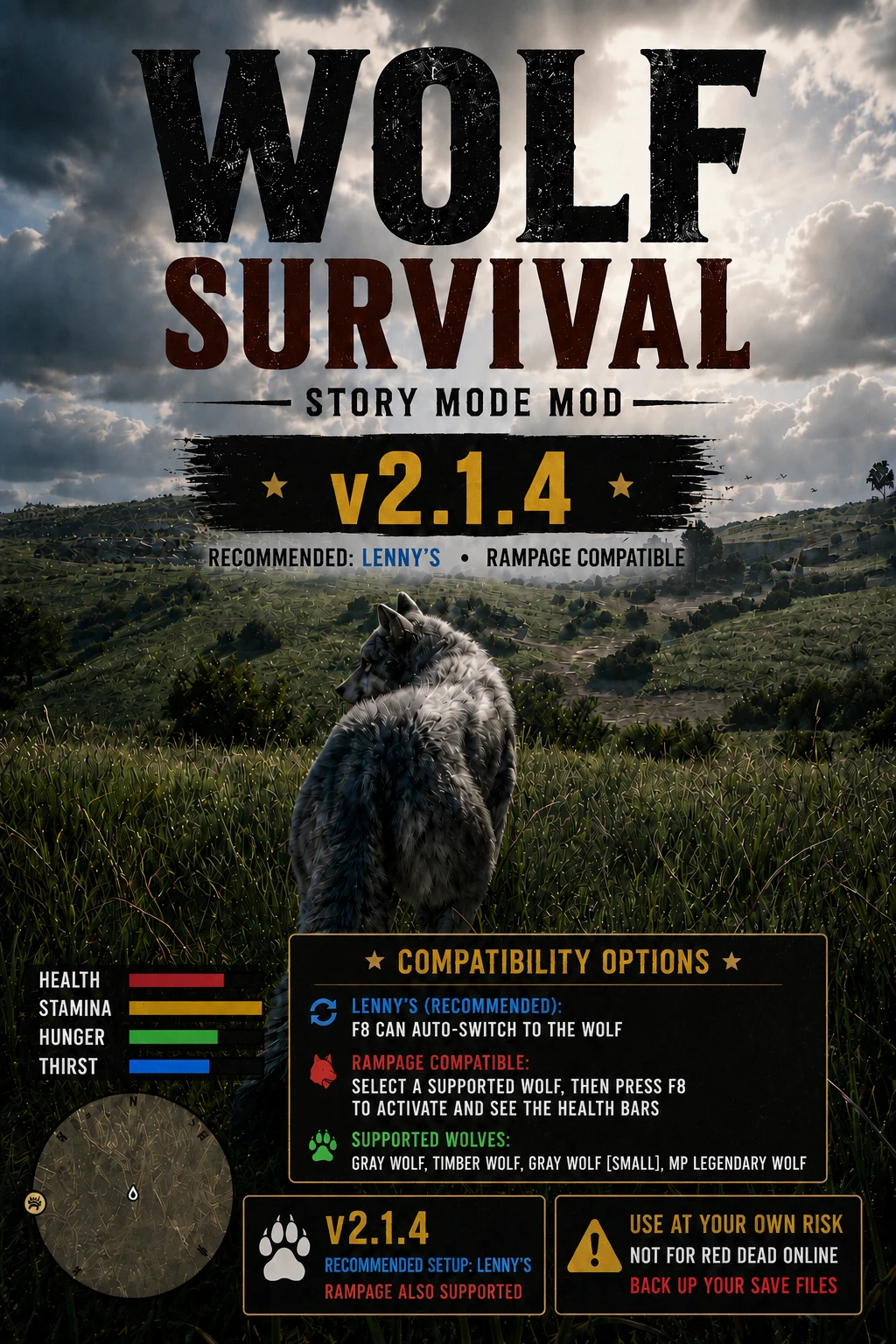
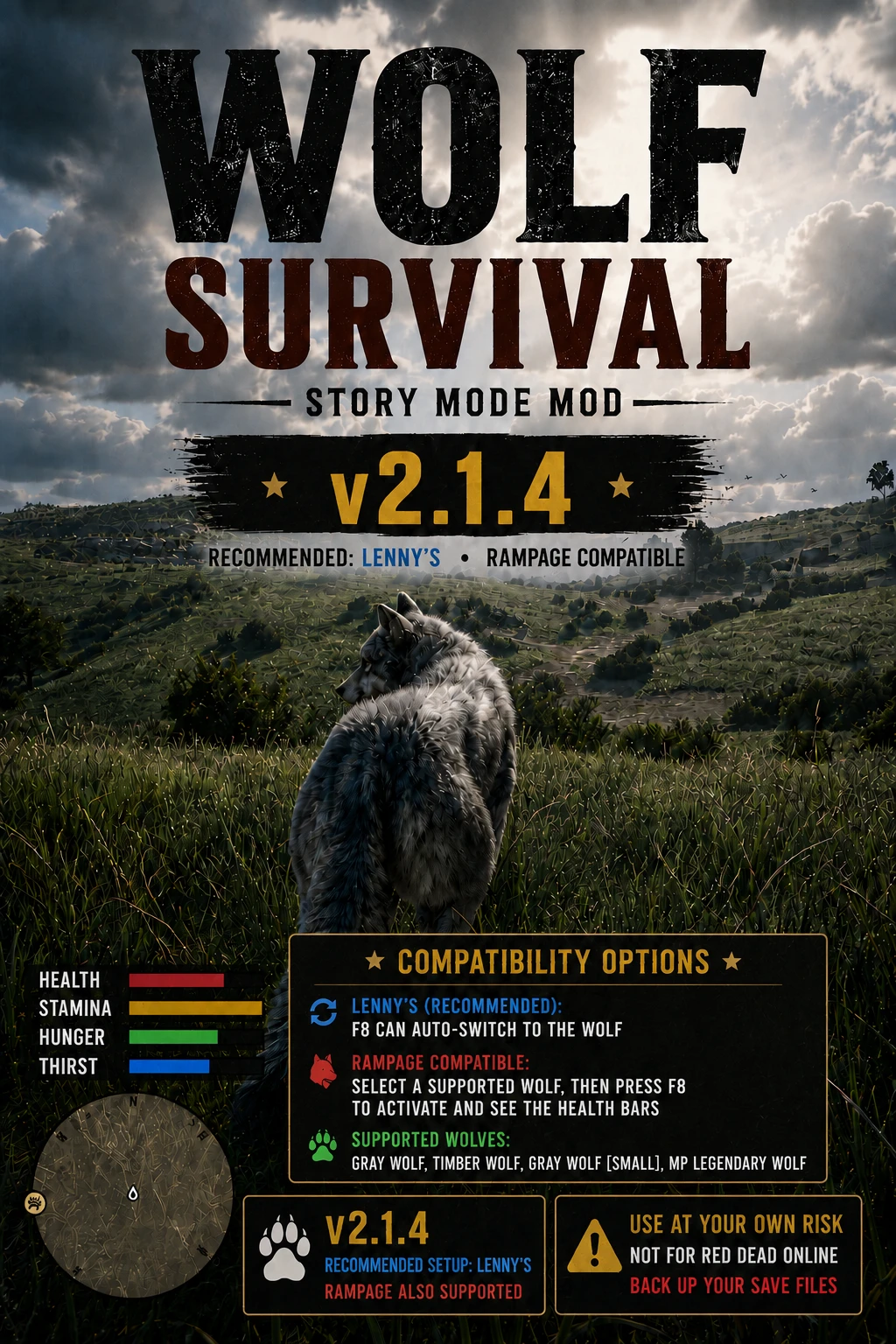
Transform RDR2 Story Mode into a full wolf survival experience. Hunt, pounce, perform cinematic finishers, feed, drink, track scents, rest, and survive with hunger, thirst, health, and stamina systems.
 查看大图
查看大图A WOLF'S LIFE WOLF SURVIVAL MODE
Version 2.1.4
Created by Gnarly Bastard Mods
================================================================================
IMPORTANT SAVE-SAFETY WARNING
================================================================================
DO NOT USE THIS MOD ON YOUR ONLY OR MAIN STORY MODE SAVE.
Before installing:
- Create a separate manual test save.
- Back up the entire RDR2 Profiles folder.
- Use the mod primarily in safe free roam.
- Do not transform during missions, cutscenes, arrests, death scenes,
wardrobe transitions, scripted character swaps, or other forced scenes.
- Remove the Wolf Survival files when you are not actively using the mod.
- Do not mix files from older stable or experimental branches.
Recommended backup location:
Documents\Rockstar Games\Red Dead Redemption 2\Profiles\
No script mod can guarantee compatibility with every trainer, outfit mod,
weapon mod, mission script, save editor, or future game update.
STORY MODE ONLY. DO NOT USE IN RED DEAD ONLINE.
================================================================================
OVERVIEW
================================================================================
Become the predator and survive the wilderness as a fully playable wolf.
A Wolf's Life adds a complete animal-survival gameplay loop to Red Dead
Redemption 2 Story Mode, including:
- Wolf Health, Stamina, Hunger, and Thirst
- Hunting, biting, jumping, and Predator Pounce attacks
- Human ground finishers and highlight-kill animations
- Carcass feeding with custom eating audio
- Natural-water drinking
- Scent Tracking
- Directional dodges
- Sit, Sleep, and Recovery Position actions
- Civilian fear and world reactions
- Custom HUD
- Keyboard and controller support
- Persistent wolf survival values
- Multiple supported wolf models
This release uses one-way activation. F8 enters or activates Wolf Survival.
F8 does not restore Arthur, John, Player 0, or another human model.
Use your trainer or model changer when you want to leave wolf form.
================================================================================
RECOMMENDED SETUP — LENNY'S SIMPLE TRAINER
================================================================================
Lenny's Simple Trainer is the recommended setup for Wolf Survival v2.1.4.
Recommended Lenny's workflow:
1. Load Story Mode as Arthur or John.
2. Press F8.
3. Wolf Survival automatically requests the wolf selected in WolfSurvival.ini.
4. Confirm the Health, Stamina, Hunger, and Thirst bars appear.
The four survival bars confirm that Wolf Survival is active.
================================================================================
RAMPAGE COMPATIBILITY
================================================================================
Rampage is compatible, but Rampage uses a manual activation workflow.
Rampage workflow:
1. Open Rampage Model Changer.
2. Manually select a supported wolf.
3. Close the Rampage menu.
4. Press F8 to activate Wolf Survival.
5. Confirm the Health, Stamina, Hunger, and Thirst bars appear.
IMPORTANT:
Changing into a wolf through Rampage does not activate Wolf Survival by itself.
You must press F8 after selecting the wolf.
Arthur's native weapon/item wheel may still be available when using Rampage.
This release does not suppress or alter those native controls because previous
control-suppression testing interfered with Wolf Survival keybinds.
================================================================================
SUPPORTED WOLF MODELS
================================================================================
WolfSurvival.ini model options:
ModelVariant=0
Gray Wolf — A_C_Wolf
ModelVariant=1
Timber Wolf — A_C_Wolf_Medium
ModelVariant=2
Gray Wolf [small] — A_C_Wolf_Small
ModelVariant=3
MP Legendary Wolf — MP_A_C_Wolf_01
Recommended default:
[Wolf]
ModelVariant=0
Some animations were authored around the standard full-size wolf. Test alternate
models on a spare save because animation alignment can vary by model and terrain.
================================================================================
MAIN FEATURES
================================================================================
WOLF SURVIVAL HUD
- Displays Health, Stamina, Hunger, and Thirst.
- HUD position and appearance are configurable in WolfSurvival.ini.
- Includes Gnarly Bastard Mods credit.
HUNGER AND THIRST
- Hunger and thirst drain over time.
- Starting values and depletion times are configurable.
- When hunger or thirst reaches zero, health begins to drain.
- Starvation and dehydration damage do not stack.
- Low hunger or thirst reduces stamina recovery.
HUNTING AND COMBAT
- Bite nearby humans or animals.
- Jump freely when no valid target is nearby.
- Predator Pounce attacks valid nearby targets.
- Human and animal pounce damage are configurable separately.
HUMAN FINISHERS
- Predator Pounce can knock down human targets.
- Eligible victims can receive a cinematic head, neck, or upper-chest finisher.
- Terrain, alignment, distance, and animation verification affect reliability.
- FallbackToPredatorPounce=0 is recommended for this release to avoid awkward
failed-animation behavior such as victims standing during a bad transition.
FEEDING
- Hold E or Y/Triangle near an edible carcass.
- Uses the included WolfSurvival_Eating.wav.
- Carcass food and healing values are configurable by animal size.
- The custom eating WAV has a repeat interval. Rapidly starting another feeding
session may occasionally cause delayed or missing custom audio; this is a known
limitation of the current stable foundation.
DRINKING
- Hold E or Y/Triangle beside shallow natural water.
- Drinking restores thirst gradually.
- Water-depth checks help prevent drinking while fully submerged.
SCENT TRACKING
- Detect nearby humans, animals, and carcasses.
- Keyboard: Caps Lock or Middle Mouse.
- Controller: D-Pad Right.
MOVEMENT AND REST
- Free jump and Predator Pounce.
- Directional left, right, and backward dodges.
- Horse-style controller stop/brake.
- Sit and Sleep actions.
- Recovery Position for health and stamina recovery.
- Healing pauses when hunger or thirst is too low.
WORLD REACTIONS
- Civilians recognize the wolf as a dangerous predator.
- Nearby pedestrians may fear and flee.
- Hostile and combat-capable NPCs retain aggressive behavior.
- Horse whistle/dismissal behavior is adjusted while wolf mode is active.
PERSISTENT WOLF PROGRESS
- Wolf Health, Stamina, Hunger, and Thirst can be saved automatically.
- Keep WolfSurvival.save when updating unless you intentionally want to reset
the wolf's survival values.
================================================================================
CONTROLS — KEYBOARD AND MOUSE
================================================================================
Left Mouse Button or F : Bite / Attack / confirm available finisher
Space : Free jump or Predator Pounce
Left Shift : Sprint
Q : Backward dodge
A + Q : Left dodge
D + Q : Right dodge
Hold E : Feed from carcass or drink natural water
H : Howl
Caps Lock / Middle Mouse: Scent Tracking
G : Sit / stand
J : Sleep / wake
Z : Recovery Position on / off
F7 : Status and controls menu / next page
F8 : Activate Wolf Survival / one-way wolf activation
F10 : Reload WolfSurvival.ini
F11 : Emergency model action if supported by the current build
================================================================================
CONTROLS — CONTROLLER
================================================================================
RT / R2 : Bite / Attack / confirm finisher
X / Square : Free jump or Predator Pounce
A / Cross : Sprint
Tap LB / L1 + left stick : Directional dodge
RB / R1 : Horse-style brake / stop
Hold Y / Triangle : Feed or drink
D-Pad Up : Howl
D-Pad Right : Scent Tracking
B / Circle : Recovery Position on / off
LB/L1 + B/Circle : Sit / stand
LB/L1 + RB/R1 : Sleep / wake
LB/L1 + D-Pad Down : Activate Wolf Survival
LB/L1 + D-Pad Left : Status menu / next page
LB/L1 + D-Pad Right : Reload INI
LB/L1 + D-Pad Up : Emergency model action if supported
All custom bindings can be changed in WolfSurvival.ini.
================================================================================
REQUIREMENTS
================================================================================
Required:
- Red Dead Redemption 2 for PC
- Story Mode
- ScriptHookRDR2
- ASI Loader, normally dinput8.dll
Recommended:
- Lenny's Simple Trainer
Also compatible:
- Rampage Trainer / Model Changer using manual wolf selection before F8
DO NOT USE IN RED DEAD ONLINE.
================================================================================
INSTALLATION
================================================================================
1. Close Red Dead Redemption 2 completely.
2. Back up all RDR2 save files.
3. Create a separate manual test save.
4. Open the main game folder containing RDR2.exe.
5. Confirm ScriptHookRDR2 and the ASI loader are installed.
6. Install Lenny's Simple Trainer for the recommended setup, or Rampage if you
prefer manual model selection.
7. Remove obsolete Wolf Survival test/helper ASIs and mixed-version files.
8. Copy these files beside RDR2.exe:
- WolfSurvival.asi
- WolfSurvival.ini
- WolfSurvival_Eating.wav
9. Keep WolfSurvival.save unless you intentionally want to reset wolf progress.
10. Start Story Mode using the spare save.
Lenny's users:
- Load as Arthur or John and press F8.
Rampage users:
- Select a supported wolf in Rampage, close Rampage, then press F8.
In both cases, confirm the four survival bars appear.
================================================================================
CLEAN UPDATE / OLD FILE REMOVAL
================================================================================
Before installing v2.1.4, remove obsolete experimental files such as:
- WolfSurvival_CharacterPreservation.asi
- WolfSurvival_BloodAfterFeeding.asi
- WolfSurvival_CorpseScenarioTest.asi
- Any Wolf Survival helper beginning with ZZ_ or zz_
- Old gore-expression, texture-overlay, natural-feeding, blood, hunter,
bodyguard, or preservation test ASIs
Do not mix files from different branches.
================================================================================
UNINSTALLATION
================================================================================
Close the game and remove:
- WolfSurvival.asi
- WolfSurvival.ini
- WolfSurvival_Eating.wav
- WolfSurvival.log, if desired
- WolfSurvival.save, only if you also want to erase saved wolf survival values
Do not remove ScriptHookRDR2, dinput8.dll, Lenny's, or Rampage if other mods
still require them.
================================================================================
TROUBLESHOOTING
================================================================================
WOLF SURVIVAL DOES NOT LOAD
- Confirm ScriptHookRDR2 and the ASI loader are installed correctly.
- Confirm WolfSurvival.asi is beside RDR2.exe.
- Use Story Mode only.
- Remove obsolete helper ASIs and mixed-version files.
RAMPAGE WOLF HAS NO SURVIVAL HUD
- Changing into a wolf through Rampage does not activate Wolf Survival.
- Close Rampage and press F8.
- Confirm Health, Stamina, Hunger, and Thirst bars appear.
LENNY'S DOES NOT AUTO-SWITCH
- Confirm Lenny's Simple Trainer is installed and loading.
- Confirm the selected ModelVariant is valid.
- Test ModelVariant=0 first.
- Check WolfSurvival.log.
EATING SOUND DOES NOT PLAY
- Confirm WolfSurvival_Eating.wav is beside WolfSurvival.asi.
- Confirm it has not been renamed.
- Rapidly feeding again may occasionally delay or skip the custom WAV.
- The native feeding sounds may still play even when the custom WAV does not.
FINISHER DOES NOT START
- The target must be eligible and within range.
- Stay near the head, neck, or upper chest.
- Use reasonably level, unobstructed terrain.
- Keep FallbackToPredatorPounce=0 for the stable behavior used in this release.
LOG LOCATION
- WolfSurvival.log in the main RDR2 game folder.
================================================================================
CURRENT RELEASE NOTES — v2.1.4
================================================================================
FOUNDATION
- Uses WolfSurvival_v2.1.4_One_Way_Wolf_Activation_Complete as the active stable
foundation.
ACTIVATION
- F8 activates or enters Wolf Survival.
- F8 does not restore a human model.
- Lenny's remains the recommended one-button setup.
- Rampage remains compatible through manual wolf selection followed by F8.
- The four survival bars confirm successful activation.
COMPATIBILITY
- Gray Wolf, Timber Wolf, Gray Wolf [small], and MP Legendary Wolf documented.
- No Rampage auto-switch retry system is included.
- No Arthur wheel-suppression modifications are included because they interfered
with Wolf Survival controls during testing.
COMBAT
- Stable Branch 14 finisher behavior retained.
- FallbackToPredatorPounce=0 remains recommended.
FEEDING AUDIO
- Original stable eating-audio behavior retained.
- Experimental WAV restart builds were discarded.
REMOVED / NOT INCLUDED
- Character-preservation helper
- Blood-after-feeding experiments
- Gore-expression experiments
- Texture-overlay experiments
- Natural corpse-feeding experiments
- Bounty hunter experiments
- Wolf pack/bodyguard experiments
- Arthur wheel-control suppression experiments
================================================================================
CREDITS
================================================================================
Created by Gnarly Bastard Mods.
buy me a beer https://cash.app/$DayzSaltedJurassicZ
or
https://venmo.com/code?user_id=4642675617695654953&created=1784555542
https://www.paypal.me/GlennMassucci
Thank you to everyone who tested builds, supplied videos and logs, reported
control conflicts, verified trainer compatibility, and helped improve the mod.
正在加载版本记录…
正在加载评论…
评论在新手盒子客户端中发表,这里同步展示。