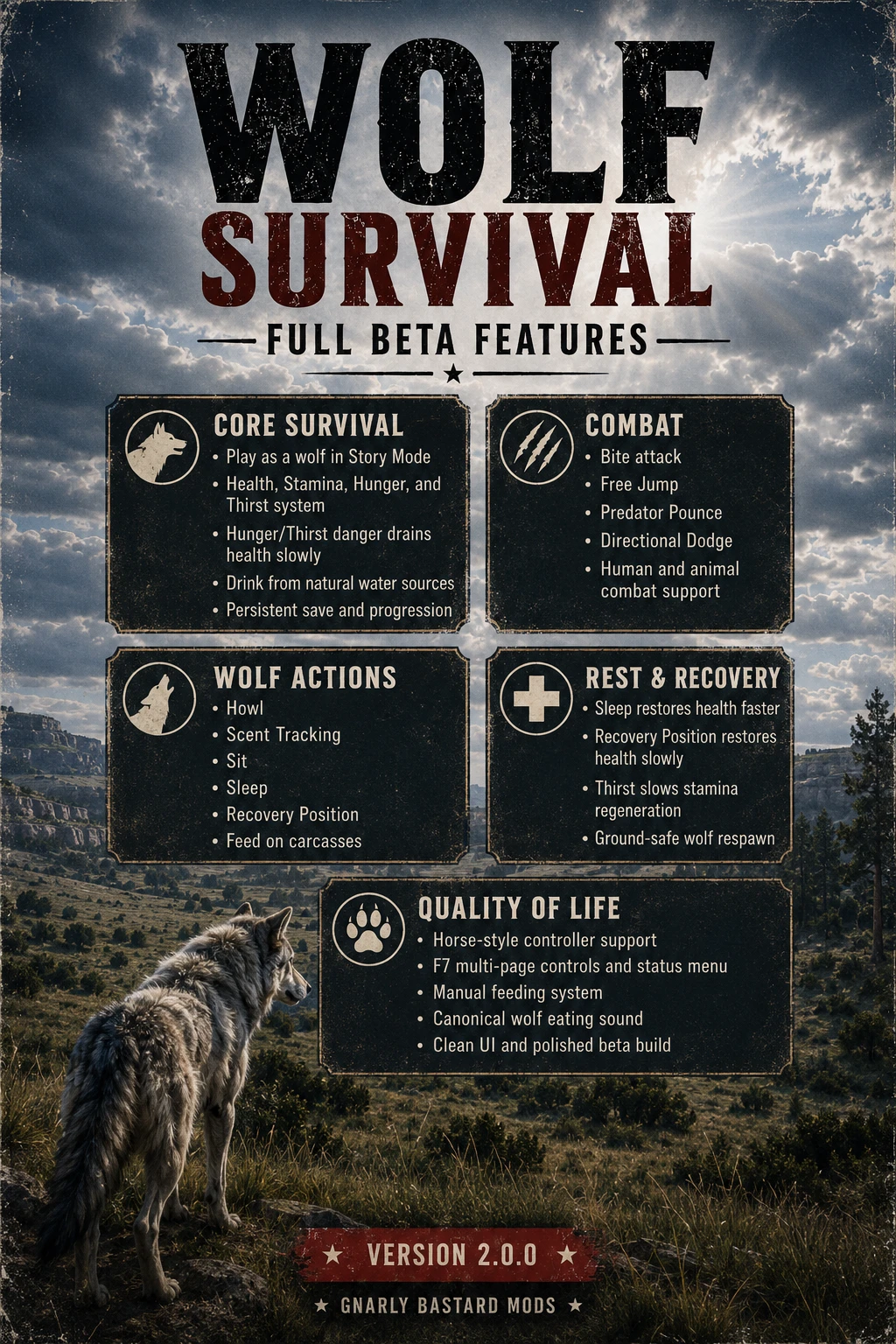
Wolf Survival
Become the wolf and survive RDR2’s wilderness. Hunt animals and humans, feed from carcasses, drink from natural water, manage health, stamina, hunger and thirst, and rest to heal. Includes configurable controls, hardcore survival balance and a custom HUD. NEEDED-ScriptHookRDR2 / ASI Loader / dinput8.dll /Lenny’s Simple Trainer- MORE Content com
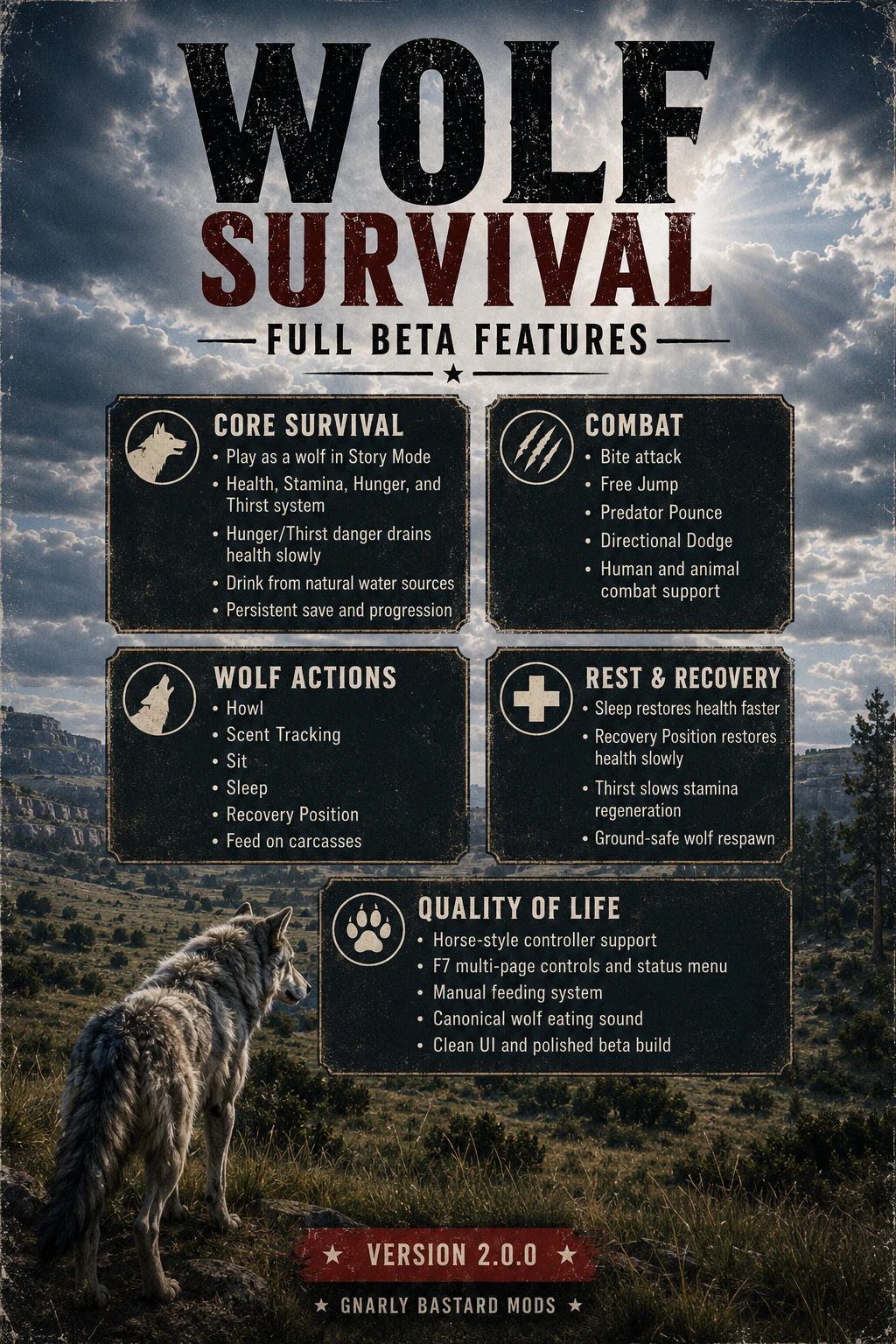 查看大图
查看大图MAKE A BACK UP OF YOUR SAVE FILE- THIS IS NOT A TOGGLE ON AND OFF MOD
YOU MUST HAVE
ScriptHookRDR2 / ASI Loader / dinput8.dll /Lenny’s Simple Trainer INSTALLED
https://www.mod-rdr.com/downloads/rdr2/mods/7-lennys-simple-trainer/
Wolf Survival — Full Beta Release v2.0.0
[b]Wolf Survival[/b] transforms Red Dead Redemption 2 Story Mode into a complete playable-wolf survival experience.
Instead of simply replacing Arthur or John with an animal model, Wolf Survival adds dedicated survival mechanics, wolf combat, natural feeding and drinking, scent tracking, resting animations, controller support, persistent progress, and configurable gameplay systems designed specifically around playing as a wolf.
Roam the wilderness, hunt animals, attack hostile humans, drink from natural water sources, feed from carcasses, track nearby creatures, rest, sleep, and survive as part of the world rather than as a human character.
[line]
[heading]Main Features[/heading]
Complete wolf survival system
The wolf has four primary survival attributes:
[list]
[][b]Health[/b] [/]
[][b]Stamina[/b] [/]
[][b]Hunger[/b] [/]
[][b]Thirst[/b] [/]
[/list]Hunger and thirst decrease naturally while playing. Sprinting, attacking, jumping, pouncing, and other physical actions consume stamina.
When the wolf becomes thirsty, stamina regenerates more slowly. A limited warning informs the player that the wolf needs water without repeatedly spamming notifications.
If hunger or thirst reaches zero, health begins decreasing gradually. By default, a completely healthy wolf can survive for approximately ten minutes under critical hunger or dehydration conditions. Hunger and thirst damage do not stack, preventing an unfair double health-drain effect.
All major survival values can be adjusted through
[code]WolfSurvival.ini[/code].
[line]
[heading]Feeding[/heading]
The wolf can feed manually from compatible human and animal carcasses.
Carcass values are divided into size categories:
[list]
[]Small game [/]
[]Medium game [/]
[]Large game [/]
[]Human carcasses [/]
[/list]Each carcass contains a limited amount of food and health recovery. Feeding from the same body repeatedly will eventually exhaust it.
Sheep are explicitly recognized as [b]medium game[/b], rather than being incorrectly classified as small animals because of their base health value.
Feeding includes:
[list]
[]Wolf eating animation [/]
[]Custom eating sound [/]
[]Hunger restoration [/]
[]Limited health restoration [/]
[]Carcass depletion [/]
[]Configurable food values [/]
[/list]The included sound file must remain named exactly:
[code]WolfSurvival_Eating.wav[/code]
[line]
[heading]Drinking[/heading]
The wolf can drink directly from natural water sources.
Stand near suitable water and hold the interaction control to drink. Drinking restores thirst gradually and prevents the reduced stamina regeneration caused by dehydration.
The system is intended for rivers, lakes, ponds, and other natural water areas rather than inventory-based drinks.
[line]
[heading]Wolf Combat[/heading]
Bite Attack
The standard close-range wolf attack.
The bite searches for a valid human or animal target within the configured attack range and targeting cone. Damage, stamina cost, range, and cooldown can be adjusted through the INI.
Free Jump
The wolf can perform a normal movement jump when no valid target is close.
A free jump is movement-only and does not automatically damage nearby entities.
Predator Pounce
[b]Predator Pounce is the wolf’s primary human NPC attack and secondary animal attack.[/b]
When a valid enemy is within normal combat range, the jump control becomes a targeted pounce:
[list]
[]Human NPCs receive heavy damage and knockdown. [/]
[]Animals receive a directed pounce attack. [/]
[]The camera remains in normal gameplay. [/]
[]No cinematic scene transition is used. [/]
[]The wolf does not automatically begin feeding after the attack. [/]
[/list]This keeps the combat fluid and prevents the abrupt scene-cut effect caused by synchronized highlight-kill animations.
Directional Dodge
The wolf can dodge:
[list]
[]Left [/]
[]Right [/]
[]Backward [/]
[/list]The dodge direction is determined by movement input when the dodge control is pressed.
Human and animal targeting
Combat supports both people and animals, using configurable:
[list]
[]Target range [/]
[]Target cone [/]
[]Damage [/]
[]Stamina cost [/]
[]Cooldown [/]
[]Knockdown duration [/]
[/list][line]
[heading]Scent Tracking[/heading]
Scent Tracking gives the wolf a dedicated hunting and awareness ability.
When activated, the wolf performs a sniffing animation and searches the surrounding area for nearby:
[list]
[]Living humans [/]
[]Animals [/]
[]Carcasses [/]
[/list]The system reports the closest detected target with an approximate distance and direction.
Controller Scent Tracking is assigned to [b]D-Pad Right[/b].
Keyboard tracking supports the normal tracking/Eagle Eye input paths, including compatibility fallbacks for animal-model control contexts.
[line]
[heading]Wolf Actions[/heading]
Howl
The wolf can perform a full howl animation at any time when another action is not blocking it.
The mod suppresses RDR2’s standard horse-whistle behavior while wolf mode is active. This prevents howling from recalling the horse or displaying messages such as:
[quote]Horse is out of range.[/quote]Sit
The wolf can sit using a dedicated animation sequence.
While sitting, the wolf can remain idle naturally and may use seated animation variations rather than appearing completely frozen.
Sleep
Sleep is the wolf’s strongest recovery state.
By default:
[list]
[]Sleep restores stamina faster. [/]
[]Sleep restores approximately [b]3 health per second[/b]. [/]
[]Healing requires sufficient hunger and thirst. [/]
[]Healing pauses if hunger or thirst falls below the configured minimum. [/]
[]Sleep healing is four times faster than Recovery Position healing. [/]
[/list]This gives sleeping a meaningful gameplay purpose rather than making it purely cosmetic.
Recovery Position
Recovery Position is a lighter resting state.
It provides:
[list]
[]Improved stamina recovery [/]
[]Slow health restoration [/]
[]Safe transition back to standing [/]
[/list]By default, Recovery Position restores approximately [b]0.75 health per second[/b], making it useful for gradual recovery while keeping Sleep as the stronger option.
[line]
[heading]Horse-Style Controller Movement[/heading]
Controller movement has been adjusted to feel closer to controlling a horse in RDR2.
Important controller functions include:
[list]
[][b]A / Cross:[/b] Sprint [/]
[][b]X / Square:[/b] Jump or Predator Pounce [/]
[][b]RB / R1:[/b] Brake and stop the wolf [/]
[][b]Hold RB / R1:[/b] Keep the wolf stopped [/]
[][b]Tap LB / L1:[/b] Directional dodge [/]
[][b]D-Pad Right:[/b] Scent Tracking [/]
[][b]D-Pad Up:[/b] Howl [/]
[/list]Holding LB/L1 with another button activates utility actions without triggering a dodge.
Examples include:
[list]
[][b]LB + B / Circle:[/b] Sit [/]
[][b]LB + RB / R1:[/b] Sleep [/]
[][b]LB + D-Pad Left:[/b] Status and controls menu [/]
[][b]LB + D-Pad Right:[/b] Reload INI [/]
[][b]LB + D-Pad Up:[/b] Emergency human restoration [/]
[][b]LB + D-Pad Down:[/b] Toggle Wolf Survival [/]
[/list]Braking is automatically blocked during jumps and pounces so the wolf cannot become frozen in midair.
[line]
[heading]F7 Status and Controls Menu[/heading]
Wolf Survival does not display a long series of keybind notifications every time the game loads.
Instead, press:
[list]
[][b]F7 on keyboard[/b] [/]
[][b]LB + D-Pad Left on controller[/b] [/]
[/list]This opens a clean multi-page information menu.
Repeatedly pressing the menu control cycles through:
[list=1]
[]Current wolf status [/]
[]Keyboard combat controls [/]
[]Keyboard survival controls [/]
[]Keyboard system controls [/]
[]Controller combat controls [/]
[]Controller survival controls [/]
[]Controller and system commands [/]
[/list]This keeps normal gameplay clean while making the complete control list available whenever it is needed.
[line]
[heading]Persistent Progress[/heading]
Wolf Survival stores survival progress in:
[code]WolfSurvival.save[/code]
Saved information includes the wolf’s primary survival values so hunger, thirst, health-related state, and progression can persist between sessions.
The INI configuration is stored separately in:
[code]WolfSurvival.ini[/code]
Older INI versions are automatically updated with newly required settings when possible.
[line]
[heading]Ground-Safe Wolf Spawning[/heading]
When the player transforms or respawns as the wolf, the mod checks whether the character is associated with Arthur or John’s horse.
The wolf is:
[list]
[]Detached from the horse [/]
[]Moved beside the horse [/]
[]Placed using detected terrain height [/]
[]Prevented from respawning mounted on the saddle [/]
[/list]This applies during the initial transformation and wolf respawn handling.
[line]
[heading]Human Restoration[/heading]
Wolf Survival includes an emergency restoration command that returns the player to a human model.
The current restoration system is primarily intended as a safety feature. It restores Arthur or John, but it may not reproduce the exact original outfit, weapons, ammunition, hair, beard, or customized equipment state.
Players should keep a manual Story Mode save before using any model-changing mod.
A more advanced character snapshot system may be developed separately to preserve complete human appearance and equipment data.
[line]
[heading]Configuration[/heading]
Most systems can be adjusted in
[code]WolfSurvival.ini[/code], including:
[list]
[]Hunger depletion [/]
[]Thirst depletion [/]
[]Critical health-drain time [/]
[]Stamina regeneration [/]
[]Thirst stamina penalty [/]
[]Bite damage [/]
[]Predator Pounce damage [/]
[]Attack range [/]
[]Targeting cone [/]
[]Stamina costs [/]
[]Feeding values [/]
[]Carcass limits [/]
[]Sleep healing [/]
[]Recovery Position healing [/]
[]Controller settings [/]
[]Ground-respawn behavior [/]
[]Notification timing [/]
[/list]The default configuration is designed to provide a playable survival experience without requiring immediate editing.
[line]
[heading]Installation[/heading]
[list=1]
[]Install the required RDR2 script-hook environment. [/]
[]Close Red Dead Redemption 2. [/]
[]Copy the following files into the game’s main directory: [/]
[/list]
[code]WolfSurvival.asi
WolfSurvival.ini
WolfSurvival_Eating.wav[/code]
[list=1]
[]Launch Story Mode. [/]
[]Load a manual save. [/]
[]Press [b]F7[/b] to view the complete controls and current wolf status. [/]
[/list]The save file will be created automatically:
[code]WolfSurvival.save[/code]
When updating from an earlier version, replace
[code]WolfSurvival.asi[/code]. Your existing INI and Wolf Survival save can normally remain in place.
[line]
[heading]Important Notes[/heading]
[list]
[]Designed for [b]Red Dead Redemption 2 Story Mode[/b]. [/]
[]Do not use multiple copies or renamed versions of
[code]WolfSurvival.asi[/code]. [/]
[]Keep
[code]WolfSurvival_Eating.wav[/code]beside the ASI. [/]
[]Back up your Story Mode save before using model-changing mods. [/]
[]Some missions and scripted scenes expect Arthur or John and may not function correctly while playing as a wolf. [/]
[]Return to human form before beginning sensitive story missions. [/]
[]The mod is currently labeled a [b]Full Beta Release[/b] because RDR2’s animal control contexts can behave differently during missions, cutscenes, scripted encounters, and other heavily controlled game states. [/]
[/list]
[b][i]Creator and owner of the DayZ[/i]
[i]Salted Servers[/i]
[i]Salted Legacy -95.173.216.130:2322[/i]
[i]Jurassic Z -207.211.212.146:2302[/i]
[i]Long live Tommy Knight[/i]
https://discord.gg/FN8dAZkSdX
https://cash.app/$DayzSaltedJurassicZ
https://venmo.com/code?user_id=4642675617695654953&created=1784289830[/b]
[b]Wolf Survival v2.0.0 — Full Beta Release
Experience Red Dead Redemption 2 from a completely different perspective.
Hunt. Drink. Feed. Track. Rest. Fight. Survive.
Created by Gnarly Bastard Mods.[/b]
正在加载版本记录…
正在加载评论…
评论在新手盒子客户端中发表,这里同步展示。