
CraftAgent
一个Minecraft Fabric模组,为你的世界带来智能AI驱动的NPC。NPC使用大型语言模型(LLM)来理解上下文、做出决策并与玩家互动。
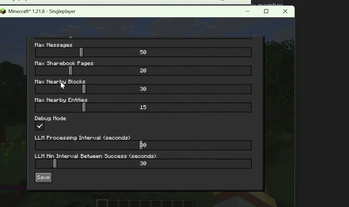 查看大图
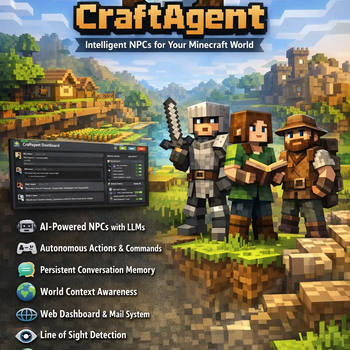
CraftAgent
一个 Minecraft Fabric 模组,为你的世界带来智能 AI 驱动的 NPC。NPC 使用大型语言模型(LLM)来理解上下文、做出决策并与玩家互动。
功能特性
- 🤖 AI 驱动的 NPC:使用 LLM(Ollama、LM Studio)进行智能决策
- 🎮 自主行动:NPC 执行 Minecraft 命令与世界互动
- 💬 对话记忆:在 SQLite 中持久保存对话历史
- 🌍 世界上下文感知:NPC 理解周围环境(方块、实体、物品栏、导航、视线)
- 🔧 多 LLM 支持:Ollama 和 LM Studio(兼容 OpenAI)
- 🎨 客户端-服务端架构:客户端 GUI 配置,服务端 NPC 逻辑
- 🛠️ 命令系统:使用 Brigadier 发现并执行所有 Minecraft 命令
- 🌐 Web 仪表板:内置 Web UI(http://localhost:8080),根据 LLM 处理间隔自动刷新
- 📧 邮件系统:NPC 可通过邮件系统发送和接收消息
- 💬 定向聊天消息:使用 "npcName: message" 格式向特定 NPC 发送消息,或向所有 NPC 广播
- 🧠 记忆系统:私有和共享记忆(privateBook、sharebook)用于持久知识
- ⚡ 结构化行动:LLM 返回包含消息和可执行行动的结构化输出
- 🔄 实时更新:Web UI 自动更新,无需手动刷新
- 🧭 导航系统:NPC 可前往坐标、实体或方块,并跟踪状态
- 👁️ 视线检测:NPC 检测其视线范围内的物品、实体和方块
- ⚡ 行动状态管理:跟踪当前行动(挖掘、建造、合成、狩猎、耕种、钓鱼、战斗)
- 🛠️ 高级行动:挖掘、建造、合成、狩猎、耕种、钓鱼和战斗行动
- ⏸️ LLM 控制:可按 NPC 切换跳过 LLM 请求,并提供手动 LLM 触发命令
环境要求
- Minecraft:1.20.1 或 1.21.8
- Java:17(1.20.1)或 21(1.21.8+)
- Fabric Loader:0.17.3+
- LLM 服务:本地运行的 Ollama 或 LM Studio
安装
玩家安装
- 从 Modrinth 或 CurseForge 下载最新的 JAR
- 将 JAR 放入你的
mods文件夹 - 安装并启动以下之一:
- Ollama:从 ollama.ai 下载并运行
ollama serve - LM Studio:从 lmstudio.ai 下载并启动服务器
- Ollama:从 ollama.ai 下载并运行
- 启动 Minecraft 即可畅玩!
开发者安装
克隆仓库:
git clone https://github.com/prskid1000/CraftAgent.git
cd CraftAgent
构建项目:
# Windows
.\gradlew.bat :1.21.8:build

# Linux/Mac
./gradlew :1.21.8:build
在
versions/1.21.8/build/libs/中找到编译好的 JAR
构建
# 构建特定版本
.\gradlew.bat :1.21.8:build

# 构建所有版本
.\gradlew.bat build

# 在开发环境中运行
.\gradlew.bat :1.21.8:runServer
使用说明
命令
/craftagent- 打开配置 GUI/craftagent add <name> <llmType>- 创建新 NPC/craftagent remove <name>- 移除 NPC(保留数据)/craftagent <npcName> llm- 为指定 NPC 手动触发 LLM 调用(NPC 名称不区分大小写)/craftagent <npcName> <action>- 对指定 NPC 执行行动(NPC 名称不区分大小写)记忆行动:
/craftagent Steve sharedbook add "Iron Mine" "Iron mine located at coordinates 150, 64, -200"/craftagent Steve sharedbook add BaseLocation "Our base is at spawn"/craftagent Steve sharedbook remove "Iron Mine"/craftagent Steve privatebook add "Secret Plan" "I will build a house tomorrow"/craftagent Steve privatebook add Notes "Remember to craft more tools"/craftagent Steve privatebook remove "Secret Plan"
通信行动:
/craftagent Steve mail send Alice "Hello there! Want to mine together?"/craftagent Steve mail send Bob "Found some diamonds at 200, 50, -100"
导航行动:
/craftagent Steve travel to 100 64 200/craftagent Steve travel to entity Zombie/craftagent Steve travel to block iron_ore/craftagent Steve travel stop
挖掘行动:
/craftagent Steve mine iron_ore 5/craftagent Steve mine diamond_ore/craftagent Steve mine at 150 64 -200
建造行动:
/craftagent Steve build stone_bricks at 100 65 200/craftagent Steve place oak_planks at 101 65 201
合成行动:
/craftagent Steve craft iron_pickaxe/craftagent Steve craft wooden_sword
狩猎行动:
/craftagent Steve hunt zombie/craftagent Steve hunt Creeper/craftagent Steve hunt Skeleton
耕种行动:
/craftagent Steve farm plant wheat at 50 64 50/craftagent Steve farm plant carrot at 51 64 51/craftagent Steve farm harvest at 50 64 50/craftagent Steve farm harvest
钓鱼行动:
/craftagent Steve fish/craftagent Steve fish stop
战斗行动:
/craftagent Steve attack Zombie/craftagent Steve attack zombie/craftagent Steve defend
聊天消息
玩家可通过聊天向 NPC 发送消息。消息会自动路由到 NPC:
- 定向消息:
steve: Do your homework- 仅向名为 "steve" 的 NPC 发送消息(不区分大小写) - 广播消息:
Do your homework- 向所有 NPC 发送消息
NPC 名称匹配不区分大小写,因此 steve、STEVE 和 Steve 都匹配同一个 NPC。
有用的 Minecraft 按键
- F3:打开调试屏幕,显示坐标、FPS、区块信息和其他技术细节。在向 NPC 下达旅行命令时查找坐标非常有用。
- F3+P:切换失焦时暂停。启用后,当你切换到其他窗口时游戏会继续运行,这对于在后台监控 NPC 很有用。
Web 仪表板
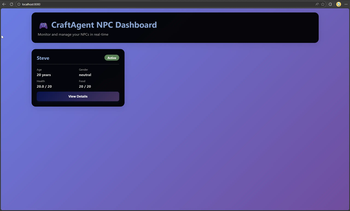
CraftAgent 内置 Web 仪表板,用于实时监控 NPC。仪表板会在 Minecraft 服务器启动时自动启动。
访问仪表板:
- 启动安装了 CraftAgent 的 Minecraft 服务器
- 打开 Web 浏览器并访问:http://localhost:8080
- 仪表板将显示所有活跃 NPC 及其当前状态
仪表板功能:
- NPC 概览:查看所有 NPC 的基本信息(名称、年龄、性别、生命值、食物、位置、当前行动、导航状态)
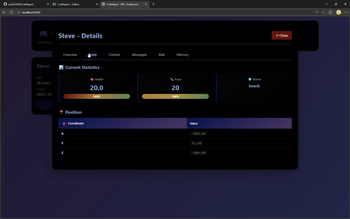
- 状态标签页:实时统计信息,包括生命值和食物的进度条、位置坐标和生物群系信息
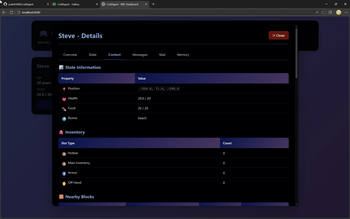
- 上下文标签页:详细的世界上下文,包括:
- 状态信息(位置、生命值、食物、生物群系)
- 物品栏详情(快捷栏、主物品栏、盔甲、副手)
- 附近方块表格(类型、位置、挖掘等级、所需工具)
- 附近实体表格(名称、类型、ID、玩家状态)
- 导航状态(当前状态、目的地、处于该状态的时间)
- 当前行动(行动类型、描述、持续时间、行动特定数据)
- 视线数据:
- 视线内的物品(类型、数量、位置、距离)
- 视线内的实体(名称、类型、ID、玩家状态)
- 目标方块(NPC 正在看的地方)
- 可见方块(视线内可见的方块)
- 消息标签页:带有角色徽章和时间戳的对话历史
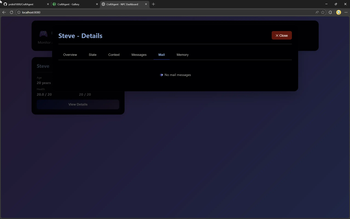
- 邮件标签页:来自其他 NPC 和玩家的邮件消息
- 记忆标签页:NPC 的持久记忆,包括:
- 私有书页面(NPC 特定记忆)
- 共享书页面(所有 NPC 都可访问)
自动刷新:
- 仪表板根据最大 LLM 处理间隔进行自动刷新
- 所有数据(NPC、消息、邮件、记忆)按配置的间隔自动更新
- 无需手动刷新 - UI 与服务器保持同步
- 在以下情况下触发更新:
- NPC 被创建或移除
- 新消息被添加到对话历史
- 邮件消息被发送或接收
- 记忆(私有/共享书)被更新
创建 NPC
- 启动你的 LLM 服务(Ollama 或 LM Studio)
- 使用
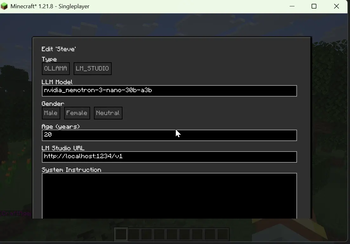
/craftagent create <name> <llmType>或通过/craftagent打开 GUI - 配置 NPC:
- 名称:显示名称
- LLM 类型:
ollama或lm_studio - 模型:模型名称(例如
llama3) - URL:LLM 服务 URL(默认:Ollama 为
http://localhost:11434,LM Studio 为http://localhost:1234/v1) - 跳过 LLM 请求:切换以禁用此 NPC 的自动 LLM 处理(用于测试或 LLM 服务不可用时)
控制 LLM 处理
- 自动处理:NPC 按配置的间隔自动处理 LLM 调用(参见基础配置中的
llmProcessingInterval) - 跳过 LLM 请求:在 NPC 配置中启用"跳过 LLM 请求"切换,以禁用该 NPC 的所有 LLM 调用(自动和手动)
- 手动触发:使用
/craftagent <npcName> llm为特定 NPC 手动触发 LLM 调用(仅在 skipLLMRequests 被禁用时有效)
LLM 设置
Ollama
- 从 ollama.ai 安装
- 启动:
ollama serve - 拉取模型:
ollama pull llama3 - 配置 NPC:LLM 类型
ollama,模型llama3,URLhttp://localhost:11434
LM Studio
- 从 lmstudio.ai 安装
- 下载模型并启动本地服务器(端口 1234)
- 配置 NPC:LLM 类型
lm_studio,模型名称,URLhttp://localhost:1234/v1
架构
系统架构概览
graph TB
    subgraph "客户端"
        GUI[OWO UI 屏幕]
        ClientNet[客户端网络管理器]
        GUI --> ClientNet
    end

    subgraph "服务端"
        Main[CraftAgent 模组]
        CmdMgr[命令管理器]
        NetHandler[网络处理器]
        NPCService[NPC 服务]
        EventReg[事件监听器注册器]
        WebServer[Web 服务器 :8080]

        Main --> CmdMgr
        Main --> NetHandler
        Main --> NPCService
        Main --> EventReg
        Main --> WebServer
    end

    subgraph "NPC 组件"
        NPCFactory[NPC 工厂]
        NPCEntity[服务器玩家实体]
        EventHandler[NPC事件处理器]
        ContextProv[上下文提供器]
        History[对话历史]
        LLMClient[LLM 客户端]

        NPCService --> NPCFactory
        NPCFactory --> NPCEntity
        NPCFactory --> EventHandler
        NPCFactory --> ContextProv
        NPCFactory --> History
        NPCFactory --> LLMClient
    end

    subgraph "数据层"
        SQLite[(SQLite 数据库)]
        ConfigFiles[配置文件]
        Repos[仓库]

        NPCService --> Repos
        Repos --> SQLite
        NPCService --> ConfigFiles
    end

    subgraph "外部服务"
        Ollama[Ollama API]
        LMStudio[LM Studio API]

        LLMClient --> Ollama
        LLMClient --> LMStudio
    end

    ClientNet <--> NetHandler
    EventReg --> NPCService
    WebServer --> NPCService
组件架构
graph LR
    subgraph "核心服务"
        NPCService[NPC 服务<br/>生命周期管理]
        CoordinationService[协调服务<br/>NPC 通信]
        ConfigProvider[配置提供器<br/>配置管理]
    end

    subgraph "NPC 实例"
        NPC[NPC 模型]
        EventHandler[事件处理器<br/>LLM 处理]
        ContextProvider[上下文提供器<br/>世界状态]
        ConversationHistory[对话历史<br/>消息存储]
        MemoryManager[记忆管理器<br/>私有记忆]
    end

    subgraph "数据仓库"
        ConversationRepo[对话仓库]
        MessageRepo[消息仓库<br/>邮件系统]
        PrivateBookRepo[私有书仓库]
        SharebookRepo[共享书仓库]
    end

    subgraph "事件监听器"
        ChatListener[聊天消息监听器]
        AgeListener[年龄更新监听器]
        LLMScheduler[LLM 处理调度器]
    end

    NPCService --> NPC
    NPC --> EventHandler
    NPC --> ContextProvider
    NPC --> ConversationHistory
    NPC --> MemoryManager

    EventHandler --> ConversationHistory
    ContextProvider --> MessageRepo
    ContextProvider --> PrivateBookRepo
    ContextProvider --> SharebookRepo

    NPCService --> CoordinationService
    ChatListener --> NPCService
    AgeListener --> NPCService
    LLMScheduler --> EventHandler
NPC 生命周期流程
stateDiagram-v2
    [*] --> Created: /craftagent create
    Created --> Validating: 验证名称与配置
    Validating --> CheckingLLM: 名称有效
    Validating --> Error: 名称无效
    CheckingLLM --> Spawning: LLM 可达
    CheckingLLM --> Error: LLM 不可达
    Spawning --> Active: 实体已生成
    Active --> Processing: LLM 调度器触发
    Processing --> Active: 响应已生成
    Active --> Removed: /craftagent remove
    Active --> Deleted: /craftagent delete
    Active --> Dead: 实体死亡事件
    Dead --> Removed: 自动移除
    Removed --> [*]: 数据保留
    Deleted --> [*]: 数据删除
    Error --> [*]
LLM 处理流程
sequenceDiagram
    participant Scheduler as LLM 处理调度器
    participant EventHandler as NPC事件处理器
    participant History as 对话历史
    participant Context as 上下文提供器
    participant LLM as LLM 客户端
    participant Ollama as Ollama/LM Studio
    participant ActionExecutor as 行动执行器
    participant WebServer as Web 服务器

    Scheduler->>EventHandler: processLLM()
    EventHandler->>History: performSummarizationIfNeeded()
    History-->>EventHandler: 如需要则已摘要
    EventHandler->>History: 获取对话消息
    EventHandler->>Context: buildContext()
    Context-->>EventHandler: WorldContext(状态、物品栏、方块、实体、记忆)
    EventHandler->>EventHandler: 将消息与上下文格式化
    EventHandler->>LLM: chat(messages, server)
    LLM->>Ollama: HTTP POST /api/chat
    Ollama-->>LLM: JSON 响应 {"message": "...", "actions": [...]}
    LLM-->>EventHandler: LLMResponse(结构化)
    EventHandler->>ActionExecutor: executeActions(actions)
    ActionExecutor->>ActionExecutor: 路由到处理器(记忆、通信等)
    EventHandler->>History: 将响应添加到历史
    EventHandler->>ChatUtil: 发送消息到聊天
    EventHandler->>History: 存储响应
    EventHandler-->>Scheduler: 成功/失败
消息流:玩家 → NPC
sequenceDiagram
    participant Player
    participant ChatListener as 聊天消息监听器
    participant NPCService
    participant MessageRepo as 消息仓库
    participant Context as 上下文提供器
    participant LLM as LLM 客户端

    Player->>ChatListener: 发送聊天消息<br/>(定向:"npcName: message"<br/>或广播:"message")
    ChatListener->>ChatListener: 解析消息格式
    alt 定向消息(npcName: message)
        ChatListener->>ChatListener: 按名称查找 NPC(不区分大小写)
        ChatListener->>NPCService: sendPlayerMessageToNpc(特定 NPC)
    else 广播消息
        ChatListener->>NPCService: sendPlayerMessageToNpc(所有 NPC)
    end
    NPCService->>MessageRepo: insert(message)
    MessageRepo-->>NPCService: 消息已存储
    Note over NPCService: 消息在下一次 LLM 调用时<br/>可用于上下文
    NPCService-->>ChatListener: 完成
    ChatListener-->>Player: 消息已处理
消息流:NPC → NPC
sequenceDiagram
    participant NPC1
    participant CoordinationService
    participant MessageRepo as 消息仓库
    participant NPC2
    participant ChatUtil
    participant Context as 上下文提供器

    NPC1->>CoordinationService: sendDirectMessage(toNpc, message)
    CoordinationService->>MessageRepo: insert(message)
    MessageRepo-->>CoordinationService: 消息已存储
    CoordinationService->>ChatUtil: sendChatMessage()
    ChatUtil-->>NPC2: 在聊天中显示
    Note over CoordinationService: 消息在下一次 LLM 调用时<br/>可用于上下文
    CoordinationService-->>NPC1: 完成
数据流架构
graph TD
    subgraph "输入源"
        PlayerChat[玩家聊天消息]
        GameEvents[游戏事件<br/>Tick、死亡等]
        WorldState[世界状态<br/>方块、实体、物品栏]
    end

    subgraph "处理层"
        EventHandler[事件处理器]
        ContextBuilder[上下文构建器]
        LLMProcessor[LLM 处理器]
    end

    subgraph "存储层"
        ConversationDB[(对话历史)]
        MessageDB[(邮件消息)]
        PrivateMemoryDB[(私有记忆)]
        SharedMemoryDB[(共享记忆)]
        ConfigFiles[配置文件]
    end

    subgraph "输出"
        ChatOutput[聊天消息]
        CommandExecution[Minecraft 命令]
        WebDashboard[Web 仪表板]
    end

    PlayerChat --> EventHandler
    GameEvents --> EventHandler
    WorldState --> ContextBuilder

    EventHandler --> LLMProcessor
    ContextBuilder --> LLMProcessor

    LLMProcessor --> ConversationDB
    EventHandler --> MessageDB
    EventHandler --> PrivateMemoryDB
    EventHandler --> SharedMemoryDB
    EventHandler --> ConfigFiles

    LLMProcessor --> ChatOutput
    LLMProcessor --> CommandExecution
    EventHandler --> WebDashboard
组件参考表
核心组件
| 组件 | 包 | 职责 | 关键方法 |
|---|---|---|---|
| CraftAgent | me.prskid1000.craftagent |
主模组初始化器 | onInitialize(), onStop() |
| NPCService | me.prskid1000.craftagent.common |
NPC 生命周期管理 | createNpc(), removeNpc(), deleteNpc() |
| NPCFactory | me.prskid1000.craftagent.common |
NPC 实例创建 | createNpc() |
| NPCEventHandler | me.prskid1000.craftagent.event |
事件处理与 LLM 调用 | updateState(), processLLM() |
| ContextProvider | me.prskid1000.craftagent.context |
世界上下文收集 | buildContext() |
| ConversationHistory | me.prskid1000.craftagent.history |
消息历史管理 | add(), performSummarizationIfNeeded() |
| CoordinationService | me.prskid1000.craftagent.coordination |
NPC 间通信 | sendDirectMessage() |
| ActionProvider | me.prskid1000.craftagent.action |
将行动路由到处理器 | executeAction(), isValidAction() |
| ActionProviderFactory | me.prskid1000.craftagent.action |
创建包含所有处理器的 ActionProvider | create() |
| ActionExecutor | me.prskid1000.craftagent.action |
执行 LLM 生成的行动,解析命令 | executeActions(), executeAction() |
| ActionParser | me.prskid1000.craftagent.action |
支持引号的通用命令解析器 | parseQuotedArguments(), wasArgumentQuoted() |
| MemoryActionHandler | me.prskid1000.craftagent.action |
处理记忆行动 | handleAction()(sharedbook/privatebook) |
| CommunicationActionHandler | me.prskid1000.craftagent.action |
处理通信行动 | handleAction()(mail send) |
| NavigationActionHandler | me.prskid1000.craftagent.action |
处理导航/旅行行动 | handleAction()(前往坐标/实体/方块) |
| MiningActionHandler | me.prskid1000.craftagent.action |
处理挖掘行动 | handleAction()(挖掘方块) |
| BuildingActionHandler | me.prskid1000.craftagent.action |
处理建造/放置行动 | handleAction()(建造/放置方块) |
| CraftingActionHandler | me.prskid1000.craftagent.action |
处理合成行动 | handleAction()(合成物品) |
| HuntingActionHandler | me.prskid1000.craftagent.action |
处理狩猎行动 | handleAction()(狩猎生物) |
| FarmingActionHandler | me.prskid1000.craftagent.action |
处理耕种行动 | handleAction()(种植/收获作物) |
| FishingActionHandler | me.prskid1000.craftagent.action |
处理钓鱼行动 | handleAction()(钓鱼/停止钓鱼) |
| CombatActionHandler | me.prskid1000.craftagent.action |
处理战斗行动 | handleAction()(攻击/防御) |
| ActionStateManager | me.prskid1000.craftagent.context |
管理当前行动状态 | setAction(), getActionDescription() |
| NavigationState | me.prskid1000.craftagent.context |
管理导航状态 | setTravelingTo(), update(), hasArrived() |
| LineOfSightProvider | me.prskid1000.craftagent.context |
检测视线内的物品/实体/方块 | getItemsInLineOfSight(), getEntitiesInLineOfSight() |
| WebServer | me.prskid1000.craftagent.web |
带自动刷新的 Web 仪表板 | HTTP API 端点 |
事件监听器
| 监听器 | 包 | 事件类型 | 用途 |
|---|---|---|---|
| ChatMessageListener | me.prskid1000.craftagent.listener |
ServerMessageEvents.CHAT_MESSAGE |
通过邮件将玩家消息路由到 NPC。支持定向消息(格式:"npcName: message")和广播消息 |
| AgeUpdateListener | me.prskid1000.craftagent.listener |
ServerTickEvents.END_SERVER_TICK |
随时间更新 NPC 年龄 |
| LLMProcessingScheduler | me.prskid1000.craftagent.listener |
ServerTickEvents.END_SERVER_TICK |
调度 NPC 的 LLM 处理 |
| EventListenerRegisterer | me.prskid1000.craftagent.listener |
- | 注册所有事件监听器 |
数据模型
| 模型 | 包 | 描述 | 关键字段 |
|---|---|---|---|
| NPC | me.prskid1000.craftagent.model |
主 NPC 数据结构 | entity, llmClient, history, eventHandler, contextProvider, config |
| ConversationMessage | me.prskid1000.craftagent.history |
对话历史消息 | message, role, timestamp |
| Message | me.prskid1000.craftagent.model.database |
邮件系统消息 | senderUuid, recipientUuid, content, read |
| WorldContext | me.prskid1000.craftagent.model.context |
世界状态快照 | state, inventory, nearbyBlocks, nearbyEntities, memoryData, navigation, lineOfSight, actionState |
| ContextData | me.prskid1000.craftagent.model.context |
上下文数据结构 | BlockData, EntityData, ItemData, InventoryData, StateData, NavigationData, LineOfSightData, ActionStateData |
仓库
| 仓库 | 包 | 用途 | 关键方法 |
|---|---|---|---|
| ConversationRepository | me.prskid1000.craftagent.database.repositories |
对话历史存储 | insert(), selectByUuid() |
| MessageRepository | me.prskid1000.craftagent.database.repositories |
邮件系统存储 | insert(), selectByRecipient(), markAsRead() |
| PrivateBookPageRepository | me.prskid1000.craftagent.database.repositories |
NPC 特定记忆 | insert(), selectByUuid() |
| SharebookRepository | me.prskid1000.craftagent.database.repositories |
NPC 间共享记忆 | insert(), selectAll() |
LLM 客户端
| 客户端 | 包 | LLM 类型 | API 端点 |
|---|---|---|---|
| OllamaClient | me.prskid1000.craftagent.llm.ollama |
Ollama | /api/chat |
| LMStudioClient | me.prskid1000.craftagent.llm.lmstudio |
LM Studio | /chat/completions |
| LLMClient | me.prskid1000.craftagent.llm |
接口 | - |
配置
| 配置 | 包 | 文件位置 | 用途 |
|---|---|---|---|
| BaseConfig | me.prskid1000.craftagent.config |
config/craftagent/base.json |
全局设置(超时、区块半径等) |
| NPCConfig | me.prskid1000.craftagent.config |
config/craftagent/npcs/{uuid}.json |
每个 NPC 的设置(名称、LLM 类型、模型等) |
| ConfigProvider | me.prskid1000.craftagent.config |
- | 配置管理 |
数据流详情
上下文构建过程
graph LR
    A[ContextProvider.buildContext] --> B[获取 NPC 状态]
    A --> C[获取物品栏]
    A --> D[获取附近方块]
    A --> E[获取附近实体]
    A --> F[构建记忆数据]
    A --> G[构建导航数据]
    A --> H[构建视线数据]
    A --> I[构建行动状态数据]

    B --> J[StateData<br/>位置、生命值、食物、生物群系]
    C --> K[InventoryData<br/>盔甲、主物品栏、快捷栏、副手]
    D --> L[BlockData 列表<br/>类型、位置、挖掘等级]
    E --> M[EntityData 列表<br/>id、名称、是否玩家]
    F --> N[记忆数据<br/>privateBook、邮件、sharebook]
    G --> O[NavigationData<br/>状态、目的地、时间]
    H --> P[LineOfSightData<br/>物品、实体、方块]
    I --> Q[ActionStateData<br/>行动类型、描述、数据]

    J --> R[WorldContext]
    K --> R
    L --> R
    M --> R
    N --> R
    O --> R
    P --> R
    Q --> R
记忆系统结构
| 记忆类型 | 仓库 | 范围 | 访问模式 |
|---|---|---|---|
| 对话历史 | ConversationRepository | 每个 NPC | 生成时加载,关闭时保存 |
| 邮件消息 | MessageRepository | 每个 NPC | 接收时存储,访问时标记为已读 |
| 私有记忆 | PrivateBookPageRepository | 每个 NPC | NPC 特定的笔记和知识 |
| 共享记忆 | SharebookRepository | 全局 | 所有 NPC 都可访问 |
行动系统
NPC 可通过结构化 LLM 输出执行行动。LLM 返回包含消息和行动列表的 JSON 响应:
{
  "message": "I found an iron mine!",
  "actions": [
    "sharedbook add IronMine Location at 150, 64, -200",
    "mail send Alice Found iron, want to mine together?"
  ]
}
可用行动:
| 行动类型 | 格式 | 描述 |
|---|---|---|
| 记忆 - 共享书 | sharedbook add <title> '<content>' |
添加/更新共享记忆页面(所有 NPC 都可读取)。标题可带引号或不带引号。内容必须用单引号(')或双引号(")包裹。 |
| 记忆 - 共享书 | sharedbook remove <title> |
移除共享记忆页面 |
| 记忆 - 私有书 | privatebook add <title> '<content>' |
添加/更新私有记忆页面(NPC 特定)。标题可带引号或不带引号。内容必须用单引号(')或双引号(")包裹。 |
| 记忆 - 私有书 | privatebook remove <title> |
移除私有记忆页面 |
| 通信 | mail send <npc_name> '<message>' |
向另一个 NPC 发送邮件消息。收件人名称可带引号或不带引号。消息必须用单引号(')或双引号(")包裹。 |
| 导航 | travel to <x> <y> <z> |
前往特定坐标 |
| 导航 | travel to entity <entity_name> |
按名称前往附近的实体 |
| 导航 | travel to block <block_type> |
前往附近指定类型的方块 |
| 导航 | travel stop |
停止当前旅行 |
| 挖掘 | mine <block_type> [count] |
挖掘指定类型的方块(默认:1) |
| 挖掘 | mine at <x> <y> <z> |
挖掘特定坐标处的方块 |
| 建造 | build <block_type> at <x> <y> <z> |
在坐标处放置方块(需要物品栏中有该方块) |
| 建造 | place <block_type> at <x> <y> <z> |
放置方块(build 的别名) |
| 合成 | craft <item_name> |
使用物品栏材料合成物品 |
| 狩猎 | hunt <mob_type> |
狩猎/攻击特定生物类型 |
| 狩猎 | hunt <entity_name> |
按名称狩猎/攻击实体 |
| 耕种 | farm plant <crop_type> at <x> <y> <z> |
在坐标处种植作物 |
| 耕种 | farm harvest at <x> <y> <z> |
在坐标处收获作物 |
| 耕种 | farm harvest |
收获附近成熟的作物 |
| 钓鱼 | fish |
开始钓鱼(抛出鱼竿) |
| 钓鱼 | fish stop |
停止钓鱼(收线) |
| 战斗 | attack <entity_name> |
攻击特定实体 |
| 战斗 | attack <entity_type> |
按类型攻击实体 |
| 战斗 | defend |
进入防御姿态 |
行动解析:
- 行动由
ActionExecutor使用ActionParser工具一次性解析 - 解析器同时处理单引号和双引号,允许包含空格的参数
- 解析后的数组传递给处理器:
["sharedbook", "add", "title", "content"] - 内容和消息必须加引号,以处理多词文本和特殊字符
示例:
sharedbook add "My Title" "Content with spaces and special chars!"sharedbook add title 'Simple content'mail send "Alice" "Hello world message"mail send Alice 'Hello world'
行动由 ActionExecutor 自动执行,它解析命令并将其路由到相应的处理器(MemoryActionHandler、CommunicationActionHandler 等)。
事件处理流程
graph TD
    A[游戏事件发生] --> B{事件类型}
    B -->|聊天消息| C[ChatMessageListener]
    B -->|服务器 Tick| D[AgeUpdateListener]
    B -->|服务器 Tick| E[LLMProcessingScheduler]

    C --> F[存储到邮件系统]
    F --> H[可用于上下文]

    D --> I[更新 NPC 年龄]
    I --> J[保存配置]

    E --> K[检查处理间隔]
    K -->|间隔已过| L[将 NPC 加入处理队列]
    L --> M[NPCEventHandler.processLLM]
    M --> N[构建上下文]
    N --> O[调用 LLM]
    O --> P[解析结构化响应]
    P --> Q{是否有行动?}
    Q -->|是| R[执行行动]
    R --> S[记忆/通信处理器]
    Q -->|否| T[更新历史]
    R --> T
    T --> U[发送聊天消息]
    U --> V[存储到历史]
配置
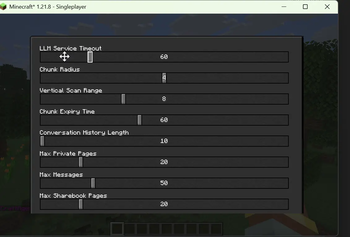
配置文件位于 config/craftagent/:
- base.json:全局设置(超时、区块半径、调试模式)
- npcs/{uuid}.json:每个 NPC 的设置(名称、LLM 类型、模型、性格)
基础配置字段
| 字段 | 类型 | 默认值 | 描述 |
|---|---|---|---|
llmTimeout |
int | 30 | LLM 请求超时(秒) |
contextChunkRadius |
int | 2 | 上下文区块扫描半径 |
contextVerticalScanRange |
int | 16 | 垂直方块扫描范围 |
maxNearbyBlocks |
int | 50 | 上下文中的最大方块数 |
maxNearbyEntities |
int | 10 | 上下文中的最大实体数 |
llmProcessingInterval |
int | 5 | LLM 处理周期之间的秒数 |
正在加载版本记录…
正在加载评论…
评论在新手盒子客户端中发表,这里同步展示。