原谅
Fabric 的 Discord 集成白名单模组。简化你的服务器访问管理。
 查看大图
Yurushi
适用于 Fabric 的 Discord 集成白名单模组。简化你的服务器访问管理。
功能
- Discord 集成: 玩家通过 Discord 表单(模态框)申请白名单访问权限。
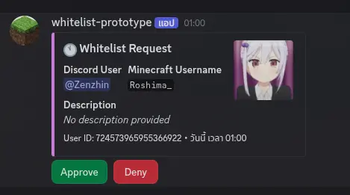
- 一键审批: 管理员可直接在 Discord 中通过单击按钮批准或拒绝请求。
- 自动通知:
- 批准或拒绝后向玩家发送私信。
- 更新原始请求消息以反映决定。
- 可自定义消息: 通过
messages.toml完全可配置文本和嵌入样式。 - 基于角色的访问: 使用
whitelistRole将白名单管理限制为特定的 Discord 角色。 - 调试工具: 使用
/debug embeds可视化你的嵌入配置。
配置
配置文件位于 config/Yurushi/。
Yurushi.toml
主插件配置。
| 配置 | 类型 | 描述 |
|---|---|---|
botToken |
String | 你的 Discord 机器人令牌 |
adminChannelId |
String | 请求发送到的 Discord 文本频道 ID |
whitelistRole |
List | 允许批准/拒绝请求的角色 ID 列表 |
Yurushi.toml
botToken = "YOUR_BOT_TOKEN_HERE"
adminChannelId = "123456789012345678"
whitelistRole = ["987654321098765432", "112233445566778899"]
messages.toml
自定义所有机器人消息、嵌入和按钮标签。支持 {minecraft_username}、{reason} 等占位符。(并非所有消息都可用)。
messages.toml
[error]
no_permission = "❌ You don't have permission to perform this action."
server_unavailable = "❌ Server is not available. Please try again later."
unexpected = "❌ An unexpected error occurred."
admin_channel_not_found = "An error occurred. Please contact an administrator."

[button]
[button.approve]
label = "Approve"
success = "✅ Whitelist request for `{minecraft_username}` has been approved!\n**UUID:** `{uuid}`"
already_whitelisted = "⚠️ `{minecraft_username}` is already whitelisted on the server."
player_not_found = "❌ Player `{minecraft_username}` was not found on Mojang's servers.\nThis username might be incorrect or doesn't exist."
failed = "❌ Failed to whitelist `{minecraft_username}`.\nError: {error}"

[button.deny]
label = "Deny"
success = "Whitelist request for `{minecraft_username}` has been denied.\n**Reason:** {reason}"

[embed]
[embed.request]
title = "🕚 Whitelist Request"
footer = "User ID: {user_id}"
[embed.request.fields]
discord_user = "Discord User"
minecraft_username = "Minecraft Username"
description = "Description"
description_empty = "*No description provided*"

[embed.approved]
title = "✅ Whitelist Request - Approved"
footer = "You can now join the server!"
[embed.approved.fields]
approved_by = "Approved By"

[embed.already_whitelisted]
title = "⚠️ Whitelist Request - Already Whitelisted"
footer = "This player is already whitelisted."

[embed.denied]
title = "❌ Whitelist Request - Denied"
footer = "Please contact an administrator if you have questions."
[embed.denied.fields]
reason = "Reason"
denied_by = "Denied By"

[dm]
[dm.approved]
title = "✅ Whitelist Request Approved"
description = "Congratulations! Your whitelist request has been approved."

[dm.denied]
title = "❌ Whitelist Request Denied"
description = "Unfortunately, your whitelist request has been denied."

[modal]
[modal.register]
title = "Whitelist Registration"
success = "Your whitelist request has been submitted!"
[modal.register.inputs]
username_label = "Minecraft Username"
username_placeholder = "Enter your Minecraft username"
description_label = "Description (Optional)"
description_placeholder = "Tell us a bit about yourself or why you want to join..."

[modal.deny]
title = "Deny Whitelist Request"
[modal.deny.inputs]
reason_label = "Denial Reason"
reason_placeholder = "Provide a reason for denying the whitelist request..."
reason_empty = "*No reason provided*"
使用方法
前提条件
- 安装了 Yurushi 模组的 Fabric Minecraft 服务器。
- 一个 Discord 机器人,具备以下条件:
- 机器人令牌(来自 Discord 开发者门户)
- 已启用
Server Members Intent(特权网关意图) - 使用
applications.commands和bot作用域邀请到你的 Discord 服务器
安装
- 从 Releases 下载模组 JAR。
- 将其放入服务器的
mods/文件夹。 - 启动服务器一次,在
config/Yurushi/中生成默认配置文件。 - 停止服务器,并使用你的机器人令牌和频道设置配置
Yurushi.toml。 - 重启服务器 — Discord 机器人将自动上线。
Discord 机器人设置
- 前往 Discord 开发者门户 并创建一个新应用。
- 导航到 Bot → Reset Token 获取你的机器人令牌。
- 在 Privileged Gateway Intents 下启用 Server Members Intent。
- 前往 OAuth2 → URL Generator,选择
bot和Administrator作用域。 - 复制生成的 URL 并将机器人邀请到你的服务器。
- 将机器人令牌粘贴到
Yurushi.toml(botToken)中。
玩家工作流程
玩家可直接从 Discord 申请白名单访问权限:
- 在机器人可见的任何频道中使用
/register斜杠命令。 - 将出现一个模态框,要求填写:
- Minecraft 用户名(必填)
- 描述(可选)– 介绍你自己或解释你为什么想加入。
- 提交后,会出现确认消息,请求将发送到管理频道。
管理员工作流程
拥有配置的 whitelistRole 的管理员可以管理请求:
- 白名单请求会出现在配置的
adminChannelId中,带有 Approve(批准)和 Deny(拒绝)按钮。 - 点击 Approve 以:
- 将玩家添加到 Minecraft 服务器白名单。
- 向玩家发送私信通知其已获批准。
- 更新请求嵌入以显示"已批准"状态。
- 点击 Deny 以:
- 打开一个模态框以输入拒绝原因。
- 向玩家发送包含原因的私信。
- 更新请求嵌入以显示"已拒绝"状态。
命令
Discord 斜杠命令
| 命令 | 描述 |
|---|---|
/register |
为玩家打开白名单注册表单 |
/debug embeds |
预览所有配置的嵌入样式(仅限管理员) |
/ping |
检查机器人是否在线 |
Minecraft 命令
| 命令 | 权限 | 描述 |
|---|---|---|
/yurushi reload |
yurushi.command.reload(OP 等级 3+) |
无需重启服务器即可重新加载配置文件 |
错误报告与建议
如果你遇到任何错误或有改进建议,请在 GitHub Issues 页面提交问题。
正在加载版本记录…
正在加载评论…
评论在新手盒子客户端中发表,这里同步展示。