
莫格鲁经济
一个简单的服务器端经济模组,包含交易、商店和生物奖励!
 查看大图

描述
一个简单的服务器端可配置经济系统,包含生物奖励、交易和悬赏组件,适用于那些运行没有插件能力的公共/私人 Forge 服务器的用户。本项目正是为此而生——在(Forge 0.1-1.20.1)(NeoForge 0.3-1.21.1)上缺乏独立的高质量经济模组,且这些组件并不存在。
我有一个蒸汽朋克 / 柴油朋克背景设定的 SMP!
你可以在以下地址申请加入:Discord
命令
货币组件:
该模组的主要组件,允许玩家查看自己的货币、查看其他玩家的货币,并向其他玩家发送货币——OP 玩家能够设置货币和从玩家处移除货币。
成员命令(等级 0):
- /currency - 显示执行命令玩家的货币。
- /currency - 显示目标玩家的货币。
- /currency send - 向某位玩家发送货币。

OP 命令(等级 4):
- /currency remove - 从某位玩家处移除一定数量的货币。
- /currency set - 将某位玩家的货币设置为一定数量。
交易组件:
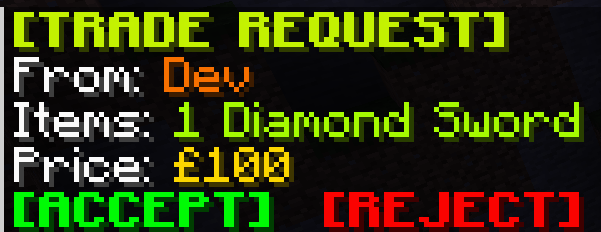
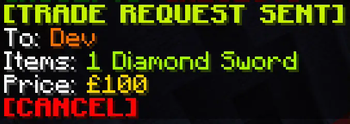
该模组的次要组件,允许玩家用手中持有的物品与另一位玩家发起交易;接受、拒绝和取消交易均在聊天中处理,因此玩家无需为了取消交易而输入简短命令。
成员命令(等级 0):
- /trade - 用手中持有的物品与某位玩家发起交易。


生物奖励组件:
该模组的次要组件,允许玩家通过击杀生物获得奖励——OP 可以为某种生物设置奖励,当玩家击杀该类型的生物时,玩家将获得设定数量的奖励。
OP 命令(等级 4):
- /mobrewards set - 为某种生物设置奖励。
- /mobrewards remove - 移除某种生物的奖励。
悬赏组件:
该模组的次要组件,允许玩家为某位玩家设置或增加悬赏;当该玩家被其他玩家击杀时,击杀者将获得悬赏奖励,且悬赏被移除。OP 具有从玩家处移除悬赏的能力。
成员命令(等级 0):
- /bounty add - 为某位玩家设置/增加悬赏。
OP 命令(等级 4):
- /bounty remove - 移除某位玩家的悬赏。
商店组件:
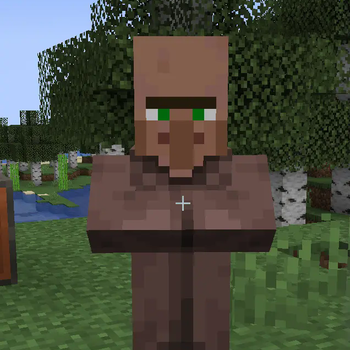
该模组的次要组件,允许管理员创建商店——玩家右键点击村民即可购买物品!
- /shops create - 创建一个村民实体,向玩家出售物品。
- /shops remove - 移除你正在注视的商店。

配置
该模组的配置文件位于服务器的配置文件夹中,文件名为 "mogruleconomy-common.toml"——你可以在此处设置命令名称、货币名称、符号等,以及禁用模组的次要组件。
[Currency]
	#Command to use when using the currency component in-game.
	currencyCommandName = "currency"
	#Name to use for singular currency. Example: (Pound)
	currencyNameSingular = "Pound"
	#Name to use for plural currency. Example: (Pounds)
	currencyNamePlural = "Pounds"
	#Symbol to use for the currency.
	currencySymbol = "£"
	#Default starting currency for new players
	# Default: 100
	# Range: > 0
	startingCurrency = 100

[MobRewards]
	#Whether the mob rewards component should be anabled.
	mobRewardsEnabled = true
	#Command to use when using the mob reward component in-game.
	mobRewardsCommandName = "mobreward"

[Trade]
	#Whether the trade component should be enabled.
	tradeEnabled = true
	#Command to use when using the trade component in-game.
	tradeCommandName = "trade"

[Shops]
	#Whether the shop component should be enabled.
	shopsEnabled = true
	#Command to use when using the shops component in-game.
	shopsCommandName = "shops"
数据处理
数据处理已迁移至 .json 文件,摆脱了依赖,并让你编辑它们变得轻松许多!
正在加载版本记录…
正在加载评论…
评论在新手盒子客户端中发表,这里同步展示。