
scarpet-webserver
允许使用scarpet运行网络服务器,使其与Minecraft进行交互
 查看大图
scarpet-webserver


一个用于通过 scarpet 运行 Web 服务器的 Carpet mod 扩展
需要 Carpet mod
警告:仅在你信任的脚本或自己编写的脚本中使用此模组。使用风险自负。
本项目在构建中使用并包含了 Jetty 12 用于 Web 服务器(许可证)
用法
要在 scarpet 中使用 Web 服务器,必须先将其定义在 scarpet-webserver.json 配置文件中。
当模组首次加载时,它会创建一个示例配置,你可以在其中定义多个 Web 服务器。每个服务器都有一个唯一的 id 和一个 port。
示例配置可能如下所示:
{
  "webservers": [
    {
      "id": "myserver",
      "port": 80
    }
  ]
}
然后这个服务器就可以在脚本中使用了。
示例语法
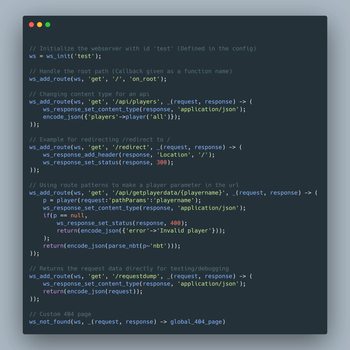
你可以查看包含 html 文件的完整可用示例 此处。 该示例还包含更多路由和一个简单的模板机制。
// 使用 id 'test' 初始化 Web 服务器(在配置中定义)
ws = ws_init('test');

// 处理根路径(回调以函数名形式给出)
ws_add_route(ws, 'get', '/', 'on_root');

// 为 API 更改内容类型
ws_add_route(ws, 'get', '/api/players', _(request, response) -> (
    ws_response_set_content_type(response, 'application/json');
    encode_json({'players'->player('all')});
));

// 将 /redirect 重定向到 / 的示例
ws_add_route(ws, 'get', '/redirect', _(request, response) -> (
    ws_response_set_status(response, 301);
    ws_response_add_header(response, 'Location', '/');
    ''
));

// 使用路由模式在 url 中创建玩家参数
ws_add_route(ws, 'get', '/api/getplayerdata/{player}', _(request, response) -> (
    playername = request~'pathParams':'player';
    p = player(playername);
    ws_response_set_content_type(response, 'application/json');
    if(p == null,
        ws_response_set_status(response, 400);
        return(encode_json({'error'->'Invalid player'}));
    );
    return(encode_json(parse_nbt(p~'nbt')));
));

// 直接返回请求数据用于测试/调试
ws_add_route(ws, 'get', '/requestdump', _(request, response) -> (
    ws_response_set_content_type(response, 'application/json');
    request_data = {};
    for(global_request_fields, request_data:_ = request~_);
    return(encode_json(request_data));
));

// 自定义 404 页面
ws_not_found(ws, _(request, response) -> global_404_page);
路由回调
路由的回调函数应具有以下签名:
_(request, response) -> (
    // 执行操作
    return('html body...')
)
request 参数提供了一个包含所有请求详情的 request 值。
你也可以使用示例脚本进行测试,其中有一个 /requestdump 路由,会将所有请求数据以 json 形式返回。
response 是一个 response 值。
函数返回的值将作为要发送的响应正文(在大多数情况下是 html 页面)。
值
此模组添加了两种新的值类型:
webserver
这是正在运行的 Web 服务器的句柄,用于创建路由。
可以通过 ws_init(id) 获取。
request
此值在路由回调中提供,用于检索各种请求数据。
请注意,从此值中检索值需要使用 ~ 查询运算符,
但其中一些值是映射,使用 : 访问。
你可以运行示例脚本并向 /requestdump 发送请求,以获取返回的所有请求数据进行测试。
request~'headers'
返回一个映射,键为字符串(请求头名称),值为字符串。 如果某个请求头有多个值,则它是一个字符串列表。
例如,可以通过 request~'headers':'Referer' 访问 Referer 请求头
示例请求头映射:
{
    'Accept'-> [
      'text/html',
      'application/xhtml+xml',
      'application/xml;q=0.9',
      '*/*;q=0.8'
    ],
    'Connection' -> 'keep-alive',
    'User-Agent' -> 'Mozilla/5.0 (Windows NT 10.0;Win64;x64;rv:138.0) Gecko/20100101 Firefox/138.0'
}
request~'method'
返回请求的 HTTP 方法。
request~'beginNanoTime'
返回接收请求时的时间,以纳秒为单位。
request~'connection'
返回一个包含连接信息的映射。
它具有以下键:
protocol:连接协议(例如HTTP/1.1)httpVersion:HTTP 版本(例如HTTP/1.1)id:返回网络连接的唯一 id(在服务器生命周期内)persistent:连接是否持久secure:连接是否安全(使用 HTTPS)
request~'uri'
返回一个包含请求 URI 信息的映射。
有关这些字段的更多信息,请参阅 MDN Web 文档中的 URL 的剖析。
它具有以下键:
scheme:请求的 scheme(通常是https或http)authority:域名和端口(例如localhost:8000、my.example.com)host:域名post:端口号(数字)path:请求路径(例如/api/users)canonicalPath:所有特殊字符(/ 除外)均经过 URL 编码的请求路径decodedPath:所有 URL 编码字符均被解码的请求路径param:最后一个路径参数或nullquery:url 中的查询参数(例如search=test&limit=50)fragment:实际上从不会发送到服务器,应始终为nulluser:url 的用户asString:完整的 URI 字符串queryParameters:解析为映射的查询参数。可以通过request~'uri':'queryParameters':'search'访问某个查询参数
request~'pathParams'
返回一个包含所有路径参数的映射。
当创建带有如下路径参数的端点时:/api/getplayerdata/{player},
可以通过以下方式检索路径中的 player 参数:
ws_add_route(ws, 'get', '/api/getplayerdata/{player}', _(request, response) -> (
    playername = request~'pathParams':'player';
    ...
));
request~'body_string'
返回请求正文的字符串形式。
response
此值在路由回调中提供,用于设置各种响应数据。
函数
ws_init(id)
从配置 id 返回一个 webserver 值。
这还会清除所有路由,并在尚未启动时启动它。
ws_add_route(webserver, method, path, callback)
向 webserver 添加一个路由。
method 是 http 方法,例如 get 或 post。
回调可以是一个先前声明的函数名字符串,或一个 lambda 函数。
更多详情请参见路由回调部分。
path 使用 jetty 的 UriTemplatePathSpec,
因此你可以使用其语法(Level 1)。
它支持像 /shop/{product} 这样的路径参数,然后可以通过 request:'pathParams':'product' 检索。
ws_not_found(webserver, callback)
为没有匹配路由的请求设置处理器。
ws_response_set_status(response, statusCode)
为 response 设置 http 状态码。
ws_response_set_content_type(response, contentType)
设置响应的内容类型。
ws_response_add_header(response, header, value)
添加一个响应头。
正在加载版本记录…
正在加载评论…
评论在新手盒子客户端中发表,这里同步展示。