
OtterLib
一个酷炫的新简单库模组,每个人都可以使用!
一个用于 Minecraft 的简单库模组,主要是为了让我更轻松地开发自己的模组,但任何人都可以使用! 目前支持的加载器:Fabric、Spigot 和 Paper
在你的项目中使用!👍️
想在你的项目中使用 OtterLib?你可以在 build.gradle 文件中将它添加为依赖项:
repositories {
    maven {
        name "oth3rMavenSnapshots"
        url "https://maven.oth3r.one/snapshots"
    }
}
在每个加载器上引入,其中 ${project.otterlib_version} 是该加载器对应的 OtterLib 当前版本(例如 0.2.0.0+1.21.6、0.2.0.0+1.20-1.21.6)
// fabric
modImplementation "one.oth3r:otterlib:${project.otterlib_version}-fabric"
// spigot
implementation "one.oth3r:otterlib:${project.otterlib_version}-spigot"
// paper
implementation "one.oth3r:otterlib:${project.otterlib_version}-paper"
访问 maven 仓库 以查看有关该库更深入的信息,包括最新版本。
功能
💬 简单的聊天构建器
示例用法:
player.sendMessage(new CTxT("Hello").color(Color.BLUE).bold(true).strikethrough(true)
    .append(new CTxT("World!!!!!!!!!").rainbow(new Rainbow(true)).underline(true).italic(true)).b());
游戏内示例:

📜 自定义语言读取器
OtterLib 提供了一个自定义语言读取器,让你可以在所有支持的加载器上轻松实现服务端本地化。同时还支持用于语言文件的次要位置,方便玩家覆盖。
🗃️ 稳健的文件保存与加载
添加了一个接口,可轻松创建配置文件,并支持保存、加载以及轻松更新版本。
将 json 中的旧条目更新到新版本:
@Override
public void update(JsonElement jsonElement) {
    JsonObject file = jsonElement.getAsJsonObject();
    if (file.get("version").getAsDouble() == 1.0) {
        this.version = 1.1;
        this.test = file.get("test-bool").getAsBoolean();
    }
}
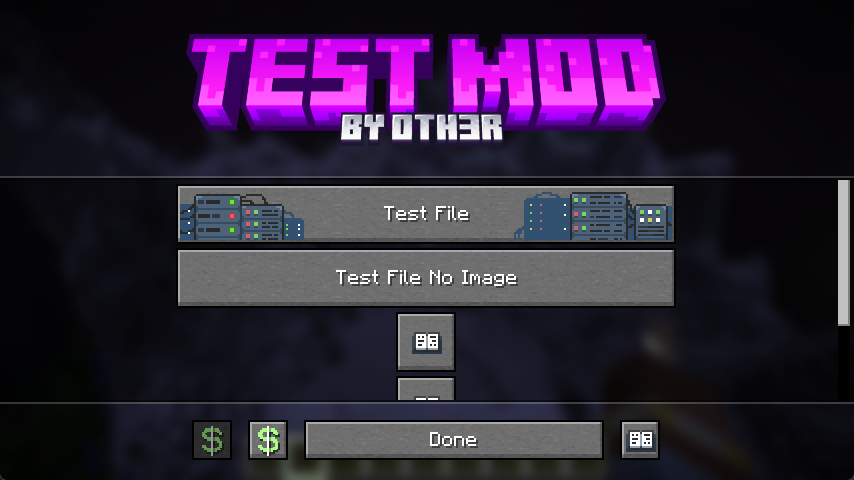
⚙️ 自定义配置界面
OtterLib 提供了一个自定义配置界面,可进行定制,以便编辑多个配置文件、链接到社交媒体,甚至打开不同的界面。
创建界面:
client.setScreen(new ConfigScreen(client.currentScreen, Text.of("test"),
    new CustomImage(Identifier.of(FabricTest.MOD_ID, "textures/gui/banner.png"),240, 60),
    // the list of buttons to be displayed in the middle
    List.of(
            SimpleButton.Templates.fileEditor(new CTxT("Test File"), FabricTest.testFile, new CustomImage(Identifier.of(FabricTest.MOD_ID, "button/server_button"),246,26)).build(),
            SimpleButton.Templates.fileEditor(new CTxT("Test File No Image"), FabricTest.testFile).build(),
            SimpleButton.Templates.wiki(new CTxT("Help")).openLink("https://oth3r.one").size(30,30).build(),
            SimpleButton.Templates.wiki(new CTxT("Help")).openLink("https://oth3r.one").size(30,30).build(),
            SimpleButton.Templates.warning(new CTxT("Help")).openLink("https://oth3r.one").size(150,15).hideText(false).build()
    ),
    // the bottom buttons can be customized!
    List.of(
            new SimpleButton.Builder(new CTxT("Donate"))
                    .miniIcon(new CustomImage(Identifier.of(Assets.ID, "icon/donate"),15,15)).build(),
            SimpleButton.Templates.donate(new CTxT("Donate")).openLink(URI.create("https://ko-fi.com/oth3r")).build(),
            SimpleButton.Templates.done(new CTxT("Done")).build(),
            SimpleButton.Templates.wiki(new CTxT("Wiki")).openLink("https://oth3r.one").build()
    )));
游戏内的主配置界面:
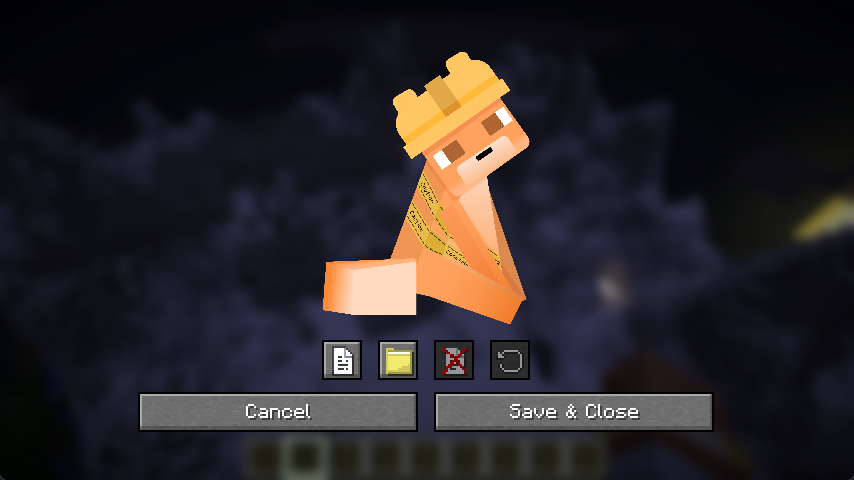
游戏内的文件编辑器:(单独的条目编辑器已在计划中,目前只是一个简单的占位符)
正在加载版本记录…
正在加载评论…
评论在新手盒子客户端中发表,这里同步展示。