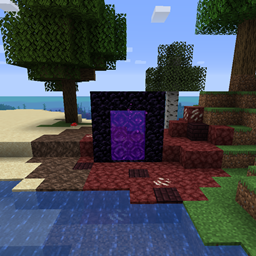
下界传送门蔓延
🔮 将(下界)方块扩散到主世界,围绕下界传送门,在可配置的半径范围内。


下界传送门会将会(下界)方块以可配置的半径扩散到主世界中传送门周围。默认情况下,你可以在传送门的半径范围内放置四个煤炭块来阻止扩散。不过这项设定可以在配置中更改。当扩散效果开始以及被阻止时,传送门周围的玩家会收到一条消息。
该模组会将所有传送门位置保存到 '../world-folder/data/netherportalspread/portals/'。当传送门被创建,或当玩家从下界前往主世界时,会检测到一个新传送门。因此对于旧世界,你需要先穿过它再返回一次以启动扩散效果,或者重新点燃传送门。这使得它比检查世界中的每个方块来寻找传送门要高效得多。
4.4 及以上版本与 Immersive Portals 模组兼容。


所有可用的配置选项:
sendMessageOnPortalCreation 默认 true
启用时,会向传送门周围的玩家发送一条消息,说明下界正在扩散,以及你可以通过放置 'preventSpreadBlockAmountNeeded' 数量的 'preventSpreadBlockString' 方块来阻止扩散。
messageOnPortalCreation 默认 "你感到一股腐败能量从传送门中传来。除非在传送门周围 %portalSpreadRadius% 格半径内放置 %preventSpreadBlockAmountNeeded% 个 %preventSpreadBlockString%,否则下界将缓慢扩散到主世界。"
传送门创建时发送的消息。
sendMessageOnPreventSpreadBlocksFound 默认 true
启用时,当传送门检测到新的 'preventSpreadBlockString' 方块时,会向传送门周围的玩家发送一条消息,说明下界扩散已停止。
messageOnPreventSpreadBlocksFound 默认 "放置了足够的 %preventSpreadBlockString% 后,你感到腐败能量逐渐消退。"
发现阻止扩散方块时发送的消息。
sendMessageOnPortalBroken 默认 true
启用时,当传送门被破坏时向玩家发送一条消息。
messageOnPortalBroken 默认 "随着下界传送门被破坏,腐败能量再也无法进入主世界。"
传送门被破坏时发送的消息。
prefixPortalCoordsInMessage 默认 true
启用时,在传送门消息中显示传送门坐标。
portalSpreadRadius 默认 15,最小 1,最大 100
下界方块可以扩散到的传送门周围半径。
spreadDelayTicks 默认 40,最小 1,最大 72000
下界传送门周围扩散之间的延迟(以刻为单位)。20 刻 = 1 秒。
instantConvertAmount 默认 50,最小 0,最大 1000
当检测到传送门时,其周围立即转换为下界方块的方块数量。如果半径内已有下界方块,其数量会从这个数字中减去。
preventSpreadWithBlock 默认 true
启用时,当半径内存在 n 个(已定义)阻止扩散方块(已定义)时,阻止扩散效果。
preventSpreadBlockAmountNeeded 默认 4
在下界传送门半径内阻止扩散所需的(已定义)阻止扩散方块数量。
preventSpreadBlockString 默认 "minecraft:coal_block"
阻止下界传送门扩散的方块。默认为煤炭块(minecraft:coal_block 是命名空间 ID)。
默认情况下,该模组会在以下情况向传送门周围的玩家发送消息:
传送门被创建,并且扩散开始时:
传送门扩散通过(配置中定义的)阻止扩散方块停止时:
传送门被破坏时的消息:
可配置的扩散方块
你可以在 "./config/netherportalspread/" 中的 "spreadsettings.txt" 文件里定义哪些方块应扩散成什么,以及发生的概率。默认包含以下内容:
stone; [netherrack>10 + magma_block>2 + nether_quartz_ore>1],
grass_block; [netherrack>1],
dirt; [netherrack>1],
sand; [soul_sand>1],
gravel; [soul_sand>1],
stone_bricks; [nether_bricks>2 + red_nether_bricks>1],
sea_lantern; [glowstone>1],
farmland; [soul_sand>1],
wheat; [nether_wart>1]
如果名称值中不包含 ":"(冒号),模组会自动在前面添加 "minecraft:"。
格式为: FROMBLOCK; [TOBLOCK>WEIGHT (+ TOBLOCK>WEIGHT + TOBLOCK>WEIGHT) ]
权重会自动转换为概率值。计算方法为:(1/total_weight)*weight。
因此默认配置文件的意思是:
将石头转换为 76.92% 下界岩、15.38% 岩浆块和 7.7% 石英矿石。
将草方块转换为 100% 下界岩。
将泥土转换为 100% 下界岩。
将沙子转换为 100% 灵魂沙。
将沙砾转换为 100% 灵魂沙。
将石砖转换为 66.67% 下界砖和 33.3% 红色下界砖。
将海晶灯转换为 100% 萤石。
将耕地转换为 100% 灵魂沙。
将小麦转换为 100% 下界疣。
Minecraft 1.16 及以上版本有使用新方块的默认配置:
stone; [netherrack>10 + magma_block>2 + nether_quartz_ore>1],
grass; [nether_sprouts>1],
cobblestone; [blackstone>1],
grass_block; [crimson_nylium>1],
dirt; [netherrack>1],
coarse_dirt; [soul_soil>1],
sand; [soul_sand>1 + soul_soil>1],
red_sand; [soul_soil>1 + soul_sand>1],
sandstone; [blackstone>1],
cut_sandstone; [polished_blackstone>1],
chiseled_sandstone; [chiseled_polished_blackstone>1],
smooth_sandstone; [basalt>1],
smooth_red_sandstone; [basalt>1],
gravel; [soul_soil>1],
stone_bricks; [nether_bricks>2 + red_nether_bricks>1],
sea_lantern; [glowstone>1],
farmland; [soul_sand>1],
wheat; [nether_wart>1],
gold_ore; [nether_gold_ore>1],
fern; [nether_sprouts>1],
oak_leaves; [nether_wart_block>1],
spruce_leaves; [nether_wart_block>1],
birch_leaves; [warped_wart_block>1],
jungle_leaves; [warped_wart_block>1],
acacia_leaves; [nether_wart_block>1],
dark_oak_leaves; [warped_wart_block>1],
oak_log; [crimson_stem>1],
spruce_log; [crimson_stem>1],
birch_log; [warped_stem>1],
jungle_log; [warped_stem>1],
acacia_log; [crimson_stem>1],
dark_oak_log; [warped_stem>1],

你也可以扩散来自其他模组的方块:
以 Mystical Agriculture 中的 Soulstone 为例:

对于模组方块,格式为 [MODID:Blockname>weight]

(使用旧的扩散设置)


你可以自由地在任何整合包中使用此模组,只要下载保持托管在 CurseForge 或 Modrinth 生态内即可。
Serilum.com 包含所有可用模组的概览和更多信息。
评论已禁用,因为我无法在如此多单独的模组页面上跟踪它们。
如有问题、想法、建议或其他任何事项,请前往 Github 仓库。谢谢!
正在加载版本记录…
正在加载评论…
评论在新手盒子客户端中发表,这里同步展示。