
自定义路径点
这个模组允许你使用命令创建具有广泛自定义选项和实用工具的自定义路径点。
 查看大图
查看大图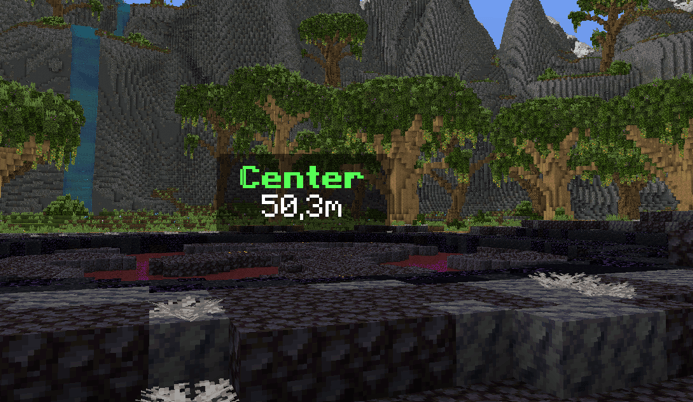
# Custom Waypoints
在世界任意位置创建路径点、计时器、计数器、跟随标签和任务标记,支持背景、动画、移动、实时距离等。使用客户端命令、全新的可视化编辑器,或通过Custom Waypoints 插件从服务器端控制一切。
支持的版本
| 加载器 | 版本 |
|---|---|
| Fabric | 1.20.1 · 1.20.4 · 1.21.1 · 1.21.4 · 1.21.5 · 1.21.8 · 1.21.11 · 26.2 |
| NeoForge | 1.20.1 · 1.20.4 · 1.21.1 · 1.21.4 · 1.21.5 · 1.21.8 · 1.21.11 · 26.2 (新) |
| Forge | 1.20.1 · 1.20.4 |
基础命令
/waypoint
在 1.21.8 → 26.2 中请改用 /customwaypoint,因为原版 Minecraft 已有自带的 /waypoint。其他一切相同。
功能
- 在任意位置、以任意缩放和旋转显示带文本的路径点
- 显示计时器(倒计时)和计数器(正计时,可选小数),带滴答音效,可使用原版或资源包中的任意音效 id (新)
- 跟随路径点可停留在玩家或实体上,并在目标再次加载时返回 (新)
- 图形:地面上 GTA 风格的任务标记(圆形、星形、箭头、心形……)或任意文本/数字,带有向上或向下淡出的墙体,以及可将它们贴到墙上的 pitch/roll (新)
- 可视化编辑器,带实时预览、滑块、色轮、撤销/重做和历史记录 (新)
- 使用插值预设和自定义时间将任意路径点移动到另一位置
- 背景支持 4 种样式、不透明度和淡出控制 (新)
- 进入/退出动画:缩放、滑动、弹跳、旋转、像素化、故障
- 实时距离
{distance}、注视显示文本{on_view_radius:N}(新) - 文本内联物品和纹理、HEX 颜色、多行文本
- 路径点按世界和维度保存 (新)
- 通过 Custom Waypoints 插件(Paper)实现服务器控制:为所有玩家设置路径点、同步计时器,以及当玩家到达或移除路径点时执行动作 (新)
可视化编辑器 (新)
![Editor 1]
按 M(控制 → Custom Waypoints)或运行 /waypoint editor。按 N 直接打开 Displays 选项卡。
- 使用滑块、色轮和世界中的实时预览编辑每种路径点类型(文本、计时器、计数器、跟随和图形)
- Displays 选项卡:显示当前维度中所有活动路径点,最近优先,可用于编辑或删除
- 底部栏显示等效命令:点击它或使用 Copy command 即可在聊天、命令方块或数据包中使用
- Ctrl+Z / Ctrl+Y 撤销和重做,History 保留最近 8 个已保存、覆盖或删除的路径点(重启后仍然保留)
- ↺ 按钮将滑块恢复为默认值,按住 Shift 时滑块以 5 为步长吸附
- Placeholders 按钮:点击一个即可将其插入文本
- Save 创建或更新路径点,New 以当前位置和下一个空闲 ID 开始一个新的路径点
- 像叠加层一样工作:编辑器打开时你仍然可以继续行走
示例
带距离的商店:
/waypoint set shop 464.49 -51.71 -724.91 9 follow far_front false 20 scale_in scale_out false &eShop/n{distance}m
![Shop Waypoint Without Background]
带圆角背景、仅在你注视时显示的文本 (新):
/waypoint set shop 100 70 100 1 follow behind true black 0.4 1 rounded 10 scale_in scale_out false &6Shop{on_view_radius:2}/n&7Open 24/7{/on_view}
带音效的计时器:
/waypoint timer set raid 100 70 100 1 follow front true black 0.45 1.2 rounded 10 scale_in scale_out block.note_block.pling false Time: &c"01:00:00"
带小数的秒表计数器:
/waypoint counter set stopwatch 100 70 100 1 follow behind false 10 scale_in scale_out none true true Time: &a{counter}s/nDistance: {distance}
跟随玩家的标签 (新:自动补全在线玩家):
/waypoint follow boss Steve 0 2.5 0 1 far_front true black 0.5 1 rounded 10 scale_in scale_out false &c{entity_displayname}/n&7{distance}m
地面上的任务标记 (新):
/waypoint figure mission1 circle 100 64 100 0 1.5 2 gold 20
朝向你的数字 "2" (新):
/waypoint figure step2 2 110 64 100 follow 1 1.5 "#55FFFF" 10
墙上的箭头,带动画和淡出 (新):
/waypoint figure door arrow 100 66 100 0 1 0.3 "#FFAA00" 10 20 0.9 scale_in scale_out 90 0
移动路径点并使其返回:
/waypoint move shop 470 -50 -720 9 follow smooth 40
/waypoint move_reset shop bounce 20
走进路径点时将其移除:
/waypoint remove_radius mission1 2 20
命令
基础命令:/waypoint   (1.21.8 → 26.2:/customwaypoint)

文本:
/waypoint set <id> <x> <y> <z> <scale> <rotation> <render> true <bgcolor> <bgopacity> <bgscale> <bgstyle> <fade_in> [<fade_out> <opacity>] <anim_in> <anim_out> <textbackground> <text>
/waypoint set <id> <x> <y> <z> <scale> <rotation> <render> false <fade_in> [<fade_out> <opacity>] <anim_in> <anim_out> <textbackground> <text>

计时器(倒计时):
/waypoint timer set <id> <x> <y> <z> <scale> <rotation> <render> true <bgcolor> <bgopacity> <bgscale> <bgstyle> <fade_in> [<fade_out> <opacity>] <anim_in> <anim_out> <sound> <textbackground> <text + "HH:MM:SS">
/waypoint timer set <id> <x> <y> <z> <scale> <rotation> <render> false <fade_in> [<fade_out> <opacity>] <anim_in> <anim_out> <sound> <textbackground> <text + "HH:MM:SS">
/waypoint stoptimer <id>
/waypoint resumetimer <id>

计数器(正计时):
/waypoint counter set <id> <x> <y> <z> <scale> <rotation> <render> true <bgcolor> <bgopacity> <bgscale> <bgstyle> <fade_in> [<fade_out> <opacity>] <anim_in> <anim_out> <sound> <decimals> <textbackground> <text + {counter}>
/waypoint counter set <id> <x> <y> <z> <scale> <rotation> <render> false <fade_in> [<fade_out> <opacity>] <anim_in> <anim_out> <sound> <decimals> <textbackground> <text + {counter}>
/waypoint stoptimer <id>
/waypoint resumetimer <id>

跟随:
/waypoint follow <id> <player|UUID> <offsetX> <offsetY> <offsetZ> <scale> <render> true <bgcolor> <bgopacity> <bgscale> <bgstyle> <fade_in> [<fade_out> <opacity>] <anim_in> <anim_out> <textbackground> <text>
/waypoint follow <id> <player|UUID> <offsetX> <offsetY> <offsetZ> <scale> <render> false <fade_in> [<fade_out> <opacity>] <anim_in> <anim_out> <textbackground> <text>

图形(新):
/waypoint figure <id> <shape> <x> <y> <z> <rotation> <radius> <height> <color> <fade_in> [<fade_out> <opacity> [<anim_in> <anim_out> [<pitch> <roll> [<width_x> <width_z>]]]]

移动:
/waypoint move <id> <x> <y> <z> <scale> <rotation> <interpolation> <time>
/waypoint move_reset <id> <interpolation> <time>

其他:
/waypoint remove <id|all> [fadeout]
/waypoint remove_radius <id> <radius> <fadeout>
/waypoint list
/waypoint editor
选项
| 选项 | 值 |
|---|---|
| scale | 路径点的大小 |
| rotation | follow(面向镜头)· follow_horizontal · follow_vertical / follow_vertical_<yaw> · 固定偏航角如 0 90 180 270 |
| render | behind(被方块遮挡)· front(穿透方块)· far_behind · far_front(远距离仍然可读) |
| bgcolor | BLACK DARK_BLUE DARK_GREEN DARK_AQUA DARK_RED DARK_PURPLE GOLD GRAY DARK_GRAY BLUE GREEN AQUA RED LIGHT_PURPLE YELLOW WHITE 或 HEX #RRGGBB |
| bgopacity / opacity | 0–1 |
| bgscale | 文本周围背景的大小 |
| bgstyle | square square_small rounded rounded_small |
| fade_in / fade_out | 刻(20 刻 = 1 秒)。fade_out 和 opacity 为可选且需一起使用 (新) |
| anim_in | none scale_in left_in right_in up_in down_in bounce_in spin_in pixelate_in glitch_in |
| anim_out | none scale_out left_out right_out up_out down_out bounce_out spin_out pixelate_out glitch_out |
| textbackground | true / false(每个字母后的原版阴影/背景) |
| sound | none 或任意音效 id:block.note_block.pling,或带命名空间的 "mypack:tick"(需加引号) |
| decimals | true / false(十分之一秒) |
| interpolation | smooth linear step bounce |
| time(移动) | 刻 |
| shape(图形) | circle square star triangle diamond pentagon hexagon octagon heart plus cross arrow lightning moon crown check question exclamation pin,或任意文本如 1、A、"10" |
| rotation(图形) | 固定偏航角、follow(随你的位置转动)或 follow_<yaw>(follow_180 使箭头指向你) |
| radius / height(图形) | 方块。负高度会使墙体向下淡出 |
| color(图形) | 颜色名称或 "#RRGGBB" |
| pitch / roll(图形) | 度数。pitch 90 使图形立起如墙上的标牌,roll 在其自身平面内旋转 |
| width_x / width_z(图形) | 将形状拉伸到指定方块数,而非 2 × radius |
提示
文本格式
&a、&l…… = Minecraft 颜色和格式代码&#RRGGBB、<#RRGGBB>、#RRGGBB或#(RRGGBB)= HEX 颜色/n= 换行|= 空格
计时器和计数器
- 计时器时间需放在引号中:
"01:00:00"。其周围的文本会保留:Time: &c"00:10:00" !!! - 不足 1 小时时隐藏小时(
59:59),不足 1 分钟时隐藏分钟(59) - 在计数器中,
{counter}(或counter)标记数值的位置
内联物品
{"diamond"}
{"diamond_sword,scale:1.5"}
{"diamond,scale:1.5,nbt:3"}      ← nbt = CustomModelData
{"diamond,s:1.5,n:3"}            ← 简写版本
内联纹理
{"assets/minecraft/textures/item/apple.png,s:1"}
{"resourcepack MyPack/assets/minecraft/textures/custom/skull.png,scale:2.5"}
按世界和维度 (新)
- 路径点按单人世界或服务器保存,且仅在其创建的维度中显示
- 同一 ID 可以同时存在于主世界和下界
- 图形仅在你的渲染距离内已加载的区块上渲染
长文本
- 聊天仅允许 256 个字符,因此超长路径点请使用命令方块
占位符
| 占位符 | 描述 |
|---|---|
{distance} |
到路径点的距离(整数方块) |
{distance_decimal} |
带 1 位小数的距离 |
{counter} |
实时计数器值(计数器) |
"HH:MM:SS" |
实时剩余时间(计时器) |
{entity_displayname} |
被跟随玩家或实体的名称(跟随) |
{on_view_radius:N} |
隐藏其后文本,直到你的准星瞄准到路径点 N 个方块范围内 (新) |
{/on_view} |
结束 {on_view_radius:N} 区块 (新) |
Custom Waypoints 插件(服务器) (新)
在 Paper 服务器上安装该插件后,可向装有该模组(Fabric、Forge 或 NeoForge)的玩家发送路径点。未安装该模组的玩家仍可正常加入。
- 所有客户端命令均可用,形式为
/waypointplugin(别名/wpl),在 ID 前需指定目标:@a或玩家名 - 路径点保存在服务器上,并在玩家加入时再次发送
- 计时器和计数器保持同步
- 路径点动作:当玩家走进路径点时(
on_step)或路径点被移除时(on_remove)运行控制台命令,支持半径、等待和 PlaceholderAPI,全部通过配置完成 - 权限:
customwaypoints.admin(默认:OP)
插件命令
/wpl set <@a|player> <id> <x> <y> <z> ...
/wpl timer set <@a|player> <id> <x> <y> <z> ...
/wpl counter set <@a|player> <id> <x> <y> <z> ...
/wpl follow <@a|player> <id> <target> ...
/wpl figure <@a|player> <id> <shape> <x> <y> <z> ...
/wpl move <@a|player> <id> ...
/wpl move_reset <@a|player> <id> ...
/wpl stoptimer <@a|player> <id>
/wpl resumetimer <@a|player> <id>
/wpl remove <@a|player> <id|all> [fadeout]
/wpl remove_radius <@a|player> <id> <radius> <fadeout>
/wpl list <@a|player>
/wpl reload
插件示例
/wpl set @a spawn 0 70 0 1.5 follow far_front true black 0.5 1 rounded 10 scale_in scale_out false &6&lSpawn/n&7{distance}m
/wpl timer set @a event 0 72 0 2 follow front true black 0.5 1.2 rounded 10 scale_in scale_out block.note_block.hat false &eEvent starts in &f"00:05:00"
/wpl figure Steve mission1 star 150 64 -30 0 2 3 gold 20 20 1 scale_in scale_out
/wpl follow @a king Steve 0 2.5 0 1 far_front false 10 scale_in scale_out false &6King: &f{entity_displayname}
/wpl remove_radius Steve mission1 2 20
/wpl remove @a event 20
路径点动作(plugins/CustomWaypoints/config.yml)
一切均按路径点 id 设置,或用 * 表示每个路径点。使用 /wpl reload 应用更改。
waypoint-actions:
  mission1:                      # 路径点 id,或 "*" 表示每个路径点
    remove_radius: 4             # 当玩家接近到此距离时移除
    remove_only_for_player: true  # true:仅对该玩家 / false:对所有拥有它的玩家
    on_remove:
      - "console_command: say %player% completed the mission!"
      - "wait: 1"                  # 秒
      - "console_command: give %player% minecraft:diamond 3"
      - "wait_ticks: 10"           # 刻
      - "console_command: title %player% title {\"text\":\"Mission complete\",\"color\":\"gold\"}"
  checkpoint:
    step_radius: 5                 # 运行 on_step 而不移除路径点
    execute_only_once: true        # on_step 对每个玩家仅运行一次
    on_step:
      - "console_command: title %player% actionbar {\"text\":\"Checkpoint!\",\"color\":\"aqua\"}"
      - "console_command: playsound minecraft:entity.experience_orb.pickup master %player%"
remove_radius:当玩家走进路径点时将其移除,无需额外命令。on_remove会为到达它的玩家运行。remove_only_for_player:true(默认)仅对该玩家移除,false对每个玩家都移除on_remove也会在/wpl remove、计时器结束或跟随实体死亡时运行(每个失去路径点的玩家运行一次)step_radius+on_step:每次玩家进入半径时运行,不移除路径点execute_only_once:true时on_step对每个玩家仅运行一次,即使他们离开再回来(直到/wpl reload、重启或重新设置路径点)console_command: <command>以控制台身份运行命令wait: <seconds>/wait_ticks: <ticks>在下一个动作前等待- 占位符:
%player%、%waypoint%以及所有 PlaceholderAPI 占位符
任务示例: 发送标记,上述配置会奖励到达它的玩家:
/wpl figure @a mission1 circle 150 64 -30 0 1.5 2 gold 20
正在加载版本记录…
正在加载评论…
评论在新手盒子客户端中发表,这里同步展示。