
地毯图形
带有 scarpet 功能的地毯扩展,用于无头图像处理(Processing 的封装)
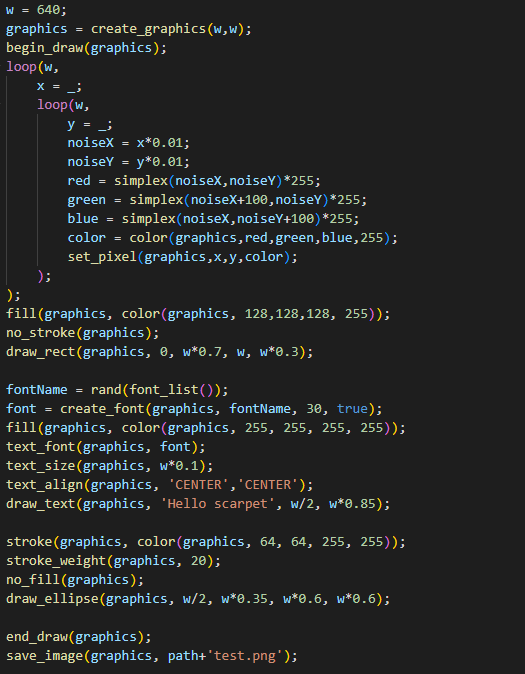 查看大图
查看大图scarpet-graphics

一个为 scarpet 提供的 Processing 封装
它也可以与 Discarpet 一起使用,以通过 Discord 发送创建的图像。
值
此扩展添加了以下新的 scarpet 值:
颜色使用数字(十六进制的 0xRRGGBBAA)处理,但可以使用 color 函数从 RGB 和 HSB 构造。
函数
有关这些函数的更详细文档,请参阅 Processing 参考
大多数函数只是内部 processing 函数的封装。
有时它们的名称可能与原始 Processing 函数略有不同,因为该名称已被 scarpet 使用(例如 copy()),或者是为了对它们进行分组(所有 draw_?() 函数)。
图形和图像函数
load_image(location, shared?)
从指定的 location(字符串)加载图像。
可以是 URL,或文件名(像 read_file 一样工作的路径)。
如果 shared 为 true,则使用共享应用存储。
返回一个 image 值。
save_image(image, location, shared?)
将 image 保存到指定的 location(工作方式类似 load_image)
create_graphics(width, height)
创建一个具有指定尺寸的新 graphics 对象。
copy_image(source, desination, sourceX, sourceY, sourceW, sourceH, destinationX, destinationY, destinationW, destinationH)
将一个图像/图形中的像素复制到另一个。
get_pixel(image, x, y)
返回某个像素的颜色。
set_pixel(image, x, y, color)
将图像上的像素设置为该颜色。
begin_draw(graphics)
准备图形对象以在其上执行绘制操作。
end_draw(graphics)
绘制完成后调用。
绘制函数
请参阅 processing 参考中的 2D Primitives 部分。(scarpet 函数以 draw_ 为前缀,后接 processing 函数名称)
draw_background(graphics, color)
draw_rect(graphics, a, b, c, d)
draw_ellipse(graphics, a, b, c, d)
draw_line(graphics, x1, y1, x2, y2)
draw_image(graphics, image, a, b, c, d)
draw_text(graphics, text, x, y)
模式函数
color_mode(graphics, mode)
mode:'RGB'、'HSB'
image_mode(graphics, mode)
mode:'CORNER'、'CORNERS'、'CENTER'
ellipse_mode(graphics, mode)
mode:'CORNER'、'CORNERS'、'CENTER'、'RADIUS'
rect_mode(graphics, mode)
mode:'CORNER'、'CORNERS'、'CENTER'、'RADIUS'
实用函数
color(graphics, v1, v2, v3, alpha)
取决于设置的 color_mode(),v1、v2、v3 分别是 r、g、b 或 h、s、b 值
fill(graphics, color)
no_fill(graphics)
stroken(graphics, color)
no_stroke(graphics)
stroke_weight(graphics, weight)
smooth(graphics)
no_smooth(graphics)
font_list() (等价于 processing 中的 PFont.list())
text_font(graphics, font)
text_size(graphics, size)
create_font(graphics, name, size, smooth?)
text_align(graphics, alignX, alignY)
正在加载版本记录…
正在加载评论…
评论在新手盒子客户端中发表,这里同步展示。