
合适的Ping
正确测量并显示延迟
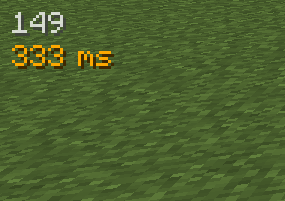 查看大图
查看大图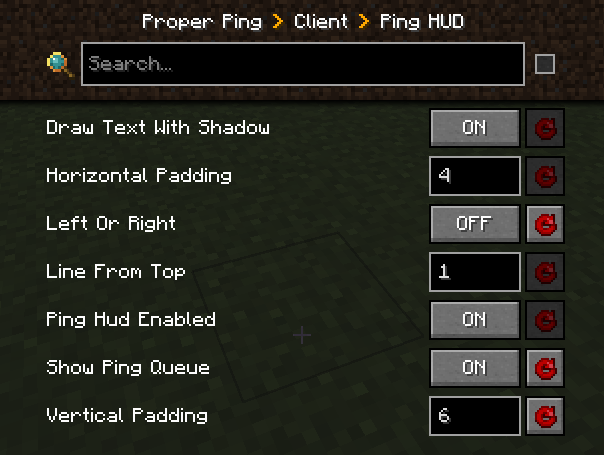


Fabric 和更新的 Minecraft 版本即将推出。



原版的 ping/延迟计算在我看来总是极其不准确且有延迟。
信息
它们每 30 秒才向客户端发送一次延迟值:
public void tick() {
   if (++this.sendAllPlayerInfoIn > 600) {
      this.broadcastAll(new ClientboundPlayerInfoPacket(ClientboundPlayerInfoPacket.Action.UPDATE_LATENCY, this.players));
      this.sendAllPlayerInfoIn = 0;
   }
}
而它们是这样“计算”延迟的:
int i = (int)(Util.getMillis() - this.keepAliveTime);
this.player.latency = (this.player.latency * 3 + i) / 4;
本模组绕过了原版机制,使用类似的自定义数据包来测量延迟,但会对最近 5 次 RTT(往返时间)结果取正确的平均值。
除此之外,它还添加了一个可自定义的 HUD 元素,让你随时查看自己的 ping,选项包括:
- 完全隐藏
- 放置在屏幕上的任意位置
- 在同一个 HUD 元素中显示最近 5 次延迟测量值
- 为服务器上的其他玩家显示数值读数,而不是抽象的条形图(有一个服务端配置选项可以更改服务器向所有人广播这些值的频率)
默认值的示例配置
["Ping HUD"]
	#Enable ping HUD
	pingHudEnabled = true
	#Additionally show 5 last ping values
	showPingQueue = false
	#Draw text with a shadow
	drawTextWithShadow = true
	#Draw ping either on the left side (true), or on the right (false)
	leftOrRight = true
	#How many scaled GUI pixels to start drawing from the edge of the screen
	#Range: > 0
	horizontalPadding = 4
	#On which line counting from the top to start drawing from
	#Range: > 0
	lineFromTop = 1
	#How many scaled GUI pixels to start drawing from the top of the screen
	#Range: > 0
	verticalPadding = 4

[Other]
	#Show numbers in milliseconds in player list
	playerListNumbers = true
开启最近 5 次测量值、玩家列表数值、并放置在屏幕右侧的完整显示示例:

常见问题
问:Forge 呢?
答:Forge。
问:我可以在视频中使用你的模组吗?
答:只要你附上模组/整合包(如果它恰好在整合包里的话)的链接,绝对可以
问:我可以把你的模组添加到整合包中吗?
答:CurseForge/Modrinth 整合包很酷。
正在加载版本记录…
正在加载评论…
评论在新手盒子客户端中发表,这里同步展示。