Custom Portal API Reforged
Fabric自定义传送门API的Forge移植版,已更新支持更新的MC版本。
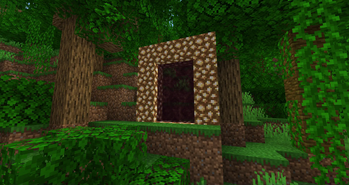 查看大图
查看大图Custom Portal API Reforged
库模组,允许开发者轻松创建通往其自定义维度的传送门。这些自定义传送门的功能与地狱传送门完全相同,但完全可自定义。您可以控制框架方块、传送门方块、色调、点火源、目的地等!
用法
将仓库/模组添加到您的 build.gradle 中。
repositories {
        maven {url 'https://maven.azuredoom.com/mods'}
}
dependencies {
//1.20.1
        implementation fg.deobf('net.kyrptonaught.customportalapi:customportalapi-reforged:MODVERSION')
//1.20.2+
implementation fg.deobf("net.kyrptonaught.customportalapi:cpapireforged-neo-1.20.2:MODVERSION")
}
现在开始创建并注册传送门本身,这得益于 CustomPortalBuilder 类而变得简单。我们将在 FMLCommonSetupEvent 中使用它。
以下是一个非常简单的传送门,它将我们传送到末地,并通过右键点击带有末影之眼的框架来点燃:
CustomPortalBuilder.beginPortal()
        .frameBlock(Blocks.DIAMOND_BLOCK)
        .lightWithItem(Items.ENDER_EYE)
        .destDimID(new ResourceLocation("the_end"))
        .tintColor(45,65,101)
        .registerPortal();
地狱传送门将按如下方式注册:
CustomPortalBuilder.beginPortal()
        .frameBlock(Blocks.OBSIDIAN)
        .destDimID(new ResourceLocation("the_nether"))
        .tintColor(131, 66, 184)
        .registerPortal();
一些值得注意的方法:
- lightWithWater/Item/Fluid - 允许您控制传送门的点燃方式。
- onlyLightInOverworld - 仅允许在主世界使用传送门到达您选择的目的地。
- flatPortal - 类似于末地或暮色森林传送门的平面传送门。
正在加载版本记录…
正在加载评论…
评论在新手盒子客户端中发表,这里同步展示。