
模组集
通过图形界面控制模组加载。对整合包和带可选功能的服务器非常有用。也适用于那些不想通过文件操作来管理模组的极客用户。
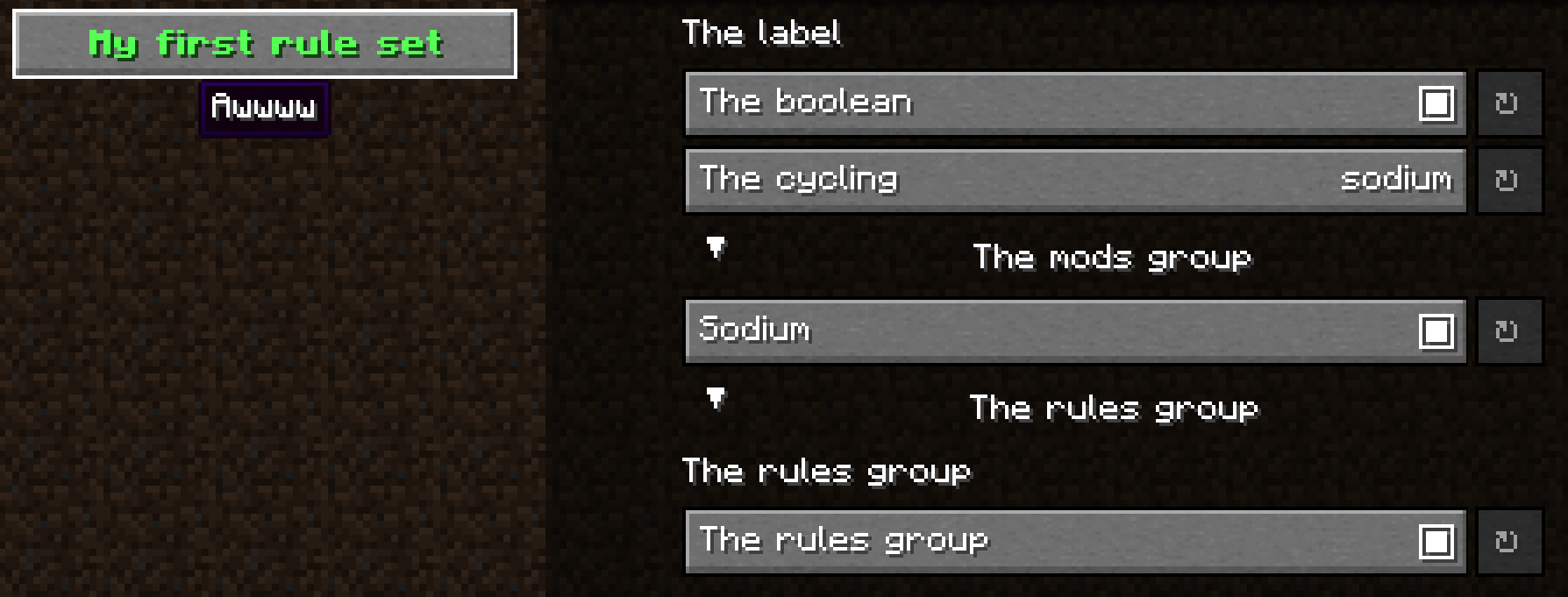 查看大图
查看大图Mod Sets








本项目深受 ThatOrThis 启发 该模组用于 Minecraft Fabric/Quilt/Forge,可在游戏内管理模组加载。 对整合包开发者非常有用
特性
- 在游戏内通过定义的模组集合/子目录名/模组 ID 启用/禁用模组(需要重启)
- 使用 https://github.com/isXander/YetAnotherConfigLib 作为配置界面
- 为整合包开发者提供自定义模组加载规则,使整合包具有更多用户自定义选项
使用方法
规则文件应为 config/modsets/rules 中的 JSON 文件。
添加规则并通过 Mod Menu 进入配置界面
完整示例:https://github.com/SettingDust/ModSets/blob/main/example_rules.json
模组集合
模组集合是定义在 config/modsets/modsets.json 中的条目,是模组 ID 集合的字符串映射。
具体来说,mods 文件夹中的子文件夹名称即为模组集合,其中的模组都属于该集合。模组 ID 则是只包含自身的模组集合。
请注意,通过配置定义的模组集合将覆盖同名的文件夹/模组 ID。
示例:
{
    //  `sodium` 将作用于这里的两个模组。
  // 如果禁用此模组集合,列表中的模组(如果存在)将不会被加载
  "sodium": {
    "text": "Sodium",
    "description": "性能:+++++",
    "mods": [
      "sodium",
      "indium"
    ]
  }
}
规则
 每条规则都包含文本和描述,用于显示你想展示的信息。
以及一个用于 YACL 用户界面的控制器
示例:
每条规则都包含文本和描述,用于显示你想展示的信息。
以及一个用于 YACL 用户界面的控制器
示例:
{
  "text": {
    "text": "我的第一条规则集",
    "bold": true,
    "color": "green"
  },
  "description": "啊~~~~",
  "rules": [
    {
      "text": "文本",
      "description": "描述",
      "controller": {
        "type": "type" // 注意,这不是有效的控制器类型。请从下方控制器中获取类型
      }
    }
  ]
}
控制器
标签
用于在屏幕上显示文本 示例:
{
  "text": "标签",
  "description": "文本 文本",
  "controller": {
    "type": "label"
  }
}
布尔值
用于切换单个模组集合的开关 示例:
{
  "text": "布尔值",
  "description": "文本 文本",
  "controller": {
    "type": "boolean",
      "id": "sodium"
  }
}
循环切换
用于在列表中的模组集合之间切换。 当存在冲突模组(如 sodium 和 optifabric)时非常有用。或者用于切换不同的整合包难度 示例:
{
  "text": "循环切换",
  "description": "文本 文本",
  "controller": {
    "type": "cycling",
      "ids": [
          // 不要留空
      "sodium",
      "optifabric"
    ]
  }
}
模组分组的
为模组集合中的每个模组分配一个简单的布尔控制器选项。 示例:
{
  "text": "模组分组",
  "description": "文本 文本",
  "controller": {
    "type": "mods_group",
    // 默认为 true
    "collapsed": false,
      "ids": [
          // 不要留空
      "sodium",
      "optifabric"
    ]
  }
}
规则分组
对规则进行分组,以便能够折叠规则 示例:
{
  "text": "规则分组",
  "description": "文本 文本",
  "controller": {
    "type": "rules_group",
    // 默认为 true
    "collapsed": true,
    "rules": [ // 不要留空
      {
        "text": "文本",
        "description": "描述",
        "controller": {
          "type": "label"
        }
      },
      {
        "text": "文本",
        "description": "描述",
        "controller": {
          "type": "boolean",
            "id": "sodium"
        }
      }
    ]
  }
}
注意:每个文本和描述都是原始 JSON 文本。 使用 https://www.minecraftjson.com/ 生成文本。
正在加载版本记录…
正在加载评论…
评论在新手盒子客户端中发表,这里同步展示。