
变量模组
该Mod添加了变量,这能简化地图制作。
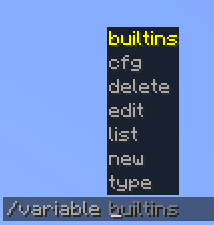 查看大图
查看大图






 关于模组 / About the Mod
VariableMod — 一个 Fabric 本地模组,为命令和聊天添加变量系统。通过 /variable 创建变量,并使用 v:name 语法将它们插入到任何命令和消息中。内置变量 v!: 会自动提供玩家数据——坐标、生命值、昵称、时间等等。
适用于:命令自动化、动态公告、数据包命令模板、服务器大厅,以及任何需要文本替换的场景。
VariableMod is a local-side Fabric mod that adds a variable system for commands and chat. Define variables via /variable and insert them anywhere using v:name syntax. Built-in variables v!: automatically resolve player data — coordinates, health, nickname, time, and more.
Use cases: command automation, dynamic announcements, datapack command templates, server hubs, and any scenario where text substitution is needed.
主要特性 / Key Features
- 通过
/variable new在游戏中直接创建变量 - 在任何命令或聊天消息中使用
v:name— 值会自动替换 - 内置变量
v!:— 坐标、生命值、饥饿值、昵称、维度、时间等 - 两种变量类型:
text和number(number 会检查数值) - 变量以 JSON 文件形式保存在世界文件夹中 — 重启后依然有效
- 命令中变量名的自动补全
- 支持在
/say、聊天消息以及任何被拦截的命令中使用
[ EN ]
- Create variables in-game via
/variable new - Use
v:namein any command or chat message — value is substituted automatically - Built-in variables
v!:— coordinates, health, food, nickname, dimension, time, and more - Two variable types:
textandnumber(number enforces numeric values) - Variables saved as JSON files in the world folder — persist across restarts
- Tab-completion for variable names in commands
- Works in
/say, chat messages, and any intercepted command
命令 / Commands
所有命令都需要操作员权限(等级 2)。/ All commands require operator permission (level 2).
| 命令 / Command | 描述 / Description |
|---|---|
/variable new <name> <value> |
创建变量 / Create a variable |
/variable edit <name> <value> |
修改变量值 / Edit a variable's value |
/variable delete <name> |
删除变量 / Delete a variable |
/variable type <name> text|number |
设置变量类型 / Set variable type |
/variable cfg <name> |
显示值和类型 / Show value and type |
/variable list |
列出所有变量 / List all variables |
/variable builtins |
列出内置变量 v!: / List built-in variables |
内置变量 / Built-in Variables
| 变量 / Variable | 描述 / Description |
|---|---|
v!:nickname |
玩家的显示名称 / Player's display name |
v!:name |
无格式的玩家名 / Raw username |
v!:gamemode |
当前游戏模式 / Current game mode |
v!:world |
当前维度 / Current dimension |
v!:x / v!:y / v!:z |
方块坐标 / Block coordinates |
v!:health |
当前生命值 / Current health |
v!:food |
饥饿值 / Food level |
v!:xp |
总经验值 / Total experience points |
v!:level |
经验等级 / Experience level |
v!:time |
游戏内时间 HH:mm / In-game time HH:mm |
v!:date |
现实日期 yyyy-MM-dd / Real-world date yyyy-MM-dd |
v!:day |
游戏内天数 / In-game day number |
v!:onlinecnt |
在线玩家数 / Players online |
使用示例 / Example Workflow
- 创建变量:
/variable new hub 0 64 0 - 在命令中使用:
/tp @s v:hub - 在聊天中发布坐标:
我位于 v!:x v!:y v!:z,所在维度:v!:world - 修改值:
/variable edit hub 100 64 -200 - 创建数值变量:
/variable type lives number→/variable edit lives 3
[ EN ]
- Create a variable:
/variable new hub 0 64 0 - Use it in a command:
/tp @s v:hub - Announce coordinates in chat:
I'm at v!:x v!:y v!:z in v!:world - Change the value:
/variable edit hub 100 64 -200 - Make a numeric variable:
/variable type lives number→/variable edit lives 3
支持的版本 / Supported Versions
| 版本 / Version | 支持 / Support |
|---|---|
| 1.21 — 1.21.8 | ✅ 支持 |
仅限 Fabric — 需要 Fabric API
数据存储 / Storage
变量以 JSON 文件形式保存在世界文件夹中:
<世界存档>/variable/commands/v/<名称>.json
服务器停止时可以手动编辑这些文件。
[ EN ]
Variables are saved as JSON files inside the world folder:
<world save>/variable/commands/v/<name>.json
Files can be edited manually while the server is stopped.
语言 / Language
Русский • English
正在加载版本记录…
正在加载评论…
评论在新手盒子客户端中发表,这里同步展示。