
VCHAT
提升服务器内的沟通体验 — 本地聊天、全局互动和智能管理,集于一款强大模组。 Поднимите коммуникацию на вашем сервере на новый уровень — локальный чат, глобальное взаимодействие и умная модерация в одном моде.
 查看大图
查看大图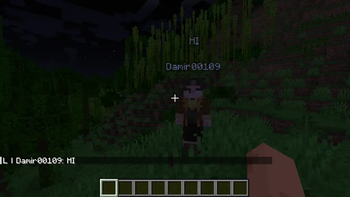
VChat — 高级 Minecraft 聊天模组


VChat 是一款功能强大且高度可定制的 Fabric 服务器聊天模组,它引入了本地与全局聊天、角色头顶气泡文字、含通知的提及系统、自定义进出服消息以及一套完整的聊天管理功能。
🌍 语言 / Languages
🇨🇳 简体中文
📋 描述
VChat 完全取代了 Minecraft 原版聊天系统,添加了许多新功能来改善玩家间的交流并提供管理工具。
✨ 主要功能
💬 双聊天系统
- 本地聊天 (L) — 消息仅对半径内的玩家可见(默认 100 格)
- 全局聊天 (G) — 消息对所有服务器玩家可见。要在全局聊天发言,请在消息前加上
!
示例:
大家好!          → 本地聊天(仅附近玩家可见)
!谁在出售钻石?    → 全局聊天(所有人可见)
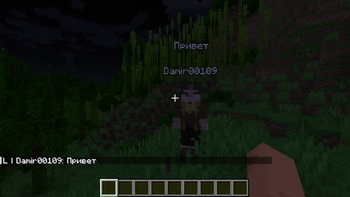
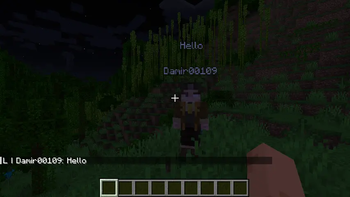
🫧 头顶气泡 (Chat Bubbles)
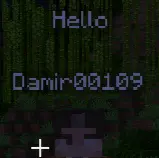
当玩家输入聊天消息时,其角色头顶会显示一个文字气泡。这样即使没有盯着聊天框,也能看到其他玩家在说什么。
- 可配置显示速度
- 可配置头顶高度
- 可在配置中关闭
🔔 提及系统
当其他玩家在聊天中提及你的名字时,你会收到:
- 名字高亮(青绿色)
- 屏幕 Toast 通知
- 声音通知(可自定义音效)
- 可点击的名字 — 点击玩家名字即可私聊
每位玩家都可以自定义自己的提及音效:
/vchat mention_sound set minecraft:block.note_block.pling 1.0 1.0
👋 自定义进出服消息
替换原版 Minecraft 进出服消息:
- 首次进入 — 为新玩家显示的特殊消息
- 常规进入 — 所有进入服务器的自定义消息
- 退出 — 退出服务器时的自定义消息
所有消息均可在配置中修改,支持 {player} 占位符。
🔇 禁言系统 (管理)
管理员可以暂时或永久禁止玩家发言:
/vchat moderation mute <玩家名> [时长] [原因]
时间格式:1d 5h 30m 10s(天、小时、分钟、秒)
示例:
/vchat moderation mute Steve 30m 刷屏
/vchat moderation mute Alex 1d 违规行为
/vchat moderation mute Notch                      → 永久禁言
解除禁言:
/vchat moderation unmute <玩家名>
查看活跃处罚:
/vchat moderation punishment_status    → 查看所有服务器处罚
/vchat punishment                       → 查看自己的处罚
📊 通知管理
玩家可以开启/关闭提及通知:
/vchat mention true      → 开启通知
/vchat mention false     → 关闭通知
🔧 命令
通用命令
| 命令 | 描述 | 权限 |
|---|---|---|
/vchat mention true/false |
开启/关闭提及 | 任意 |
/vchat mention_sound set <音效> [音量] [音调] |
设置提及音效 | 任意 |
/vchat mention_sound reset |
重置音效为默认值 | 任意 |
/vchat punishment |
查看自己的处罚 | 任意 |
管理员命令(需要权限等级 2)
| 命令 | 描述 |
|---|---|
/vchat moderation mute <玩家名> [时长] [原因] |
禁言玩家 |
/vchat moderation unmute <玩家名> |
解除玩家禁言 |
/vchat moderation punishment_status |
列出所有活跃处罚 |
⚙️ 配置
主配置 — config/vchat/vchat.json
{
  "globalPrefix": "G",
  "localPrefix": "L",
  "noNearbyMessage": "&c附近没有其他玩家",
  "localChatRadius": 100.0,
  "hoverMessage": "&e点击发送私聊消息",
  "firstJoin": true,
  "firstJoinMessage": "&6{player} 首次加入了服务器",
  "joinMessage": true,
  "joinMessageText": "&e{player} 降临了服务器",
  "leaveMessage": true,
  "leaveMessageText": "&e{player} 离开了服务器",
  "highlightPlayerMentions": true,
  "chatBubbles": true,
  "chatBubbleCharactersPerSecond": 10,
  "chatBubbleYOffset": 2.7,
  "mentionToast": true,
  "mentionToastTitle": "&b你被在聊天中提及",
  "mentionToastDescription": "&e{player} 在聊天中提及了你",
  "mentionSoundEnabled": true,
  "mentionSound": "minecraft:block.note_block.pling",
  "mentionSoundVolume": 1.0,
  "mentionSoundPitch": 1.0
}
管理配置 — config/vchat/moderation.json
{
  "moderation": true,
  "commandMuteSuccess": "VChat: {player} 被禁言 {time}。原因:{reason}",
  "commandUnmuteSuccess": "VChat: {player} 已被解禁",
  "chatMutedMessage": "&c你已被禁言。剩余时间:&e{time}&c。原因:&e{reason}"
}
所有消息支持:
- 颜色代码 — 使用
&代替§(例如&c红色、&a绿色) - 占位符:
{player}— 玩家名称{time}— 剩余时间{reason}— 原因{moderator}— 管理员名称
🛠️ 安装
- 为 Minecraft 1.21.1 安装 Fabric Loader
- 安装 Fabric API
- 下载 VChat 并放入
mods文件夹 - 启动服务器 — 配置文件会自动生成
📋 依赖
- Fabric API — 必需
- Minecraft 1.21.1
🇬🇧 English
📋 Description
VChat is a powerful and customizable chat mod for Fabric servers that adds local and global chat, chat bubbles above players' heads, a mention system with notifications, custom join/leave messages, and a moderation system.
✨ Key Features
💬 Dual Chat System
- Local Chat (L) — messages only visible to players within radius (default 100 blocks)
- Global Chat (G) — messages visible to all players on the server. To write globally, start your message with
!
Examples:
Hello everyone nearby!       → Local chat (only nearby players see)
!Anyone selling diamonds?     → Global chat (everyone sees)
🫧 Chat Bubbles
When a player types in chat, a text bubble appears above their head. This lets you see what other players are saying without looking at the chat window.
- Configurable display duration
- Configurable height offset
- Can be disabled in config
🔔 Mention System
When someone mentions you in chat (types your name), you get:
- Name highlighting in chat (aqua color)
- Toast notification on screen
- Sound notification (customizable sound)
- Clickable names — click a player's name to message them privately
Each player can customize their mention sound:
/vchat mention_sound set minecraft:block.note_block.pling 1.0 1.0
👋 Custom Join & Leave Messages
Replaces vanilla Minecraft join/leave messages with customizable ones:
- First join — special message for new players
- Regular join — custom message for all joins
- Leave — custom message when players disconnect
All messages support the {player} placeholder and color codes.
🔇 Mute System (Moderation)
Moderators can temporarily or permanently prevent players from chatting:
/vchat moderation mute <player> [duration] [reason]
Duration format: 1d 5h 30m 10s (days, hours, minutes, seconds)
Examples:
/vchat moderation mute Steve 30m Spam
/vchat moderation mute Alex 1d Rule violation
/vchat moderation mute Notch                    → Permanent mute
Unmute:
/vchat moderation unmute <player>
View active punishments:
/vchat moderation punishment_status    → List all punishments
/vchat punishment                       → View your punishments
📊 Mention Preferences
Players can toggle mentions:
/vchat mention true      → Enable mentions
/vchat mention false     → Disable mentions
🔧 Commands
General Commands
| Command | Description | Permission |
|---|---|---|
/vchat mention true/false |
Toggle mentions | Any |
/vchat mention_sound set <sound> [volume] [pitch] |
Set mention sound | Any |
/vchat mention_sound reset |
Reset to default sound | Any |
/vchat punishment |
View your punishments | Any |
Moderator Commands (require permission level 2)
| Command | Description |
|---|---|
/vchat moderation mute <player> [duration] [reason] |
Mute a player |
/vchat moderation unmute <player> |
Unmute a player |
/vchat moderation punishment_status |
List active punishments |
⚙️ Configuration
Main Config — config/vchat/vchat.json
{
  "globalPrefix": "G",
  "localPrefix": "L",
  "noNearbyMessage": "&cNo one is nearby",
  "localChatRadius": 100.0,
  "hoverMessage": "&eClick to send a private message",
  "firstJoin": true,
  "firstJoinMessage": "&6{player} joined for the first time",
  "joinMessage": true,
  "joinMessageText": "&e{player} has landed on the server",
  "leaveMessage": true,
  "leaveMessageText": "&e{player} left the server",
  "highlightPlayerMentions": true,
  "chatBubbles": true,
  "chatBubbleCharactersPerSecond": 10,
  "chatBubbleYOffset": 2.7,
  "mentionToast": true,
  "mentionToastTitle": "&bYou were mentioned in chat",
  "mentionToastDescription": "&e{player} mentioned you in chat",
  "mentionSoundEnabled": true,
  "mentionSound": "minecraft:block.note_block.pling",
  "mentionSoundVolume": 1.0,
  "mentionSoundPitch": 1.0
}
Moderation Config — config/vchat/moderation.json
{
  "moderation": true,
  "commandMuteSuccess": "VChat: {player} muted for {time}. Reason: {reason}",
  "commandUnmuteSuccess": "VChat: {player} unmuted",
  "chatMutedMessage": "&cYou are muted. Remaining: &e{time}&c. Reason: &e{reason}"
}
All messages support:
- Color codes — use
&instead of§(e.g.,&c= red,&a= green) - Placeholders:
{player}— player name{time}— remaining time{reason}— reason{moderator}— moderator name
🛠️ Installation
- Install Fabric Loader for Minecraft 1.21.1
- Install Fabric API
- Download VChat and place in your
modsfolder - Start the server — configs will generate automatically
📋 Dependencies
- Fabric API — required
- Minecraft 1.21.1
📜 License
This project is available under the CC0 license. Feel free to use and modify.
🤝 Support
If you find a bug or have suggestions, feel free to open an issue!
正在加载版本记录…
正在加载评论…
评论在新手盒子客户端中发表,这里同步展示。