
Hudifine
使用简单的脚本语言构建自定义HUD覆盖层。无需模组编程知识。
 查看大图
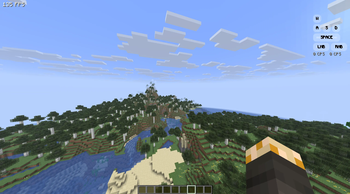
查看大图Hudifine 是一款 HUD 模组,允许任何人通过 HUD Script 轻松制作 HUD,显示你选择的指标。
打开聊天界面即可添加和配置它们。
以下是 HUDScript 的文档,即 Hudifine 的脚本语言。
HUDScript 文档
HUD Script 开发者文档
HUD Script 是一种安全、沙盒化的脚本格式,用于在 Minecraft (Fabric) 中创建完全可自定义的游戏内 HUD 覆盖层。脚本即贴即用;无需模组开发环境。
目录
- 概述
- 脚本结构
- 屏幕预算 (30% 规则)
- 数据源
- 玩家
- 世界
- 性能
- 战斗
- 物品栏
- 输入
- 环境
- 游戏状态
- 多人游戏
- 时间
- 布局系统
- 排序与层级
- 样式
- 元素
- 条件与逻辑
- 事件
- 无障碍开关
- 玩家设置 API
- 动画
- CPS 实现指南
- 完整示例
概述
HUD Script 是一种声明式 + 事件驱动的脚本格式。脚本定义:
- 显示哪些数据(来自一组固定的允许数据源)
- 如何显示(在屏幕预算内完全自由视觉)
- 玩家可配置的设置(无障碍、开关、颜色等)
脚本按设计进行沙盒化。它们只能:
- ✅ 从允许的数据源读取
- ✅ 渲染到 HUD 覆盖层
- ✅ 响应玩家输入的视觉变化
- ❌ 发起网络请求
- ❌ 访问文件系统
- ❌ 与小部件之外的任何内容交互
脚本结构
每个脚本有三个可选顶层块:
meta {
  name: "我的小部件"
  author: "你的名字"
  version: "1.0.0"
  description: "关于这个小部件功能的简短描述。"
}

settings {
  // 在右键菜单中暴露给玩家配置的选项
}

widget {
  // 布局、元素、样式、逻辑
}
只有 widget 块是必需的。
屏幕预算 (30% 规则)
一个小部件在任何时候都不能占据超过屏幕面积的 30%。
- 屏幕面积计算为
screenWidth × screenHeight - 你的小部件的边界框(所有元素组合)不得超过
screenWidth × screenHeight × 0.30 - 此规则在运行时强制执行;如果你的小部件超过 30%,它将被自动缩小,并且小部件编辑器中会出现警告
- 已关闭或完全透明的小部件不计入预算
- 多个小部件各自独立拥有自己的 30% 预算
提示: 合理使用
size属性,并在不同分辨率下测试。以 1920×1080 作为基准进行设计。
数据源
所有数据源均为只读。在元素值中使用 get() 调用它们。
玩家
| 来源 | 返回类型 | 描述 |
|---|---|---|
player.health |
float |
当前生命值 (0.0–20.0) |
player.maxHealth |
float |
最大生命值(含吸收) |
player.absorption |
float |
吸收生命值 |
player.hunger |
int |
饥饿度 (0–20) |
player.saturation |
float |
饱和度 (0.0–20.0) |
player.exhaustion |
float |
消耗度 (0.0–4.0) |
player.air |
int |
空气值(刻) (0–300) |
player.xp |
int |
总经验值 |
player.xpLevel |
int |
当前经验等级 |
player.xpProgress |
float |
距下一级的经验进度 (0.0–1.0) |
player.speed |
float |
当前移动速度 (方块/秒) |
player.isSprinting |
bool |
玩家是否在疾跑 |
player.isSneaking |
bool |
玩家是否在潜行 |
player.isSwimming |
bool |
玩家是否在游泳 |
player.isFlying |
bool |
玩家是否在飞行(创造模式/鞘翅) |
player.isFalling |
bool |
玩家是否在下落 |
player.isOnGround |
bool |
玩家是否在地面 |
player.isInWater |
bool |
玩家是否在水中 |
player.isInLava |
bool |
玩家是否在熔岩中 |
player.fallDistance |
float |
当前下落距离(方块) |
player.reachDistance |
float |
当前触及距离 |
player.name |
string |
玩家用户名 |
player.uuid |
string |
玩家 UUID |
player.gamemode |
string |
survival, creative, adventure, spectator |
player.score |
int |
玩家当前的计分板分数 |
player.ping |
int |
延迟 (毫秒) (仅多人游戏) |
世界
| 来源 | 返回类型 | 描述 |
|---|---|---|
world.x |
float |
玩家 X 坐标 |
world.y |
float |
玩家 Y 坐标 |
world.z |
float |
玩家 Z 坐标 |
world.blockX |
int |
玩家方块 X (向下取整) |
world.blockY |
int |
玩家方块 Y (向下取整) |
world.blockZ |
int |
玩家方块 Z (向下取整) |
world.chunkX |
int |
当前区块 X |
world.chunkZ |
int |
当前区块 Z |
world.facing |
string |
基本方向: N, NE, E, SE, S, SW, W, NW |
world.facingDegrees |
float |
偏航角 (度) (0–360) |
world.pitch |
float |
俯仰角 (-90 到 90) |
world.yaw |
float |
偏航角 (0–360) |
world.dimension |
string |
overworld, nether, end 或自定义命名空间 |
world.biome |
string |
当前群系名称 (例如 minecraft:plains) |
world.lightLevel |
int |
玩家脚部方块光照等级 (0–15) |
world.skyLightLevel |
int |
玩家位置天空光照等级 (0–15) |
world.moonPhase |
int |
月相 (0–7) |
world.isRaining |
bool |
是否下雨 |
world.isThundering |
bool |
是否有雷暴 |
world.rainStrength |
float |
降雨强度 (0.0–1.0) |
world.difficulty |
string |
peaceful, easy, normal, hard |
world.name |
string |
世界/服务器名称 |
world.seed |
string |
世界种子 (仅单人游戏, 服务器返回 "hidden") |
world.spawnX |
int |
世界出生点 X |
world.spawnZ |
int |
世界出生点 Z |
world.distanceToSpawn |
float |
距世界出生点的距离(方块) |
性能
| 来源 | 返回类型 | 描述 |
|---|---|---|
perf.fps |
int |
当前每秒帧数 |
perf.fpsAvg |
float |
过去 5 秒平均 FPS |
perf.fpsMin |
int |
过去 5 秒最小 FPS |
perf.fpsMax |
int |
过去 5 秒最大 FPS |
perf.frameTime |
float |
上一帧时间(毫秒) |
perf.frameTimeAvg |
float |
过去 5 秒平均帧时间 |
perf.tps |
float |
服务器每秒刻数 (仅多人游戏) |
perf.mspt |
float |
每刻毫秒数 (服务器, 仅多人游戏) |
perf.chunkUpdates |
int |
本帧区块更新数 |
perf.renderedChunks |
int |
已渲染区块数量 |
perf.entities |
int |
渲染距离内的实体 |
perf.blockEntities |
int |
渲染距离内的方块实体 |
perf.particles |
int |
活跃粒子数 |
战斗
| 来源 | 返回类型 | 描述 |
|---|---|---|
combat.attackCooldown |
float |
攻击冷却进度 (0.0–1.0) |
combat.attackCooldownMs |
int |
距完全攻击冷却的毫秒数 |
combat.isAttacking |
bool |
玩家是否正在攻击 |
combat.lastDamage |
float |
上次受到的伤害 |
combat.lastDamageSource |
string |
上次伤害来源 (例如 fire, fall, player) |
combat.killCount |
int |
本局玩家击杀数 |
combat.deathCount |
int |
本局玩家死亡数 |
combat.kdr |
float |
本局击杀/死亡比 |
combat.targetName |
string |
玩家正在注视的实体名称 (如果有) |
combat.targetHealth |
float |
玩家正在注视的实体生命值 |
combat.targetMaxHealth |
float |
玩家正在注视的实体最大生命值 |
combat.targetDistance |
float |
与目标实体的距离 |
combat.targetType |
string |
玩家正在注视的实体类型 |
combat.isInCombat |
bool |
玩家最近是否被击中/击中某物 |
combat.combatTimer |
int |
距上次战斗动作的秒数 |
物品栏
| 来源 | 返回类型 | 描述 |
|---|---|---|
inventory.hotbarSlot |
int |
当前快捷栏格子 (0–8) |
inventory.mainHandItem |
string |
主手物品 ID |
inventory.mainHandCount |
int |
主手物品堆叠数量 |
inventory.mainHandDurability |
int |
主手物品耐久度 |
inventory.mainHandMaxDurability |
int |
主手物品最大耐久度 |
inventory.mainHandDurabilityPct |
float |
主手物品耐久度百分比 (0.0–1.0) |
inventory.offHandItem |
string |
副手物品 ID |
inventory.offHandCount |
int |
副手物品堆叠数量 |
inventory.offHandDurability |
int |
副手物品耐久度 |
inventory.helmetItem |
string |
头盔物品 ID |
inventory.helmetDurability |
int |
头盔耐久度 |
inventory.helmetDurabilityPct |
float |
头盔耐久度百分比 (0.0–1.0) |
inventory.chestplateItem |
string |
胸甲物品 ID |
inventory.chestplateDurability |
int |
胸甲耐久度 |
inventory.chestplateDurabilityPct |
float |
胸甲耐久度百分比 (0.0–1.0) |
inventory.leggingsItem |
string |
护腿物品 ID |
inventory.legginsDurability |
int |
护腿耐久度 |
inventory.leggingsDurabilityPct |
float |
护腿耐久度百分比 (0.0–1.0) |
inventory.bootsItem |
string |
靴子物品 ID |
inventory.bootsDurability |
int |
靴子耐久度 |
inventory.bootsDurabilityPct |
float |
靴子耐久度百分比 (0.0–1.0) |
inventory.arrowCount |
int |
物品栏中箭的数量 |
inventory.totalSlots |
int |
总物品栏格子数 (36) |
inventory.usedSlots |
int |
已使用的物品栏格子数 |
inventory.emptySlots |
int |
空的物品栏格子数 |
inventory.xpBottleCount |
int |
物品栏中经验瓶数量 |
输入
输入源反映玩家物理上按下的按键。它们仅用于显示;你不能拦截、阻止或重定向输入。
| 来源 | 返回类型 | 描述 |
|---|---|---|
input.forward |
bool |
按住 W 键 |
input.backward |
bool |
按住 S 键 |
input.left |
bool |
按住 A 键 |
input.right |
bool |
按住 D 键 |
input.jump |
bool |
按住空格键 |
input.sneak |
bool |
按住 Shift 键 |
input.sprint |
bool |
按住疾跑键 |
input.attack |
bool |
按住鼠标左键 |
input.use |
bool |
按住鼠标右键 |
input.drop |
bool |
按住 Q 键 |
input.inventory |
bool |
按住物品栏键 |
input.swap |
bool |
按住 F 键 (交换副手) |
input.hotbar1–input.hotbar9 |
bool |
按住快捷栏数字键 |
input.cps |
int |
左键 CPS (每秒点击次数) |
input.rcps |
int |
右键 CPS |
input.mouseX |
int |
鼠标在屏幕上的 X 位置 |
input.mouseY |
int |
鼠标在屏幕上的 Y 位置 |
input.mouseDeltaX |
float |
本帧鼠标 X 移动量 |
input.mouseDeltaY |
float |
本帧鼠标 Y 移动量 |
input.sensitivity |
float |
当前鼠标灵敏度 (0.0–1.0) |
环境
| 来源 | 返回类型 | 描述 |
|---|---|---|
env.timeOfDay |
int |
世界刻 (0–24000) |
env.timeString |
string |
格式化时间 (例如 6:00 AM) |
env.dayCount |
int |
游戏内已过天数 |
env.temperature |
float |
玩家位置的群系温度 |
env.humidity |
float |
玩家位置的群系湿度 |
env.canSeeSky |
bool |
玩家是否能看见天空 |
env.isUnderground |
bool |
玩家是否在地下 (无法接触天空) |
env.nearestVillageDistance |
float |
距最近检测到的村庄的距离 (方块) |
env.isInVillage |
bool |
玩家是否在村庄内 |
env.nearestPlayerDistance |
float |
距最近其他玩家的距离 (多人游戏) |
env.nearestPlayerName |
string |
最近其他玩家的名称 |
游戏状态
| 来源 | 返回类型 | 描述 |
|---|---|---|
game.isPaused |
bool |
游戏是否暂停 |
game.isInGui |
bool |
是否有任何 GUI 打开 |
game.isInventoryOpen |
bool |
物品栏是否打开 |
game.isInBed |
bool |
玩家是否在睡觉 |
game.isRiding |
bool |
玩家是否在骑乘实体 |
game.ridingEntityType |
string |
被骑乘实体的类型 |
game.ridingEntityHealth |
float |
被骑乘实体的生命值 |
game.isElytraFlying |
bool |
玩家是否在鞘翅飞行 |
game.elytraHealth |
int |
当前鞘翅耐久度 |
game.elytraSpeed |
float |
当前鞘翅速度 (方块/秒) |
game.potionEffects |
list<string> |
活跃的药水效果 ID |
game.potionEffectAmplifiers |
map<string, int> |
每个活跃效果的放大器 |
game.potionEffectDurations |
map<string, int> |
每个活跃效果的持续时间(刻) |
game.scoreboardObjective |
string |
当前侧边栏计分板目标名称 |
game.scoreboardScore |
int |
玩家在当前侧边栏目标上的分数 |
game.bossBarName |
string |
活跃的首领血条名称 (如果有) |
game.bossBarProgress |
float |
首领血条进度 (0.0–1.0) |
game.isSpectatingEntity |
bool |
玩家是否在旁观实体 |
game.spectatingEntityType |
string |
正在被旁观的实体类型 |
多人游戏
| 来源 | 返回类型 | 描述 |
|---|---|---|
server.name |
string |
服务器名称 / IP |
server.motd |
string |
服务器 MOTD |
server.playerCount |
int |
当前在线玩家数 |
server.maxPlayers |
int |
服务器最大玩家容量 |
server.ping |
int |
到服务器的 Ping (毫秒) |
server.tps |
float |
服务器 TPS |
server.isLAN |
bool |
是否连接到局域网服务器 |
server.isSingleplayer |
bool |
是否在单人游戏 |
server.version |
string |
服务器 Minecraft 版本 |
时间
| 来源 | 返回类型 | 描述 |
|---|---|---|
clock.hour |
int |
真实世界小时 (0–23) |
clock.minute |
int |
真实世界分钟 (0–59) |
clock.second |
int |
真实世界秒 (0–59) |
clock.timeString |
string |
格式化真实时间 (例如 14:32) |
clock.timeString12 |
string |
12 小时制格式 (例如 2:32 PM) |
clock.sessionTime |
int |
当前游戏会话秒数 |
clock.sessionTimeString |
string |
格式化会话时间 (例如 1h 23m) |
clock.date |
string |
真实世界日期 (例如 2025-04-26) |
clock.unixTimestamp |
int |
Unix 时间戳 (秒) |
布局系统
小部件使用基于盒子的简单布局,锚定到屏幕位置。
锚点
widget {
  anchor: top-left       // top-left, top-center, top-right
                         // middle-left, center, middle-right
                         // bottom-left, bottom-center, bottom-right
  offsetX: 10            // 从锚点 X 的像素偏移 (可以为负)
  offsetY: 10            // 从锚点 Y 的像素偏移 (可以为负)
}
尺寸
widget {
  width: 120             // 固定像素宽度
  height: auto           // "auto" 适应内容,或固定像素
  padding: 8             // 统一内边距 (或 padding: 8 4 表示垂直/水平)
  margin: 4              // 外边距
}
方向
widget {
  direction: column      // "column" (垂直堆叠) 或 "row" (水平堆叠)
  gap: 4                 // 子元素之间的像素间距
  align: start           // "start", "center", "end" — 交叉轴对齐
  justify: start         // "start", "center", "end", "space-between" — 主轴对齐
}
Z 索引
widget {
  zIndex: 10             // 更高的值渲染在其他小部件之上
}
排序与层级
默认情况下,元素按照它们在脚本中编写的顺序渲染,从上到下。你可以使用任何元素或组上的 order 属性覆盖此行为。
widget {
  direction: column

  text { value: "我出现在第二位" order: 2 color: #ffffff fontSize: 12 }
  text { value: "我出现在第一位"  order: 1 color: #aaaaaa fontSize: 10 }
  text { value: "我出现在第三位"  order: 3 color: #555555 fontSize: 9 }
}
order 的工作方式类似于 CSS order;数字越小渲染得越早(根据 direction 越靠上或越靠左)。没有 order 值的元素默认为 order: 0 并在明确排序的元素之前渲染。
你也可以在 group 内部使用 order:
group {
  direction: row

  text { value: "CPS" order: 2 color: #aaaaaa fontSize: 9 }
  keyIndicator { key: input.attack label: "LMB" order: 1 size: 20 borderRadius: 8 activeColor: #ffffff inactiveColor: #ffffff33 }
}
提示: 当你希望将脚本逻辑分组在一起但视觉布局不同时,使用
order。如果所有内容都有明确的顺序,那么直接按正确顺序重写脚本会更清晰。
样式
背景
widget {
  background: #00000088        // 十六进制颜色,可带可选 alpha (最后 2 位)
  background: transparent      // 无背景
  borderRadius: 6              // 像素单位的圆角
  border: 1 #ffffff44          // 边框: 宽度 颜色
  backdropBlur: 4              // 小部件后面的模糊像素 (依赖 GPU)
}
文本样式
text {
  value: get(player.health)
  color: #ffffff
  fontSize: 12               // 像素单位 (推荐 8–32)
  fontWeight: bold           // "normal", "bold"
  fontStyle: normal          // "normal", "italic"
  shadow: true               // Minecraft 风格的文本阴影
  shadowColor: #00000066
  letterSpacing: 0           // 字符间像素
  lineHeight: 1.2            // 行高倍数
  align: left                // "left", "center", "right"
  truncate: 20               // 截断前的最大字符数 (可选)
  uppercase: false           // 强制大写
}
颜色
颜色是十六进制字符串:#RRGGBB 或 #RRGGBBAA (带 alpha)。
color: #ff0000             // 红色,完全不透明
color: #ff000088           // 红色,50% 透明
color: #fff                // 简写 (扩展为 #ffffff)
不透明度
widget {
  opacity: 0.8             // 0.0 (不可见) 到 1.0 (完全不透明)
}
元素
元素是 widget 块内部的视觉构建块。
text
显示一个字符串值。
text {
  value: "FPS: {get(perf.fps)}"    // 带 {} 的内联表达式
  color: #ffffff
  fontSize: 12
  shadow: true
}
bar
一个填充条 (生命值、经验值、冷却等)
bar {
  value: get(player.health)
  max: get(player.maxHealth)
  width: 100
  height: 8
  fillColor: #ff4444
  backgroundColor: #00000066
  borderRadius: 4
  direction: left-to-right    // "left-to-right", "right-to-left", "bottom-to-top", "top-to-bottom"
}
icon
渲染一个 Minecraft 物品或方块图标。
icon {
  item: get(inventory.mainHandItem)    // 物品 ID 字符串
  size: 16                             // 图标像素大小
}
circle
一个圆形进度指示器。
circle {
  value: get(combat.attackCooldown)    // 0.0–1.0
  radius: 12
  strokeWidth: 3
  color: #ffffff
  backgroundColor: #ffffff33
  startAngle: -90                      // 角度 — 0 = 右, -90 = 上
  direction: clockwise                 // "clockwise" 或 "counterclockwise"
}
image
从资源包渲染一个静态纹理。
image {
  texture: "hud:textures/my_icon.png"    // 资源包内的 命名空间:路径
  width: 16
  height: 16
  tint: #ffffff                          // 可选颜色色调
}
keyIndicator
显示一个在按下时亮起的视觉按键。
keyIndicator {
  key: input.forward
  label: "W"
  activeColor: #ffffff
  inactiveColor: #ffffff44
  size: 20              // 按键的像素宽度和高度
  width: 20             // 仅覆盖宽度 (对于 SPACE, LMB, RMB 很有用)
  borderRadius: 8       // 越高越圆。使用 999 获得完整的药丸形状
  fontSize: 9           // 按键内标签的字体大小
  shadow: true          // 标签上的文本阴影
}
提示: 对于宽键,如 SPACE、LMB 和 RMB,将
width设置为大于size以在保持相同高度的同时水平拉伸它们。borderRadius为8–12与 Lunar Client 外观匹配。
group
用于将元素分组和嵌套在一起的容器。
group {
  direction: row
  gap: 4
  background: #00000066
  padding: 6
  borderRadius: 4

  text { value: "生命值: " color: #aaaaaa fontSize: 11 }
  text { value: "{get(player.health)}" color: #ff4444 fontSize: 11 }
}
separator
一条水平或垂直的分隔线。
separator {
  direction: horizontal    // "horizontal" 或 "vertical"
  color: #ffffff22
  thickness: 1
  length: 80               // 像素,或 "auto" 以填充可用空间
  margin: 4
}
spacer
元素之间的空白空间。
spacer {
  size: 8
}
条件与逻辑
if / else
根据条件显示或隐藏元素。
if get(player.health) < 6 {
  text {
    value: "⚠ 低生命值"
    color: #ff0000
    fontSize: 14
    shadow: true
  }
} else if get(player.health) < 10 {
  text {
    value: "生命值正在降低"
    color: #ffaa00
    fontSize: 12
  }
} else {
  // 什么都不做
}
内联表达式
在字符串值中使用 {} 进行内联表达式:
text { value: "你处于 {get(world.dimension)} 维度" }
text { value: "经验等级: {get(player.xpLevel)} ({round(get(player.xpProgress) * 100)}%)" }
数学辅助函数
| 函数 | 描述 |
|---|---|
round(x) |
四舍五入到最接近的整数 |
floor(x) |
向下取整 |
ceil(x) |
向上取整 |
abs(x) |
绝对值 |
min(x, y) |
两个值中的最小值 |
max(x, y) |
两个值中的最大值 |
clamp(x, min, max) |
将值限制在最小值和最大值之间 |
lerp(a, b, t) |
线性插值 |
pct(value, max) |
返回 (value / max) * 100 |
format(x, decimals) |
将数字格式化为 N 位小数 |
字符串辅助函数
| 函数 | 描述 |
|---|---|
upper(s) |
字符串转大写 |
lower(s) |
字符串转小写 |
concat(a, b) |
连接两个字符串 |
trim(s, n) |
将字符串修剪为 N 个字符 |
replace(s, from, to) |
替换子字符串 |
比较运算符
==, !=, <, >, <=, >=, &&, ||, !
if get(world.dimension) == "nether" && get(player.health) < 10 {
  text { value: "危险!" color: #ff0000 }
}
事件
响应事件以视觉上更新小部件。
on keypress(input.attack) {
  // 按键首次按下时触发一次
  text {
    value: "正在攻击!"
    color: #ff4444
    fadeOut: 500    // 500ms 后淡出
  }
}

on keyhold(input.sneak) {
  // 按住键时每 tick 触发
}

on keyrelease(input.jump) {
  // 释放键时触发一次
}

on event(player.health < 5) {
  // 当条件变为 true 时触发
  // 如果条件变为 false 后又变为 true,则重新触发
}

on tick {
  // 每游戏刻运行一次 (20 次/秒)
}

on frame {
  // 每渲染帧运行一次
}
无障碍开关
开发者可以为具有特定无障碍需求的玩家公开开关和设置。这些显示在小部件的右键设置面板中。
settings {
  toggle "高对比度模式" {
    id: highContrast
    default: false
    description: "增加颜色对比度以获得更好的可见性。"
  }

  toggle "减少动画" {
    id: reduceMotion
    default: false
    description: "禁用动画和过渡效果。"
  }

  toggle "大号文本" {
    id: largeText
    default: false
    description: "将所有文本大小增加 1.5 倍。"
  }

  toggle "色盲模式" {
    id: colorblindMode
    default: false
    description: "将颜色编码指示器替换为形状/图案。"
  }

  toggle "屏幕阅读器提示" {
    id: screenReaderHints
    default: false
    description: "在仅图标元素上显示额外的文本标签。"
  }
}
然后在你的小部件中使用设置值:
widget {
  text {
    value: "HP: {get(player.health)}"
    color: if setting(highContrast) then #ffff00 else #ffffff
    fontSize: if setting(largeText) then 18 else 12
    shadow: true
  }
}
玩家设置 API
除了无障碍开关,你还可以公开完全自定义的玩家可配置设置。
设置类型
settings {

  // 颜色选择器
  color "生命条颜色" {
    id: healthColor
    default: #ff4444
    description: "生命条填充的颜色。"
  }

  // 滑块 (数值范围)
  slider "小部件不透明度" {
    id: widgetOpacity
    min: 0.1
    max: 1.0
    step: 0.05
    default: 0.85
    description: "小部件背景的透明度。"
  }

  // 下拉选择
  select "显示模式" {
    id: displayMode
    options: ["compact", "normal", "expanded"]
    default: "normal"
    description: "显示多少信息。"
  }

  // 文本输入 (仅显示标签)
  text "自定义标签" {
    id: customLabel
    default: "我的小部件"
    maxLength: 20
    description: "显示在顶部的自定义标题。"
  }

  // 开关 (布尔值)
  toggle "显示小部件" {
    id: showWidget
    default: true
    description: "打开或关闭整个小部件。"
  }

  // 按键绑定 (仅输入显示 — 显示按下了哪个键)
  keybind "高亮键" {
    id: highlightKey
    default: input.forward
    description: "要在按键显示中高亮显示的键。"
  }

}
在小部件中使用设置
widget {
  opacity: setting(widgetOpacity)
  visible: setting(showWidget)

  text {
    value: setting(customLabel)
    fontSize: 11
    color: #aaaaaa
  }

  bar {
    value: get(player.health)
    max: get(player.maxHealth)
    fillColor: setting(healthColor)
    width: 100
    height: 8
  }
}
动画
当玩家启用 reduceMotion 时(如果你定义了该开关),动画会自动禁用。在关注无障碍的小部件中使用动画之前,请务必检查。
text {
  value: "⚠ 低生命值"
  color: #ff0000

  animate {
    property: opacity
    from: 1.0
    to: 0.3
    duration: 600         // 毫秒
    easing: ease-in-out   // "linear", "ease-in", "ease-out", "ease-in-out"
    loop: true
    pingpong: true        // 每次循环反向
    paused: setting(reduceMotion)
  }
}
过渡 (状态变化时)
text {
  value: "{get(perf.fps)}"
  color: #ffffff

  transition {
    property: color
    duration: 200
    easing: ease-out
  }
}
CPS 实现指南
本节适用于在 Java 端实现
input.cps和input.rcps数据源的 Hudifine 模组开发者。
CPS (每秒点击次数) 不是 Minecraft 原生追踪的值。你需要使用滑动时间窗口实现一个点击计数器。
工作原理
使用时间戳追踪每次左键点击(攻击)
正在加载版本记录…
正在加载评论…
评论在新手盒子客户端中发表,这里同步展示。