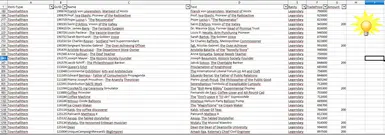
物品作弊-生成器
此Openoffice电子表格可用于通过简单编辑所需数量来生成物品作弊文件。
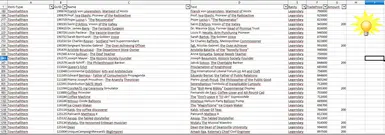 查看大图
查看大图This Calc file can be used with OpenOffice to generate the content of "assets.xml" in order to obtain desired items.
Steps
- Extract the zip file into your Anno 1800 folder.
- Open "item_generator.ods" with OpenOffice Calc.
- In the "Items" sheet, configure the desired quantity for each item in the "G Number" column. You can use filters to easily find items. Only rows with a number greater than 0 will be used to generate valid mods.
- Ensure macros are enabled in OpenOffice (Enable Macros).
- Click the "lightbulb" icon on the "Items" sheet to open the generation dialog. a) Use "Check Anno1800 folder" to verify the game path is correct. If the game is not found, a new folder selection dialog will open. b) Use "Generate items", which will populate both text areas below with all configured items and the final mod XML. The XML is automatically saved to the correct file; no further action is required.
In Game:
- Go to "Crown Falls" in Cape Trelawney, build a "Sailing Shipyard", and click "Cheat Items". Item generation only works in Crown Falls, which has a unique island ID in the game.
!! Sometimes items only appear after clicking "Fuchs" a second time !!
Enjoy your generated items.
DE:
This "OpenOffice Calc" spreadsheet conveniently creates content for the famous item cheat. The necessary steps are:
- Extract the compressed file into the Anno folder.
- In the "item_generator.ods" file, enter the desired quantity in the "G Number" column. Rows without a quantity will not be exported. The first row contains filter options that can be used to limit the view to, for example, legendary town hall items.
- Press the "lightbulb" to open the item generation dialog. a) "check Anno1800 folder" = Check whether generation will occur in the correct folder. If an error occurs, the corresponding folder dialog opens, where you select the main Anno1800 folder. b) "Generate items" = Configured items will be generated. For informational purposes, the two text boxes below will be filled with the item list and the complete mod XML. The file is written at this point; no manual action is needed.
In Game
- Start Anno 1800 and load a savegame. Build a Sailing Shipyard at the harbor of Crown Falls and activate the "Fox" quest from the shipyard at once. After that, the desired items will appear in Crown Falls' inventory. Sometimes items may not generate on the first attempt; clicking "Fox" again should resolve this.
正在加载版本记录…
正在加载评论…
评论在新手盒子客户端中发表,这里同步展示。