X4HW舰队超空间
带领你的首都舰队穿越星区,使用《家园》风格的超空间传送门、编队与音效。亲自驾驶Sajuuk或希格拉母舰,跃迁至导航信标。需要X4 9.0及任一受支持的舰船模组。
 查看大图
X4HW:舰队跃迁 / Fleet Hyperspace
需要 X4 9.0,以及希格拉母舰或萨尤克舰船 Mod。舰船 Mod 可任选其一,也可同时安装。
亲自驾驶希格拉母舰或萨尤克,带领麾下的大型舰船穿越星区。舰队集结成阵,在熟悉的跃迁门与音效中消失,再从目的地一同驶出。
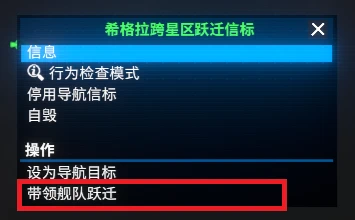
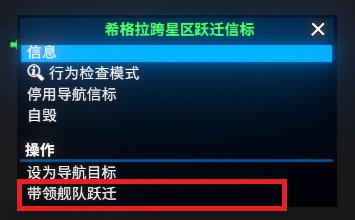
- 在星图界面选择且仅选择导航信标,右键选择“带领舰队跃迁”。
- 支持跨星区跃迁,本舰下属舰队中的 L/XL 舰船会随行。
- 保留舰船原有命令;未停泊的 S/M 舰船不随行,请提前回收舰载机。
- 普通舰船使用蓝色跃迁门,部分特殊舰船使用独特的黄色跃迁门。
本 Mod 为非商业同人项目。《家园》相关素材与商标归各自权利人所有。
Requires X4 9.0 and either the Hiigaran Mothership or Sajuuk ship mod. You may install either ship mod or both.
Personally pilot the Hiigaran Mothership or Sajuuk and lead your capital ships across sectors. Watch your fleet assemble, disappear through familiar hyperspace portals with accompanying sound effects, and emerge together at its destination.
- Select a navigation beacon, and only a navigation beacon, on the map. Then right-click and choose “Initiate Fleet Hyperspace”.
- Supports jumps between sectors. L/XL ships subordinate to your ship will travel with you.
- Existing ship orders are preserved. Undocked S/M ships do not travel with the fleet, so recover your fighters before jumping.
- Ordinary ships use blue hyperspace portals, while certain special ships use distinctive yellow portals.
This mod is a non-commercial fan project. All Homeworld-related assets and trademarks belong to their respective owners.
由于游戏引擎并不原生支持这种舰船裁剪效果,本 Mod 通过特殊的镜头调度与渲染方式加以模拟。我已尽可能兼顾不同环境与 Mod 组合下的表现,但仍可能存在兼容性问题。如果你在跃迁过场中发现背景或舰船显示异常,欢迎反馈,并注明发生问题的星区与舰船;如能同时提供截图或录像、画质设置及已安装的 Mod 信息,将更有助于定位问题。
注意:MSAA会导致过场中的体积雾显示不正常,如果你想获得最好的体验,请使用其他的抗锯齿方式。
Since the game engine does not natively support this type of ship clipping effect, this mod simulates it through custom camera sequencing and rendering techniques. I have made every effort to keep the visuals consistent across different environments and mod combinations, but compatibility issues may still occur. If you notice any background or ship rendering issues during the hyperspace cinematics, please report them and include the affected sector and ships. Screenshots or video, graphics settings, and information about your installed mods would also help diagnose the issue.
Note: MSAA causes volumetric fog to display incorrectly during cutscenes; for the best experience, please use a different anti-aliasing method.
正在加载版本记录…
正在加载评论…
评论在新手盒子客户端中发表,这里同步展示。